Linux systemd: Managing Services with systemctl, Unit Files, and journalctl
Unit file sections, Type= semantics, restart policies and the daemon-reload step everyone forgets, plus the journal queries that explain the failure.
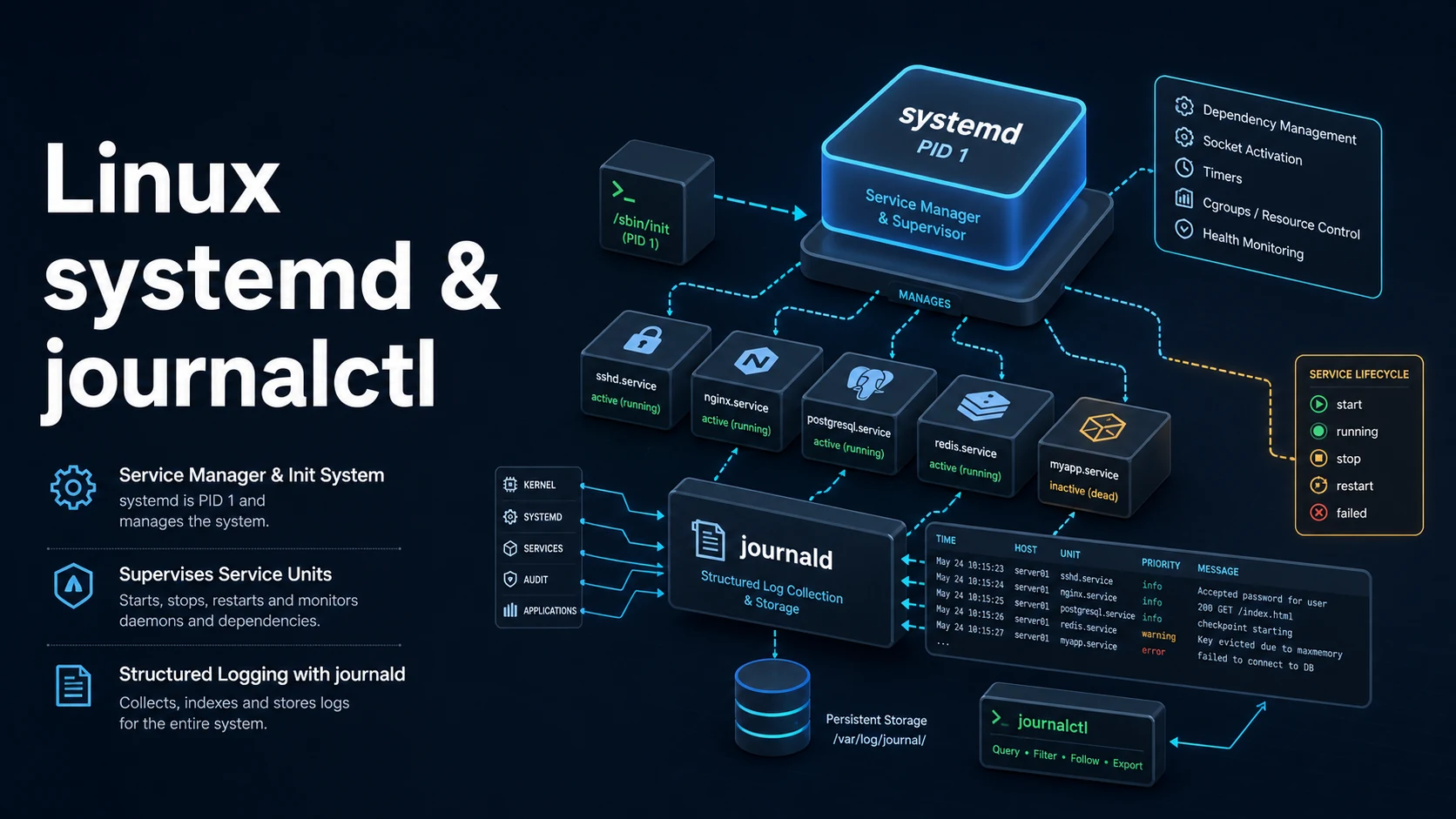
Quick Summary
systemd is PID 1 and the service manager on nearly every modern distribution. It reads unit files that describe what to start, how to start it, what it depends on, and what to do when it exits; systemctl controls those units, and journalctl reads the logs they produce. The three commands cover most administration: systemctl status to see what a service is doing, systemctl restart to change that, journalctl -u to find out why it failed.
A unit file is three sections. [Unit] holds description and ordering, [Service] holds the command line, user, restart policy, and sandboxing, [Install] holds which targets enable it. The part people miss is that WantedBy=multi-user.target in [Install] only takes effect when you run systemctl enable; a unit file dropped into /etc/systemd/system/ is known to systemd but not started at boot until it is enabled.
The second thing people miss is that systemd does not re-read unit files automatically. Editing a unit and running restart runs the old definition until systemctl daemon-reload. Drop-in overrides under NAME.service.d/*.conf are the safe way to change a vendor unit, because a package upgrade overwrites the unit file itself.
Basic Syntax & Signature
# /etc/systemd/system/api.service
[Unit]
Description=Backend API
Documentation=https://example.com/docs
After=network-online.target postgresql.service
Wants=network-online.target
Requires=postgresql.service

[Service]
Type=simple
User=api
Group=api
WorkingDirectory=/srv/api
EnvironmentFile=/etc/api/env
Environment=NODE_ENV=production PORT=8080
ExecStart=/usr/bin/node /srv/api/server.js
ExecReload=/bin/kill -HUP $MAINPID
Restart=on-failure
RestartSec=3
TimeoutStopSec=20
KillSignal=SIGTERM
LimitNOFILE=65535
StandardOutput=journal
StandardError=journal
SyslogIdentifier=api

# Hardening: each line removes an attack surface, at the cost of a feature.
NoNewPrivileges=true
PrivateTmp=true
ProtectSystem=strict
ProtectHome=true
ReadWritePaths=/srv/api/uploads

[Install]
WantedBy=multi-user.targetsudo systemctl daemon-reload # after editing any unit file
sudo systemctl enable --now api.service # start now and at boot
systemctl status api.service # state, recent log lines, main PID
sudo systemctl restart api.service
sudo systemctl reload-or-restart api.service
systemctl is-enabled api.service
systemctl list-units --type=service --state=failed
journalctl -u api.service -n 100 --no-pager
journalctl -u api.service -f # follow
journalctl -u api.service --since "10 min ago"
journalctl -u api.service -p err -b # errors since the last boot
journalctl -u api.service -o json-pretty | headType= is the decision that determines when systemd considers the service started: simple (default) starts and forks immediately, exec waits until execve succeeds, forking waits for the parent to exit, notify waits for sd_notify(READY=1), oneshot waits for the command to finish, and idle waits until the job queue is empty.
Key Comparison Table
| Task | Command | Notes |
|---|---|---|
| Start now | systemctl start api | Not persistent |
| Start at boot | systemctl enable api | Reads [Install] |
| Both | systemctl enable --now api | One transaction |
| Stop | systemctl stop api | Runs ExecStop |
| Restart | systemctl restart api | Stop then start |
| Reload config | systemctl reload api | Needs ExecReload |
| Re-read units | systemctl daemon-reload | Required after edits |
| Show unit file | systemctl cat api | Includes drop-ins |
| Override safely | systemctl edit api | Writes a drop-in |
| Prevent start | systemctl mask api | Symlink to /dev/null |
| Undo mask | systemctl unmask api | Restores the unit |
| Boot logs | journalctl -b | -b -1 for the previous boot |
| Which unit owns a process | systemctl status <PID> | Or cat /proc/<PID>/cgroup |
| List timers | systemctl list-timers | Cron replacements |
| Check failure cause | systemctl status api / journalctl -u api -p err | Exit code line |
Practical Edge Cases & Deep Dives
1. A service that starts fine by hand and fails under systemd
# Works in a shell:
/srv/api/server.js

# Fails as a unit: PATH, home, cwd, and env are minimal under systemd.
systemctl status api
# ... status=203/EXEC
203/EXEC means the kernel could not execute ExecStart. Common causes: a relative path (systemd requires an absolute path), a missing shebang, an interpreter that lives in /usr/local/bin not on systemd's PATH, or an SELinux label. Fix with an absolute interpreter path and an explicit environment:
[Service]
Environment=PATH=/usr/local/bin:/usr/bin:/bin
ExecStart=/usr/bin/node /srv/api/server.js
Services do not inherit your shell, your ~/.bashrc, or your working directory. WorkingDirectory= and EnvironmentFile= exist to make that explicit.
2. Restart loops and the rate limit
systemctl status api
# Active: activating (auto-restart) (Result=exit-code)
# ... start request repeated too quickly
Restart=on-failure with RestartSec=1 will spin forever, and systemd eventually refuses to start the unit after five attempts in ten seconds. Two adjustments are usually needed: a longer RestartSec, and StartLimitIntervalSec/StartLimitBurst in [Unit]:
[Unit]
StartLimitIntervalSec=60
StartLimitBurst=5

[Service]
Restart=always
RestartSec=5
Use Restart=always for daemons that should never be down and on-failure for ones that exit cleanly when there is nothing to do. Restart=no on a oneshot unit that is supposed to run once.
3. Graceful shutdown that respects the timeout
[Service]
KillSignal=SIGTERM
TimeoutStopSec=30
KillMode=mixed
systemctl stop sends SIGTERM to the main process by default and waits TimeoutStopSec before sending SIGKILL. If the application drains connections in its SIGTERM handler it needs those thirty seconds; if it ignores the signal, systemctl stop appears to hang for exactly the timeout. KillMode=mixed sends the first signal to the main process only and the final SIGKILL to the whole cgroup, which avoids killing worker children before the parent has drained them.
4. Reload without dropping connections
[Service]
ExecReload=/bin/kill -HUP $MAINPIDsudo systemctl reload nginx # sends HUP only if ExecReload exists
sudo systemctl reload nginx || sudo systemctl restart nginxreload fails with "Job type reload is not applicable" when the unit has no ExecReload. Wrapping reload with a restart fallback in deployment scripts is correct as long as the restart is the fallback, not the default — a restart drops in-flight requests that a reload would have preserved.
5. Drop-in overrides instead of editing vendor units
sudo systemctl edit api
# creates /etc/systemd/system/api.service.d/override.conf

# override.conf
[Service]
Environment=LOG_LEVEL=debug
LimitNOFILE=131072

sudo systemctl daemon-reload
sudo systemctl restart api
A drop-in appends to or replaces specific keys without touching the packaged file, so apt upgrade does not silently revert the change. systemctl cat api shows the original followed by each drop-in in order, which is the fastest way to see the effective configuration.
6. Watching a unit fail at boot
journalctl -b -u api.service --no-pager
journalctl -b -1 -u api.service --no-pager   # previous boot
systemd-analyze verify /etc/systemd/system/api.service
systemd-analyze critical-chain api.service
systemd-analyze verify catches syntax errors, unknown keys, and missing executables before a reboot. critical-chain shows which dependency delayed the unit, which is how an After=network-online.target that never becomes ready is identified — the service is not broken, it is waiting.
Common Compilation/Runtime Mistakes
| Symptom | Cause | Fix |
|---|---|---|
| Edits have no effect | Unit file not re-read | systemctl daemon-reload |
| Service not starting at boot | Not enabled | systemctl enable api |
status=203/EXEC | Bad ExecStart path or interpreter | Absolute paths, check shebang |
status=200/CHDIR | WorkingDirectory missing | Create it or point elsewhere |
| Starts by hand, fails as a unit | Environment not inherited | Environment=, EnvironmentFile= |
| Restart loop | Restart=always with a fast crash | RestartSec, StartLimitBurst |
Logs empty in journalctl | Output not journaled | Remove StandardOutput=null, check SyslogIdentifier |
Unit is masked | systemctl mask was used | systemctl unmask |
| Stop takes 90 seconds | SIGTERM ignored | Fix the handler, tune TimeoutStopSec |
| Config changes lost after upgrade | Vendor unit edited in place | Use systemctl edit drop-ins |
| Service killed mid-request | KillMode=control-group with workers | KillMode=mixed plus a SIGTERM handler |
| Unit fails only in a container | No systemd or no cgroup write access | Run systemd as PID 1 in the container |
The pattern behind almost every one of these is that systemd runs services with less context than a shell does — no login environment, no terminal, a fixed PATH, and its own cgroup for killing. Writing the unit with that in mind, absolute paths and an explicit environment, is what turns a service that works "on my machine" into one that survives a reboot and a deploy.
Try matching browser tools
All toolsSmall utilities that fit Linux work — they run entirely in this browser tab, so nothing you paste leaves your device.
Related Linux guides
All Linux guidesBash Indexed Arrays, Associative Maps, and Parameter Expansion
Quoting decides whether an array stays a list, and the expansion operators replace most external text tools. Includes set -u, mapfile, namerefs, and the bash 3.2 differences that break scripts on macOS.
Parsing JSON and YAML in Shell Pipelines with jq and yq
jq is a filter language, not a pretty-printer. The operators that do the work, --arg versus string interpolation, in-place YAML edits, and how to tell which yq is installed before writing a command.
Linux Memory, Swap, the OOM Killer, vmstat, and sysctl Tuning
MemAvailable versus used, the vmstat columns that prove thrashing, how the OOM killer picks its victim, and the sysctl keys that belong in /etc/sysctl.d instead of a one-off command.
Linux Firewalls: ufw, iptables, and nftables Rules and Persistence
First-match ordering, stateful filtering, and persistence: the three ideas behind every Linux firewall. Plus why Docker-published ports ignore ufw and how DOCKER-USER closes them.
More in Linux
All Linux guidesThe guides filed next to this one in Linux, in library order.