SQL Subqueries: Correlated vs Uncorrelated, EXISTS, IN, and Performance
What makes a subquery run once versus once per row, why NOT IN returns nothing when the inner column has a NULL, and when IN beats a join.
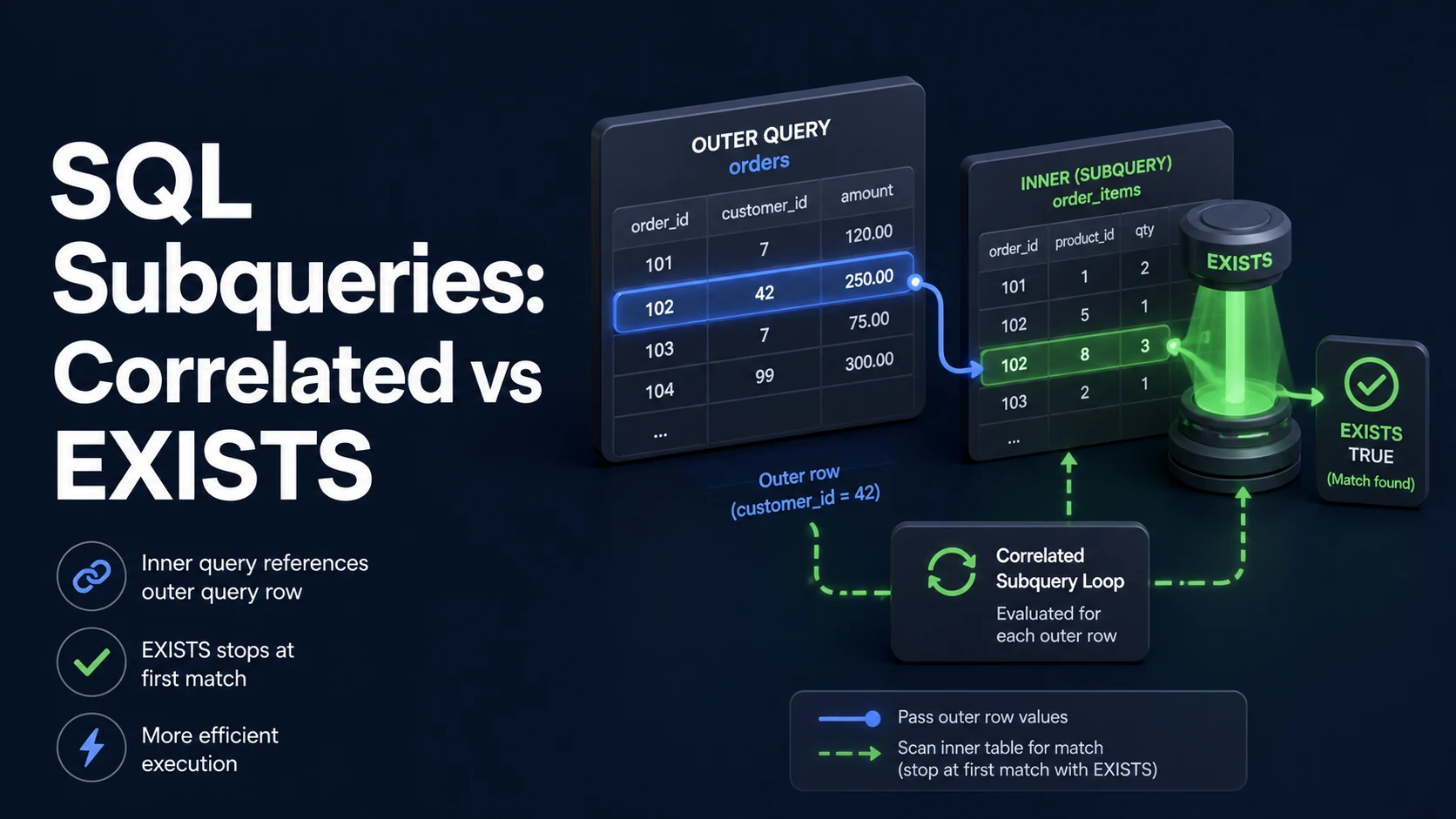
Quick Summary
A subquery is a SELECT inside another statement. It is uncorrelated when it can run once on its own, and correlated when it references a column from the outer query and therefore has to run again for each outer row. That single distinction decides most of the performance, and modern planners usually rewrite the correlated version into a semi-join anyway — but not always, and never for the cases where the subquery sits in the SELECT list.
EXISTS asks "is there at least one row?", stops at the first match, and is null-safe by construction. IN compares values, materialises a list, and breaks on NULL. For existence checks EXISTS is the safer default; for value lists IN is clearer. NOT IN against a nullable column is the classic bug that returns zero rows.
Basic syntax and query signatures
-- Uncorrelated scalar subquery: runs once
SELECT (SELECT COUNT(*) FROM orders WHERE status = 'paid') AS paid_orders;

-- Correlated scalar subquery: conceptually once per outer row
SELECT c.id,
       (SELECT MAX(o.placed_at) FROM orders o WHERE o.customer_id = c.id) AS last_order
FROM customers c;

-- Semi-join: keep customers with at least one matching row
SELECT c.* FROM customers c
WHERE EXISTS (SELECT 1 FROM orders o WHERE o.customer_id = c.id);

-- Anti-join
SELECT c.* FROM customers c
WHERE NOT EXISTS (SELECT 1 FROM orders o WHERE o.customer_id = c.id);
Also in the family: IN (subquery) and NOT IN (subquery), quantified comparisons (> ALL, = ANY), derived tables in FROM, and LATERAL/CROSS APPLY where the subquery needs to see the row to its left. IN with a subquery is a semi-join too; the planner is free to turn it into a hash semi-join.
Scalar subqueries must return at most one row and one column. That is enforced at runtime, not at parse time — which is why the error appears in production the week the data grows a duplicate.
Key comparison table
| Form | Returns | NULL behaviour | Planner equivalent | Runs |
|---|---|---|---|---|
EXISTS (subquery) | Boolean | Safe — NULL rows still "exist" | Semi-join / nested loop | Once per outer row at worst, short-circuits |
IN (subquery) | Boolean | NULL in list makes non-matches UNKNOWN | Semi-join / hashed subplan | Once if uncorrelated |
NOT IN (subquery) | Boolean | Any NULL → no rows at all | Anti-join (rarely) | Same as above |
NOT EXISTS | Boolean | Safe | Anti-join | Short-circuits per row |
| Scalar subquery | One value | NULL if no row | Projection / lateral | Once per outer row if correlated |
Derived table (FROM (SELECT …)) | Rows | Normal | Inlined where possible | Once |
| Rewrite | When it helps | When it does not |
|---|---|---|
EXISTS → JOIN + DISTINCT | Outer rows duplicate, and you want other columns from the inner table | Duplicates are likely; DISTINCT sorts the whole result |
IN → JOIN | Values needed from both sides | Semantics change: fan-out, and NULL handling differs |
Correlated SELECT → LEFT JOIN aggregate | Many outer rows, index on the join key | Inner aggregate is expensive and few outer rows qualify |
| Correlated → window function | Ranking or "latest per group" | Filtering inside WHERE requires a CTE anyway |
Practical edge cases and deep dives
1. NOT IN and the NULL that empties the result
-- Returns zero rows if any customers.id is NULL in the subquery result
SELECT * FROM customers
WHERE id NOT IN (SELECT customer_id FROM orders);
The expression becomes id <> 1 AND id <> 2 AND id <> NULL, and the last term is UNKNOWN, so the whole conjunction is never TRUE. Even a single NULL in the subquery result — one order with no customer — silently empties the output. NOT EXISTS has no such behaviour:
SELECT c.* FROM customers c
WHERE NOT EXISTS (
    SELECT 1 FROM orders o WHERE o.customer_id = c.id
);
The other fix, NOT IN (SELECT customer_id FROM orders WHERE customer_id IS NOT NULL), works but relies on every future edit remembering the guard. NOT EXISTS also handles composite keys and correlated conditions that IN cannot express.
2. Correlated subqueries in the SELECT list are per-row work
SELECT c.id,
       (SELECT COUNT(*) FROM orders o WHERE o.customer_id = c.id) AS orders,
       (SELECT MAX(o.total) FROM orders o WHERE o.customer_id = c.id) AS biggest
FROM customers c;
With 200,000 customers this is 400,000 index lookups — the SQL version of an N+1 query. It is correct, and on a small table it is perfectly fine. On a large one, two LEFT JOINs against one aggregate pass do the same work once:
WITH stats AS (
    SELECT customer_id, COUNT(*) AS orders, MAX(total) AS biggest
    FROM orders
    GROUP BY customer_id
)
SELECT c.id, COALESCE(s.orders, 0) AS orders, s.biggest
FROM customers c
LEFT JOIN stats s ON s.customer_id = c.id;
The rewrite changes one thing besides speed: with no orders, the subquery returns 0 for COUNT and NULL for MAX, while the join returns 0 and NULL too — but only because of the COALESCE. Without it the join version returns NULL for the count, which is a different report.
3. EXISTS and short-circuiting
SELECT p.* FROM posts p
WHERE EXISTS (
    SELECT 1 FROM comments c
    WHERE c.post_id = p.id AND c.created_at > now() - interval '7 days'
);
EXISTS does not care what the subquery selects — SELECT 1 is idiomatic, SELECT * costs the same, SELECT COUNT(*) does not (the aggregate forces a full count and defeats the early exit). With an index on comments (post_id, created_at) the planner can stop at the first matching row per post, which is what makes this cheap on a comment table with millions of rows.
The correlated form also wins for "exists with a limit-shaped condition": WHERE (SELECT count(*) FROM comments c WHERE c.post_id = p.id) > 0 computes every count and then compares, while EXISTS stops at one.
4. Scalar subqueries that return more than one row
-- ERROR: more than one row returned by a subquery used as an expression (21000)
SELECT id, (SELECT total FROM orders WHERE customer_id = c.id) FROM customers c;

-- Correct: pick a row explicitly
SELECT id,
       (SELECT o.total FROM orders o
        WHERE o.customer_id = c.id
        ORDER BY o.placed_at DESC, o.id DESC
        LIMIT 1) AS latest_total
FROM customers c;
The LIMIT 1 does two things: it removes the runtime error, and it documents which row you meant. When the intent is "all of them", the scalar form is the wrong shape and a JOIN or LATERAL is the right one. MySQL reports the same condition as error 1242, SQL Server as 512 (Subquery returned more than 1 value).
5. When IN is genuinely faster
SELECT * FROM posts
WHERE author_id IN (SELECT id FROM users WHERE is_editor);
Uncorrelated IN can be planned as a hashed subplan: the inner query runs once, the values go into a hash table, and each outer row probes it. That is linear work with no per-row round trip, and for a small inner set it beats a join because there is no fan-out to deduplicate. The correlated EXISTS version is planned as a nested loop and runs once per outer row.
The trade flips when the inner set is huge: hashing a million ids costs memory, and a merge or nested-loop semi-join with an index may win. EXPLAIN ANALYZE on both forms against production-sized data is the only reliable answer; the rule of thumb is that uncorrelated IN is fine for small lists, EXISTS is fine for indexed existence, and joins are fine when you need columns from both sides.
Common mistakes and runtime errors
| Error or symptom | Cause | Fix |
|---|---|---|
more than one row returned by a subquery used as an expression (PG 21000) | Scalar subquery matched multiple rows | Add LIMIT 1 with a deterministic ORDER BY, or use a join |
Subquery returns more than 1 row (MySQL 1242 / SQL Server 512) | Same | Same |
| Query returns zero rows only in production | NOT IN with a NULL in the inner result | NOT EXISTS |
operator does not exist: integer = text | Type mismatch between subquery and outer column | Cast explicitly and fix the schema |
Slow query with high loops in EXPLAIN | Correlated subquery executed per row | Rewrite as join against a pre-aggregated CTE |
subquery in FROM must have an alias (PostgreSQL) | Derived table without a name | FROM (SELECT ...) AS t |
invalid reference to FROM-clause entry for table "x" | Correlated reference where correlation is not allowed, or alias shadowing | Qualify the outer alias; add LATERAL |
LIMIT/ORDER BY inside IN (subquery) has no effect | ORDER BY in a subquery used as a set | Move ordering to the outer query |
Two DISTINCT aggregates in one subquery | COUNT(DISTINCT a), COUNT(DISTINCT b) fan-out | Split into separate LEFT JOINs |
| Same answer, ten times slower after rewrite | JOIN introduced fan-out and DISTINCT | Pre-aggregate, or keep the semi-join |
The practical rule: use EXISTS/NOT EXISTS for existence, IN for small uncorrelated value lists, and joins when you need the other table's columns. Read the plan with loops visible — a node executed once per outer row is the signature of a correlated subquery that should have been a join.
Try matching browser tools
All toolsSmall utilities that fit SQL work — they run entirely in this browser tab, so nothing you paste leaves your device.
Related SQL guides
All SQL guidesSQL Cursors vs Set-Based Operations: Syntax, Memory, and Performance
Why a row-by-row cursor costs minutes where one UPDATE takes seconds, how server cursors spool to disk, and the set-based replacements for each loop.
SQL String Functions: CONCAT, SUBSTRING, REPLACE, and Pattern Matching
The concatenation and slice functions that differ between engines, why LIKE 'x%' uses an index and '%x%' cannot, plus escaping and NULL rules.
SQL Date and Time Functions: INTERVAL Arithmetic, Time Zones, and DST
timestamptz versus timestamp, half-open ranges that keep an index, and the daylight saving gaps that make local scheduling wrong once a year.
SQL Row Locking: SELECT FOR UPDATE, SKIP LOCKED, and NOWAIT
How FOR UPDATE locks rows until commit, why the plan decides the lock scope, and the SKIP LOCKED claim-queue pattern that scales to many workers.
More in SQL
All SQL guidesThe guides filed next to this one in SQL, in library order.