Linux Bash Scripting: Redirection, Pipes, Exit Codes, and set -euo pipefail
File descriptor order determines where errors go, and exit codes determine whether anyone notices. The strict-mode template that fails loudly.
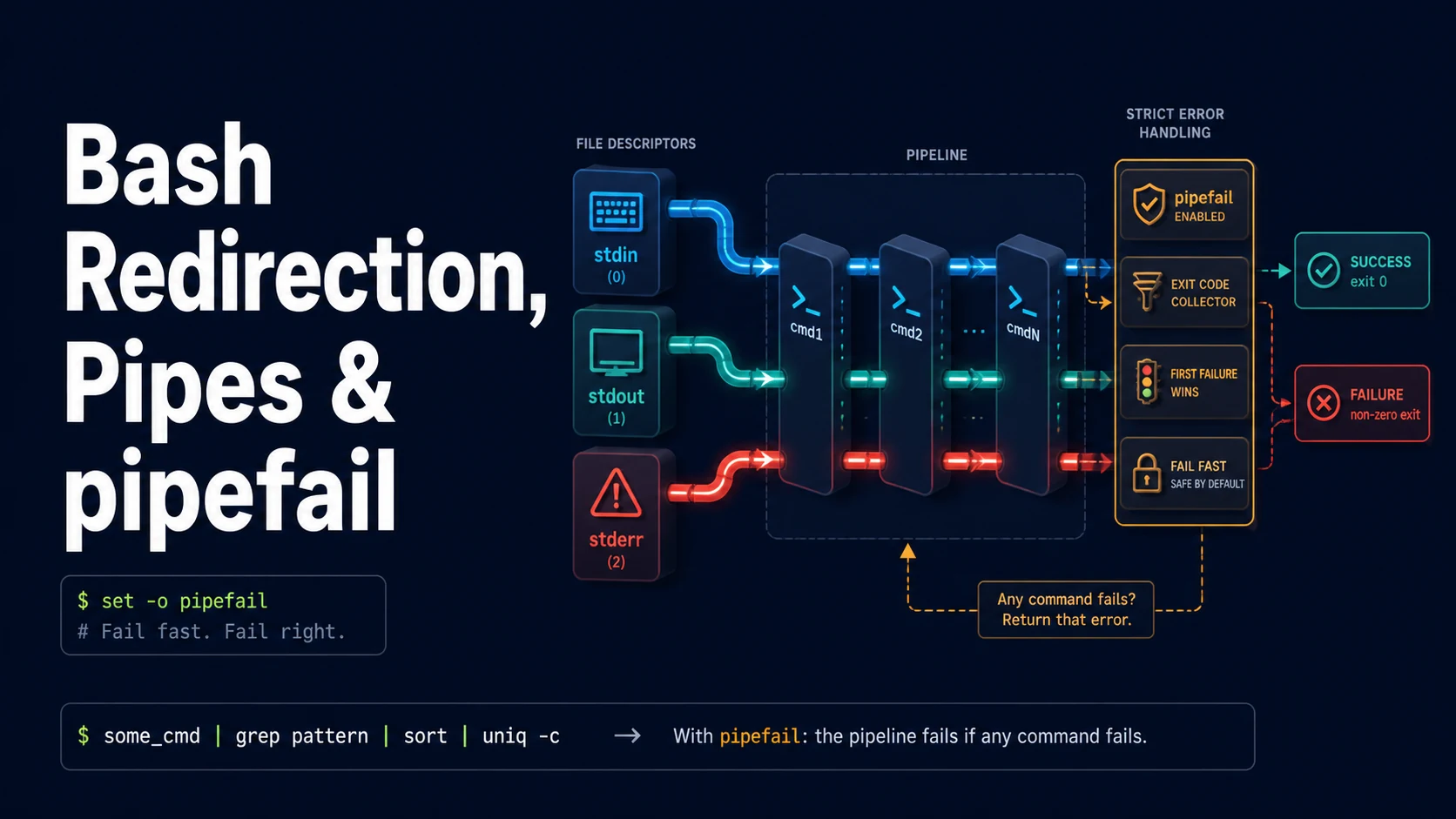
Quick Summary
A shell script is a sequence of commands whose correctness depends on three things: where each command's output goes, what happens when a command fails, and whether a variable is safe to expand. Redirection answers the first, exit codes answer the second, and set -euo pipefail is the one-line policy that makes the second answer consistent.
The file descriptors are 0 for stdin, 1 for stdout, and 2 for stderr. > redirects stdout and truncates the file, >> appends, 2> redirects stderr, and &> sends both. Order matters because redirections are applied left to right: cmd > file 2>&1 sends both streams to the file, while cmd 2>&1 > file sends stderr to the terminal and stdout to the file.
Exit codes are the contract between a command and a script. 0 means success, 1–125 are command-defined failures, 126 means not executable, 127 means not found, and 128 + N means the process was killed by signal N — 130 for Ctrl-C, 143 for SIGTERM. $? holds the last one, and the pipe holds only the last stage's code unless pipefail is set.
Basic Syntax & Signature
# Redirection
cmd > out.txt              # stdout to file, truncating
cmd >> out.txt             # append
cmd 2> err.txt             # stderr to file
cmd > out.txt 2>&1         # both to the same file (order matters)
cmd &> out.txt             # same, bash shorthand
cmd 2>&1 | tee out.txt     # both to the terminal and a file
cmd < input.txt            # stdin from file
cmd <<< "string"           # here-string
cmd > /dev/null 2>&1       # discard everything
exec 3> file.txt           # open fd 3 for writing
echo "line" >&3            # write to fd 3
exec 3>&-                  # close it

# Exit codes
echo $?
false || echo "failed: $?"
(exit 42); echo $?         # subshell, 42
kill -TERM $$; echo $?     # 143 in a trap

# Strict mode
set -euo pipefail          # errexit, nounset, pipefail
set -x                     # trace to stderr
trap 'echo "failed at line $LINENO" >&2' ERR
trap 'rm -f "$tmp"' EXIT
A script template that fails loudly:
#!/usr/bin/env bash
set -euo pipefail
IFS=$'\n\t'

readonly SCRIPT_DIR="$(cd -- "$(dirname -- "${BASH_SOURCE[0]}")" && pwd)"
tmp="$(mktemp)"
trap 'rm -f "$tmp"' EXIT

main() {
  local target="${1:?usage: $0 <target>}"
  [[ -d $target ]] || { echo "not a directory: $target" >&2; return 1; }
  find "$target" -type f -print0 | xargs -0 sha256sum > "$tmp"
  wc -l < "$tmp"
}

main "$@"
Key Comparison Table
| Operator | Effect | Note |
|---|---|---|
> | Truncate and redirect stdout | Clobbers silently |
>> | Append stdout | Safer in logs |
2> | Redirect stderr | Does not capture stdout |
2>&1 | Duplicate stderr onto current stdout | Order relative to > matters |
&> | Both streams to a file | Bash-specific |
|| | Run the right side on failure | Suppresses set -e for the left |
&& | Run the right side on success | Chain of preconditions |
| | Pipe stdout to the next command | Only stdout |
|& | Pipe both streams | Bash 4+ |
tee | Copy to a file and stdout | -a to append |
set -e | Exit on non-zero status | Not applied inside if, &&, || |
set -u | Error on unset variable | Use ${VAR:-default} for optional |
set -o pipefail | Pipe fails if any stage fails | Otherwise only the last counts |
Practical Edge Cases & Deep Dives
1. Redirection order changes the destination
# Wrong: stderr still points at the terminal, stdout goes to the file.
cmd 2>&1 > out.txt

# Right: stdout is redirected first, then stderr is duplicated onto it.
cmd > out.txt 2>&1

# Both to separate files, in any order
cmd > out.txt 2> err.txt
2>&1 means "make fd 2 a copy of whatever fd 1 currently points to". If stdout has not been redirected yet, fd 2 copies the terminal, and the later > out.txt only changes fd 1. This is the most common reason a cron job's error output ends up in mail instead of the log file.
2. set -e and the exceptions that surprise people
set -e

# Not caught: the left side of || is allowed to fail.
grep -q 'ready' health.txt || echo "not ready"

# Not caught: a command in an if condition.
if ! curl -sf http://localhost/health; then echo "down"; fi

# Not caught: a failure inside a command substitution in an assignment.
out="$(false)"; echo "still running: $?"   # set -e does not exit here

# Caught: the assignment fails when the substitution fails.
out="$(false)"     # exits, because the assignment's status is the substitution's
set -e is famously inconsistent, which is why real scripts combine it with pipefail and explicit checks at the points that matter. A function called in a condition inherits the exemption and will not exit on failure inside, so functions should return explicit statuses and be checked.
3. pipefail and the pipeline that hides a failure
# Without pipefail: a failed download is invisible if the last stage succeeds.
curl -fsSL https://example.com/app.tar.gz | tar -xz -C /opt/app
echo "exit=$?"    # 0, because tar exited 0

set -o pipefail
curl -fsSL https://example.com/app.tar.gz | tar -xz -C /opt/app
echo "exit=$?"    # non-zero, from curl
pipefail makes the pipeline return the rightmost non-zero status. Combined with -f on curl, -e on bash, and set -e, a truncated download stops the script instead of unpacking an empty file. Without it, the exit status of a pipeline is the last command's, and the last command usually succeeds.
4. set -u and optional variables
set -u

# Fails: unset variable.
# echo "$UNSET_VAR"

# Safe expansions
: "${API_URL:?API_URL must be set}"
port="${PORT:-8080}"
config="${CONFIG_FILE:-$HOME/.config/app.conf}"
echo "${array[@]+"${array[@]}"}"   # empty array without a nounset error
${VAR:?message} exits with the message when the variable is empty or unset, which is exactly the behaviour wanted for required configuration. ${VAR:-default} substitutes. ${VAR-default} substitutes only when unset, not when empty — a distinction that matters for values that are legitimately empty.
5. Traps that clean up and explain
#!/usr/bin/env bash
set -euo pipefail

tmpdir="$(mktemp -d)"
cleanup() {
  local code=$?
  rm -rf "$tmpdir"
  if (( code != 0 )); then
    echo "failed with $code at ${BASH_SOURCE[0]}:${LINENO}" >&2
  fi
  exit "$code"
}
trap cleanup EXIT

trap 'echo "interrupted" >&2; exit 130' INT
trap 'echo "terminated" >&2; exit 143' TERM

work() { sleep 30; }
work
trap ... EXIT runs on every exit path, including set -e failures and signals, which makes it the right place for cleanup. $? is still the failing status when the trap starts, so capturing it first and re-exiting with it preserves the script's exit code instead of masking it with rm's success.
6. Exit codes the caller can act on
#!/usr/bin/env bash
set -euo pipefail

case "${1:-}" in
  check)  probe; exit 0 ;;
  fix)    apply; exit 0 ;;
  *)      echo "usage: $0 {check|fix}" >&2; exit 64 ;;   # EX_USAGE
esac

# Distinguishing failures for a supervisor
# 0   success
# 1   general failure
# 2   misuse of a builtin or invalid argument
# 64  usage error
# 75  temporary failure, retry later (EX_TEMPFAIL)
# 126 command not executable
# 127 command not found
# 130 interrupted by SIGINT
# 143 terminated by SIGTERM
Returning 75 for a transient lock contention and 1 for a real error lets the caller retry one and alert on the other. A script that returns 1 for everything forces every caller to parse stderr, which is the same as having no exit codes at all.
Common Compilation/Runtime Mistakes
| Symptom | Cause | Fix |
|---|---|---|
| Errors in the terminal but not the log | 2>&1 before > | > file 2>&1 |
| Script continues after a failure | No set -e, or failure inside || | Explicit checks, pipefail |
| Pipeline reports success despite failure | Only the last stage's status counts | set -o pipefail |
| "unbound variable" on an optional value | set -u with no default | ${VAR:-} |
Empty array errors under set -u | ${arr[@]} on an empty array | ${arr[@]+"${arr[@]}"} |
| Filenames split on spaces | Unquoted $var | "$var", IFS, arrays |
| Glob expanded when unexpected | Unquoted * | Quote it, or set -f |
| Trap swallows the exit code | exit without capturing $? | Save $? first |
exit 1 inside a subshell | Status lost at the parent | Return the status explicitly |
| Temp files left behind | No trap ... EXIT | Add a cleanup trap |
| Exit code always 0 | return from a command | while subshell | Process substitution or mapfile |
set -x output in the log | Tracing left on | Guard with [[ ${DEBUG:-} ]] |
The script that can be trusted unattended is the one where every command's failure is either handled or fatal, every expansion is quoted, and every temporary resource has a cleanup on every exit path. set -euo pipefail plus a trap covers most of that in three lines, and the remaining discipline — quoting, explicit status checks, and not relying on set -e inside conditionals — is what separates a script that usually works from one that fails loudly and correctly.
Try matching browser tools
All toolsSmall utilities that fit Linux work — they run entirely in this browser tab, so nothing you paste leaves your device.
Related Linux guides
All Linux guidesBash Indexed Arrays, Associative Maps, and Parameter Expansion
Quoting decides whether an array stays a list, and the expansion operators replace most external text tools. Includes set -u, mapfile, namerefs, and the bash 3.2 differences that break scripts on macOS.
Parsing JSON and YAML in Shell Pipelines with jq and yq
jq is a filter language, not a pretty-printer. The operators that do the work, --arg versus string interpolation, in-place YAML edits, and how to tell which yq is installed before writing a command.
Linux Memory, Swap, the OOM Killer, vmstat, and sysctl Tuning
MemAvailable versus used, the vmstat columns that prove thrashing, how the OOM killer picks its victim, and the sysctl keys that belong in /etc/sysctl.d instead of a one-off command.
Linux Firewalls: ufw, iptables, and nftables Rules and Persistence
First-match ordering, stateful filtering, and persistence: the three ideas behind every Linux firewall. Plus why Docker-published ports ignore ufw and how DOCKER-USER closes them.
More in Linux
All Linux guidesThe guides filed next to this one in Linux, in library order.