Linux Disk and Storage: df, du, lsblk, Inode Exhaustion, and fstab Mounts
Bytes and inodes are two different full disks. Reading both, finding held-open deleted files, and writing fstab lines that cannot hang a boot.
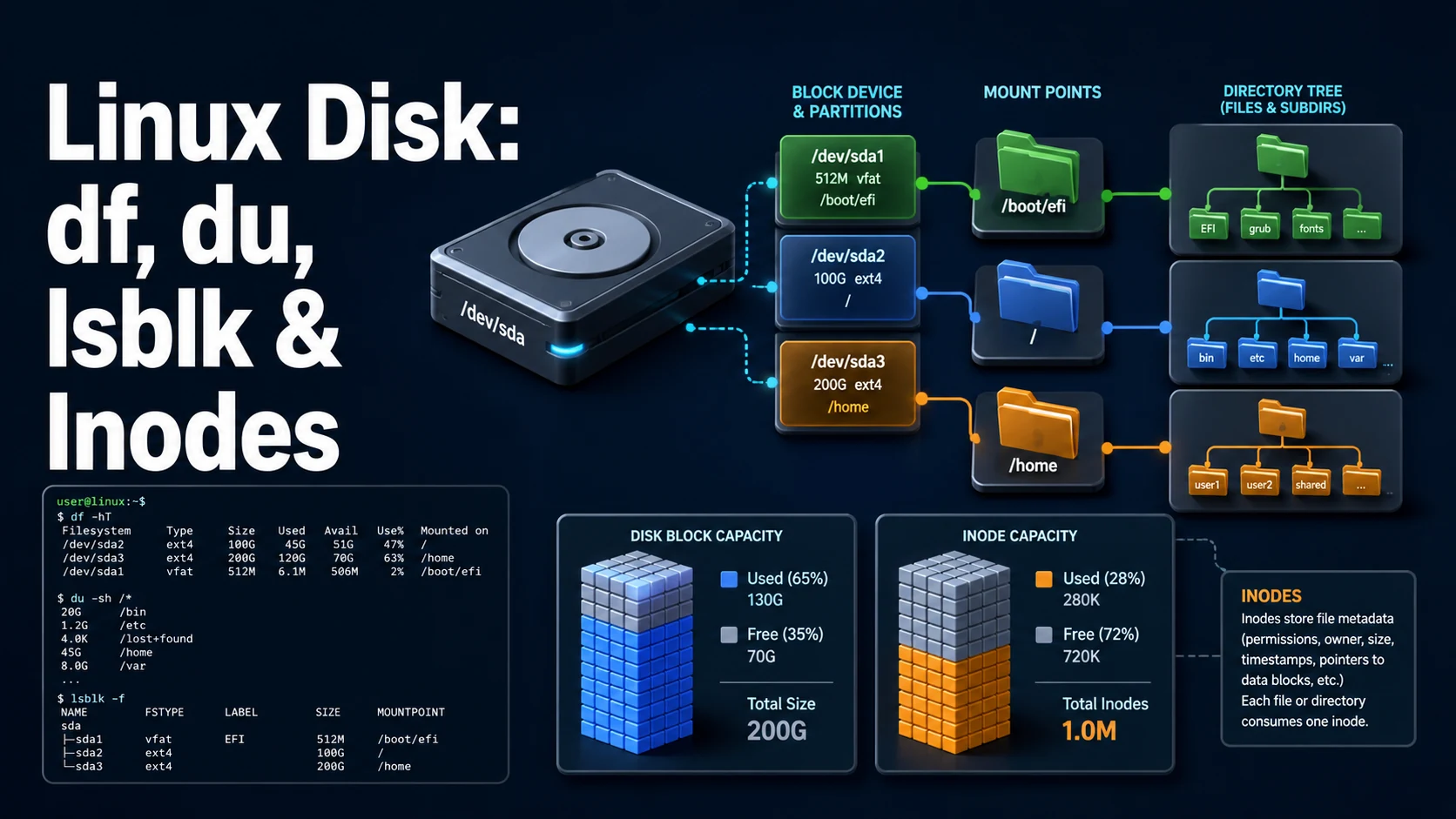
Quick Summary
Two numbers describe a full disk: bytes and inodes. df reports both — df -h for capacity and df -i for the inode table — and a filesystem can be at 5% capacity and 100% inodes, at which point every write fails with "No space left on device" while df -h shows plenty of room. Millions of small files, and Docker's overlay layers, are the usual causes.
du answers "what is using the space", measured by walking a directory and summing the blocks it finds. du -sh * and du -h --max-depth=1 | sort -h are the two invocations worth memorising. df and du disagree when a file has been deleted but is still held open by a process — the blocks are free to the directory tree and not free to the filesystem until the last descriptor closes.
lsblk and findmnt describe the block devices and what is mounted where. fstab makes a mount survive a reboot, and a bad line in it can leave a machine at an emergency prompt, which is why nofail and x-systemd.mount-timeout= exist.
Basic Syntax & Signature
# Capacity and inodes
df -h                     # human-readable, per filesystem
df -i                     # inode usage
df -hT                    # with filesystem type
df -h /var/lib/docker     # the filesystem holding a specific path

# Directory usage
du -sh /var/log
du -h --max-depth=1 /var | sort -h
du -ah /srv | sort -rh | head -20
du -x -sh /            # stay on one filesystem (no bind mounts, no /proc)

# Devices and mounts
lsblk -f                  # tree with filesystem, UUID, mountpoint
lsblk -o NAME,SIZE,FSTYPE,MOUNTPOINT,UUID
blkid
findmnt                   # mount table as a tree
findmnt /var/lib/postgresql
mount | column -t

# Mounting
sudo mount /dev/sdb1 /mnt/data
sudo mount -o ro,noload /dev/sdb1 /mnt/recovery
sudo umount /mnt/data
sudo mount -a # apply fstab without rebooting# <device> <mountpoint> <type> <options> <dump> <pass>
UUID=6f1a2b3c-... / ext4 errors=remount-ro 0 1
UUID=8c4d5e6f-... /data ext4 defaults,nofail,noatime 0 2
UUID=1a2b-3c4d /boot/efi vfat umask=0077 0 1
data.example.com:/export /mnt/nfs nfs rw,soft,timeo=30,_netdev 0 0
tmpfs /tmp tmpfs defaults,noatime,size=2G 0 0
//nas/share /mnt/share cifs credentials=/etc/cifs.cred,nofail 0 0Key Comparison Table
| Command | Reports | Unit | Follows mounts |
|---|---|---|---|
df -h | Free and used blocks per filesystem | Human-readable | Yes, one row per fs |
df -i | Free and used inodes | Count | Yes |
du -sh dir | Total apparent disk usage of a tree | Human-readable | Yes, unless -x |
du -sh --apparent-size | Sum of file sizes, not blocks | Human-readable | Yes |
lsblk -f | Devices, filesystems, UUIDs, mounts | Tree | No |
findmnt | Mount table with sources and options | Tree | No |
lsof +L1 | Deleted files still held open | Links | Cross-filesystem |
Practical Edge Cases & Deep Dives
1. Inode exhaustion with free space
df -h /var
# Filesystem      Size  Used Avail Use% Mounted on
# /dev/sda1        40G   12G   28G  30% /

df -i /var
# Filesystem     Inodes  IUsed  IFree IUse% Mounted on
# /dev/sda1     2621440 2621440      0  100% /

# Find which directory holds the files
for d in /var/*; do printf '%8d %s\n' "$(find "$d" -xdev 2>/dev/null | wc -l)" "$d"; done | sort -rn | head
At 100% inodes every open() for a new file fails, including the ones a mail queue, a package manager, or a session handler needs. The cleanup is by file count, not by size: find /var/spool -type f -mtime +7 -delete or removing a cache directory entirely. Filesystems created with a large -i value or -T small reserve fewer inodes, and XFS allocates them dynamically, so the same workload that exhausts ext4 may not exhaust XFS.
2. df and du disagree
df -h /var
du -xsh /var

# Deleted but still open: the blocks are held by a process
sudo lsof +L1 | head
sudo lsof -nP +L1 | awk '$NF ~ /var/ {print $2, $1, $NF}'

# Reclaim by restarting the holder, not by deleting the path again
sudo systemctl restart app.service
A log file removed with rm while a process still writes to it shows as used in df and gone in du. Truncating instead of deleting avoids the problem entirely: : > /var/log/app.log frees the blocks and keeps the descriptor valid.
3. Reserved blocks on ext4
# Root-reserved space, 5% by default: invisible to non-root users
sudo tune2fs -l /dev/sda1 | grep -i 'reserved block count\|block count'
sudo tune2fs -m 1 /dev/sda1        # 1% is enough for most data volumes
On a 2 TB data volume, the default 5% reserve is 100 GB that df reports as used and no application can write. Lowering it on a volume that does not hold / is standard practice; keeping it on / is what lets root log in and clean up a full disk.
4. Reading lsblk and fstab before mounting
lsblk -f
# NAME   FSTYPE FSVER LABEL UUID                                 FSAVAIL FSUSE% MOUNTPOINTS
# sda
# └─sda1 ext4   1.0         a1b2c3d4-1111-2222-3333-444455556666   28G    30% /
# sdb
# └─sdb1 xfs                 b2c3d4e5-4444-5555-6666-777788889999

blkid /dev/sdb1
findmnt --verify --verbose
sudo mount -a   # errors here rather than at the next boot
Using UUID= instead of /dev/sdb1 is not style: device names depend on discovery order and change when a disk is added, which turns a working fstab into a boot failure. findmnt --verify checks the file's syntax and whether the referenced devices and mount points exist, which catches a typo without rebooting.
5. fstab options that prevent a boot hang
UUID=8c4d5e6f-... /data ext4 defaults,nofail,x-systemd.device-timeout=10s 0 2Without nofail, a missing or unreachable device makes the boot wait until the default 90-second timeout, and then drop to an emergency shell. nofail lets the system boot and mounts the volume when it appears. _netdev tells systemd the mount needs the network, so it is attempted after the network is up rather than during early boot. NFS additionally wants soft,timeo=30 — a hard mount with no timeout hangs forever on a dead server, which at boot looks like a hung machine.
6. Where the space actually went in a container host
docker system df
docker system df -v | head -30
sudo du -xh --max-depth=1 /var/lib/docker | sort -h

# The overlay layers that count against the host filesystem
sudo du -sh /var/lib/docker/overlay2/* | sort -h | tail -5
Container storage is invisible to du on the application's paths because the layers live under /var/lib/docker. docker system df reports images, containers, volumes, and build cache separately, which is the only reliable way to know which of the four is growing; docker system prune without a filter reclaims all four, including volumes that belong to stopped containers.
7. Triage order when a host is full
# 1. Which filesystem, and is it bytes or inodes?
df -hT / ; df -i /

# 2. Is the space held by an open deleted file?
sudo lsof -nP +L1 | awk '{ if ($7+0 > 1073741824) print $1, $2, $7, $NF }'

# 3. The largest directories, without crossing filesystems
sudo du -xh --max-depth=1 / 2>/dev/null | sort -h | tail -8

# 4. The largest individual files
sudo find / -xdev -type f -size +500M -printf '%10s %p\n' 2>/dev/null | sort -n | tail -10
This sequence answers the four possible causes in order: wrong filesystem, held blocks, directory growth, single large file. Running du first on a busy host can take minutes and add I/O pressure to a machine that is already failing writes, while df and lsof finish in under a second and settle the question half the time.
Common Compilation/Runtime Mistakes
| Symptom | Cause | Fix |
|---|---|---|
| "No space left" with space free | Inodes exhausted | df -i, delete many small files |
df and du disagree | Deleted file still open | lsof +L1, restart the holder |
du slow on a whole disk | Traversing /proc, bind mounts | du -x |
| Space "used" but no files | ext4 reserved blocks | tune2fs -m 1 |
| Disk full after log rotation | Process holds the old file | Truncate instead of rm |
| Boot stops at emergency mode | fstab entry for a missing device | nofail, correct UUID |
| Device name changed after reboot | /dev/sdb1 in fstab | Use UUID= |
| NFS mount hangs the host | hard mount, no timeout | soft,timeo=,retrans= |
umount: target is busy | Process with an open file or cwd | lsof +D /mnt/data, fuser -mv |
| Container disk grows unboundedly | Logs and images on the host fs | docker system df, log rotation |
du counts a file twice | Hard links or bind mounts | du -x, -l for hard links |
Storage problems are almost always one of two mismatches: the wrong measurement (bytes instead of inodes, apparent size instead of blocks) or the wrong owner (blocks held by a deleted file, by a container layer, or by a filesystem that is mounted twice). Checking both numbers first — df -h and df -i — eliminates half the possibilities before any directory walk begins.
Try matching browser tools
All toolsSmall utilities that fit Linux work — they run entirely in this browser tab, so nothing you paste leaves your device.
Related Linux guides
All Linux guidesBash Indexed Arrays, Associative Maps, and Parameter Expansion
Quoting decides whether an array stays a list, and the expansion operators replace most external text tools. Includes set -u, mapfile, namerefs, and the bash 3.2 differences that break scripts on macOS.
Parsing JSON and YAML in Shell Pipelines with jq and yq
jq is a filter language, not a pretty-printer. The operators that do the work, --arg versus string interpolation, in-place YAML edits, and how to tell which yq is installed before writing a command.
Linux Memory, Swap, the OOM Killer, vmstat, and sysctl Tuning
MemAvailable versus used, the vmstat columns that prove thrashing, how the OOM killer picks its victim, and the sysctl keys that belong in /etc/sysctl.d instead of a one-off command.
Linux Firewalls: ufw, iptables, and nftables Rules and Persistence
First-match ordering, stateful filtering, and persistence: the three ideas behind every Linux firewall. Plus why Docker-published ports ignore ufw and how DOCKER-USER closes them.
More in Linux
All Linux guidesThe guides filed next to this one in Linux, in library order.