Linux Process Management: ps, lsof, Signals (SIGTERM vs SIGKILL), and nice
Process states that explain why kill -9 does nothing, the signal table, port ownership with ss and lsof, and how niceness actually affects the scheduler.
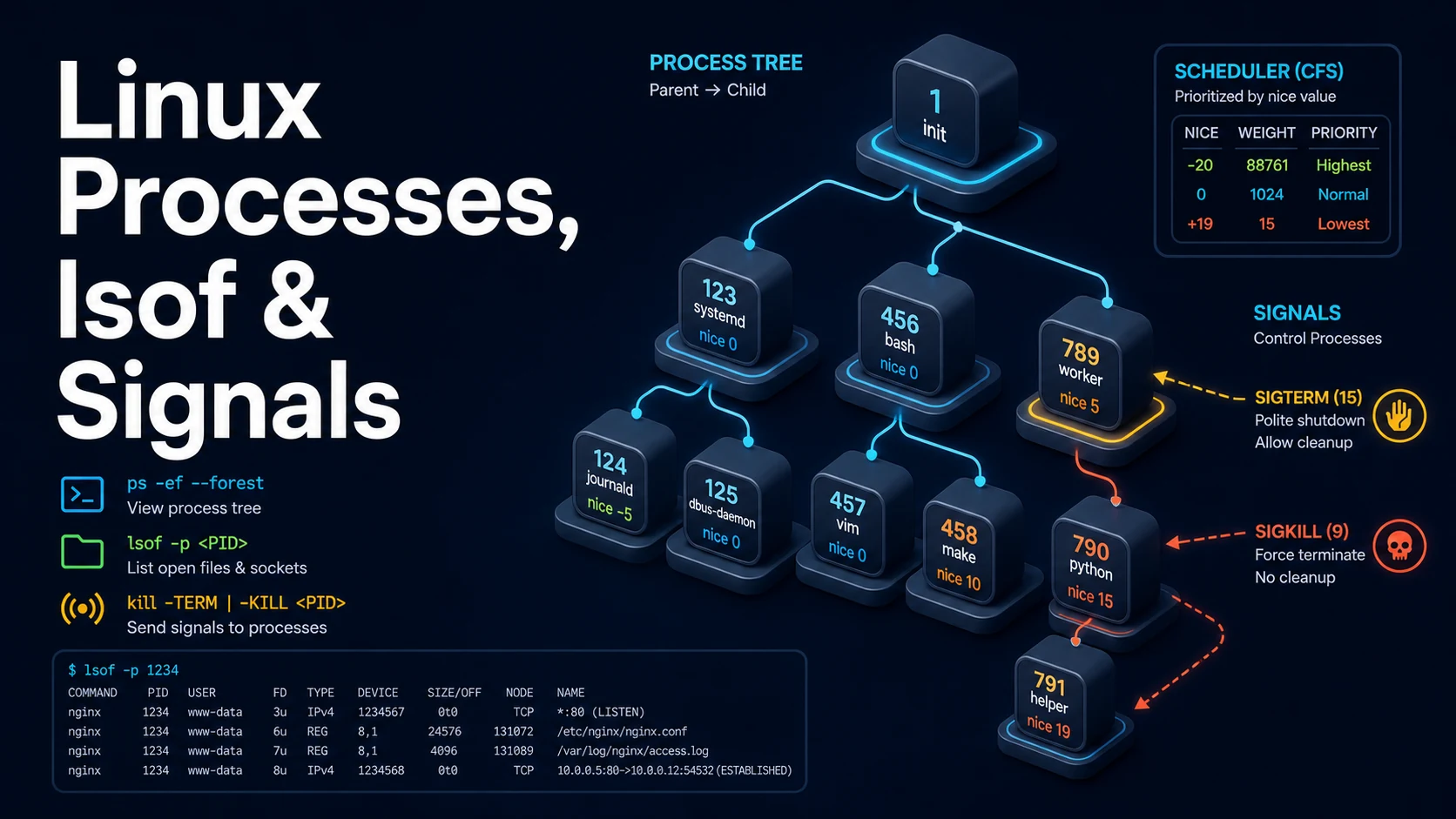
Quick Summary
A Linux process is identified by a PID, owned by a user, and controlled by signals. ps shows what is running, lsof shows what it has open, and kill sends it a signal. The three commands answer the three questions that come up in every incident: what is eating the CPU, what is holding port 8080, and how do I stop it without corrupting its data.
Signals are not all the same kind of thing. SIGTERM (15) is a request: the process can catch it, flush buffers, close connections, and exit. SIGKILL (9) is not a request: the kernel terminates the process immediately, the handler never runs, and any in-flight write is lost. SIGHUP (1) conventionally means "reload your configuration" for daemons. SIGINT (2) is what Ctrl-C sends.
nice is the scheduling counterpart. Every process has a niceness from -20 (most CPU) to 19 (least), default 0, and only root can lower it. Backups, indexing, and transcoding belong at positive niceness so an interactive session keeps its responsiveness; renice changes the value of a process that is already running.
Basic Syntax & Signature
# ps: snapshots
ps aux                         # BSD syntax: user, pid, %cpu, %mem, command
ps -ef                         # POSIX syntax: uid, pid, ppid, cmd
ps -eo pid,ppid,stat,pcpu,pmem,etime,cmd --sort=-pcpu | head -15
ps auxf                        # process tree
ps -p 1234 -o pid,ppid,stat,wchan:30,cmd
pgrep -af node                 # PIDs and command lines matching a name
pgrep -u www-data -f php-fpm

# lsof: open files and sockets
lsof -i :8080                  # who is listening on 8080
lsof -p 1234                   # everything that PID has open
lsof +D /var/log/app           # processes with files open under a directory
lsof -u deploy -a -i           # sockets owned by a user
lsof /var/lib/dpkg/lock        # what is holding a lock file

# Signals
kill -l                        # list signal names
kill 1234                      # SIGTERM
kill -15 1234                  # same, explicit
kill -HUP 1234                 # reload
kill -9 1234                   # SIGKILL, last resort
kill -TERM -- -1234            # whole process group
pkill -f 'node server.js'      # by command line
pkill -u deploy -9             # every process of a user

# Priorities
nice -n 10 tar czf backup.tgz /srv/data
renice 15 -p 4321
ionice -c3 -p 4321             # idle I/O class, on top of nice
SIGKILL cannot be caught, blocked, or ignored, which is why a process in uninterruptible sleep (D state) does not die even with kill -9 — it is waiting in the kernel for I/O, and it will exit when the I/O completes or fails.
Key Comparison Table
| Signal | Number | Catchable | Default action | Typical use |
|---|---|---|---|---|
SIGHUP | 1 | Yes | Terminate | Reload configuration |
SIGINT | 2 | Yes | Terminate | Ctrl-C |
SIGQUIT | 3 | Yes | Core dump | Ctrl-\ , debugging |
SIGKILL | 9 | No | Terminate | Force stop |
SIGSEGV | 11 | No | Core dump | Memory fault |
SIGTERM | 15 | Yes | Terminate | Normal stop |
SIGSTOP | 19 | No | Stop | Pause a process |
SIGCONT | 18 | Yes | Continue | Resume a paused process |
SIGCHLD | 17 | Yes | Ignore | Child state change |
SIGPIPE | 13 | Yes | Terminate | Write to a closed pipe |
Practical Edge Cases & Deep Dives
1. Reading ps state codes
ps -eo pid,stat,etime,cmd | grep -E '^ *[0-9]+ +(D|Z)'| Code | Meaning | Consequence |
|---|---|---|
R | Running or runnable | Using or waiting for CPU |
S | Interruptible sleep | Waiting for an event; normal |
D | Uninterruptible sleep | Waiting on I/O; SIGKILL does not take effect |
Z | Zombie | Exited, parent has not reaped it |
T | Stopped | SIGSTOP or a debugger |
I | Idle kernel thread | Not a user process |
A Z process consumes no memory beyond its exit record and cannot be killed; only its parent can reap it, by calling wait(). Killing the parent hands the child to PID 1, which reaps it. A growing count of zombies means a process is forking without waiting, which is a bug in that process, not in ps.
2. Finding what holds a port
# Three ways, in order of preference
ss -ltnp 'sport = :8080'
lsof -nP -iTCP:8080 -sTCP:LISTEN
fuser -n tcp 8080

# Then inspect before killing
ps -o pid,ppid,user,cmd -p $(ss -ltnp 'sport = :8080' | grep -oP 'pid=\K[0-9]+' | head -1)
ss reads the kernel's socket table directly and is the fast path; lsof resolves more context but is slower on a busy host. The -nP flags matter on lsof: without them, DNS lookups and service-name resolution turn a millisecond answer into a multi-second one.
3. Killing a process tree, not just a PID
# nginx-style master/worker: TERM the master and let it drain workers
kill -TERM "$(cat /run/api.pid)"

# A supervisor that ignores TERM: signal the whole group
kill -TERM -- -1234
sleep 5
kill -KILL -- -1234

# Everything matching a pattern, safely previewed first
pgrep -af 'celery worker'
pkill -TERM -f 'celery worker'
kill -- -PGID requires the negative sign and a group id, not a single PID's id. Getting it wrong signals your own shell's group. The preview step matters: pkill -f matches the pattern anywhere in the command line, including the pkill invocation itself on some shells and any editor that has the string open.
4. A shutdown handler that actually drains
# Python: SIGTERM triggers a graceful stop, SIGKILL cannot be handled.
import signal, sys, time

def handler(signum, frame):
    print("draining connections", flush=True)
    time.sleep(2)                       # close pools, finish in-flight requests
    sys.exit(0)

signal.signal(signal.SIGTERM, handler)
signal.signal(signal.SIGINT, handler)kill -TERM "$PID"
for i in $(seq 1 30); do kill -0 "$PID" 2>/dev/null || break; sleep 1; done
kill -0 "$PID" 2>/dev/null && kill -KILL "$PID"kill -0 tests whether a process exists without sending a signal, which is the correct polling primitive. Sending SIGKILL first skips the handler entirely: databases left with unclean shutdowns, temp files left behind, and connection pools closed mid-transaction.
5. nice, renice, and what they do not do
# Start a CPU-heavy job below interactive work
nice -n 19 tar -cf /backup/data.tar /srv/data

# Lower the priority of a running process (positive only, as a normal user)
renice 10 -p 4321
renice 10 -g 1000        # by process group
renice 10 -u backup      # all of a user's processes

# Add an I/O class on top; CPU niceness does not throttle disk
ionice -c 2 -n 7 -p 4321
Niceness is a hint to the scheduler, not a limit. On a machine with idle cores, a niced process still uses every CPU it can get, and renice does nothing for a process blocked on disk until ionice is applied. Cgroups (systemd's CPUQuota=, IOWeight=) are the mechanism that enforces a ceiling.
6. When the OOM killer is the cause
dmesg -T | grep -i -E 'killed process|out of memory'
journalctl -k --since "1 hour ago" | grep -i oom
ps -eo pid,pmem,rss,cmd --sort=-rss | head -10
cat /proc/meminfo | grep -E 'MemTotal|MemAvailable|SwapTotal'
An OOMKilled service that stops without an error in its own log was killed by the kernel, not by systemd. The evidence is in the kernel ring buffer, and the useful follow-up is RSS per process rather than %MEM, which is a share of total RAM and misleading on machines with a large page cache.
7. Mapping a PID back to its unit, container, and cwd
# Which systemd unit owns this process
cat /proc/1234/cgroup
systemctl status 1234

# Where it is and what it was launched as
tr '\0' ' ' < /proc/1234/cmdline; echo
readlink /proc/1234/cwd
readlink /proc/1234/exe

# Its open descriptors, with sizes for the growing ones
lsof -p 1234 | sort -k7 -n | tail -10

# Its threads, for a process that is stuck at 100% CPU
ps -L -o pid,tid,pcpu,stat,comm -p 1234 | sort -k3 -rn | head
/proc/<pid>/cgroup is the fastest way to tell whether a process belongs to a systemd unit, a container runtime, or your own shell — which then decides who is supposed to restart it. ps -L breaks a process into threads, and the thread with the highest CPU is what a profiler or gdb -p should attach to.
Common Compilation/Runtime Mistakes
| Symptom | Cause | Fix |
|---|---|---|
kill -9 does not stop the process | D state waiting on I/O | Fix the device or reboot |
| Service restarts with no log entry | SIGKILL from OOM or systemd | Check dmesg / journalctl -k |
| Zombie processes accumulate | Parent never calls wait() | Fix the parent; killing the zombie does nothing |
| Port still bound after stop | Child process survived | Signal the process group |
pkill -f kills the wrong thing | Pattern matched the caller | Preview with pgrep -af |
%CPU looks impossible (300%) | Per-core percentage | Divide by core count |
lsof hangs for seconds | DNS and service-name lookups | lsof -nP |
| Nice value has no effect | I/O bound, or idle cores | Use ionice or cgroup limits |
renice denied | Lowering below the current value as non-root | Run as root, or raise instead |
| Process tree half-killed | Only the parent was signalled | kill -- -PGID |
The working order for any "it will not stop" problem is: identify the PID and its state, send SIGTERM, wait with kill -0, then escalate to SIGKILL on the group. Escalating first is the one habit that turns a routine restart into an outage, because whatever the process was writing at that moment never reaches disk.
Try matching browser tools
All toolsSmall utilities that fit Linux work — they run entirely in this browser tab, so nothing you paste leaves your device.
Related Linux guides
All Linux guidesBash Indexed Arrays, Associative Maps, and Parameter Expansion
Quoting decides whether an array stays a list, and the expansion operators replace most external text tools. Includes set -u, mapfile, namerefs, and the bash 3.2 differences that break scripts on macOS.
Parsing JSON and YAML in Shell Pipelines with jq and yq
jq is a filter language, not a pretty-printer. The operators that do the work, --arg versus string interpolation, in-place YAML edits, and how to tell which yq is installed before writing a command.
Linux Memory, Swap, the OOM Killer, vmstat, and sysctl Tuning
MemAvailable versus used, the vmstat columns that prove thrashing, how the OOM killer picks its victim, and the sysctl keys that belong in /etc/sysctl.d instead of a one-off command.
Linux Firewalls: ufw, iptables, and nftables Rules and Persistence
First-match ordering, stateful filtering, and persistence: the three ideas behind every Linux firewall. Plus why Docker-published ports ignore ufw and how DOCKER-USER closes them.
More in Linux
All Linux guidesThe guides filed next to this one in Linux, in library order.