SQL JSON and JSONB: Functions, Operators, and Indexing Strategies
Why jsonb is the default for queryable documents, when containment can use a GIN index, and the expression-index fixes for scalar lookups.
Quick Summary
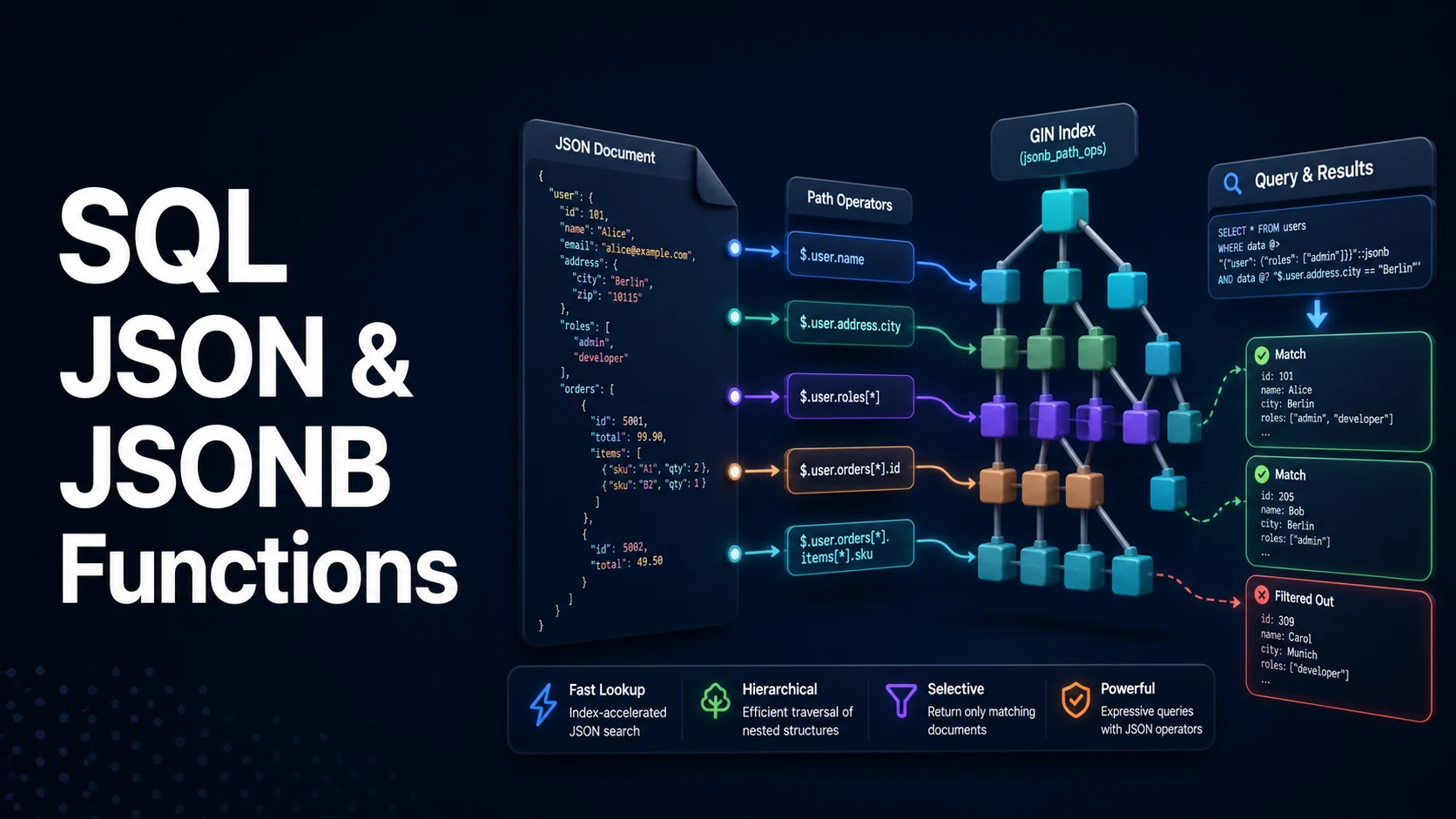
PostgreSQL gives you two JSON types, and the choice between them decides whether your queries are fast or whether they scan the whole table. json stores the exact text you sent, byte for byte, including duplicate keys and whitespace. jsonb parses the document once on write, discards whitespace and duplicate keys, sorts object keys, and stores a binary tree that supports containment operators and GIN indexes. If you plan to filter, join, or index on JSON, store jsonb. Keep json only when you must preserve the original formatting, such as a signed payload you need to re-serve verbatim.
The query surface has three layers. First, access operators: -> returns JSON, ->> returns text, and their path variants #> and #>> walk nested structures. Second, predicate operators: @> containment, ? key existence, ?| and ?& for key sets, and @? / @@ for SQL/JSON path expressions. Third, shaping functions: jsonb_build_object, jsonb_set, jsonb_strip_nulls, and the set-returning jsonb_array_elements and jsonb_each that turn a document back into rows.
The performance rule is short. Containment (@>) is the only operator a GIN index accelerates out of the box, so model filters as containment whenever you can. A predicate that casts or extracts text (WHERE (data->>'status') = 'open') cannot use the default GIN index; it needs an expression index on exactly that expression. Mixing the two is fine — one GIN index for containment, one B-tree expression index for hot scalar lookups.
Basic syntax and query signatures
-- Access: returns jsonb
SELECT data -> 'customer' -> 'address' -> 'city' FROM orders;

-- Access: returns text (no surrounding quotes)
SELECT data ->> 'status' FROM orders;

-- Path access: '{a,b,0}' walks keys and array positions
SELECT data #> '{items,0,sku}'  AS json_value,
       data #>> '{items,0,sku}' AS text_value
FROM orders;

-- Existence and containment
SELECT * FROM orders WHERE data ? 'coupon';                 -- key or array element exists
SELECT * FROM orders WHERE data ?| ARRAY['coupon','gift'];  -- any of
SELECT * FROM orders WHERE data ?& ARRAY['coupon','gift'];  -- all of
SELECT * FROM orders WHERE data @> '{"status":"shipped"}';  -- containment

-- SQL/JSON path (PostgreSQL 12+)
SELECT jsonb_path_query(data, '$.items[*] ? (@.qty > 2)') FROM orders;
SELECT * FROM orders
WHERE data @@ '$.items[*].qty > 2';                          -- boolean predicate
Construction and modification are functional; nothing mutates in place.
SELECT jsonb_build_object('id', id, 'tags', to_jsonb(tags)) FROM posts;

-- set a nested key; create_missing defaults to true
SELECT jsonb_set(data, '{customer,city}', '"Busan"');

-- append to an array
SELECT jsonb_set(data, '{items,0}', (data #> '{items,0}') || '{"gift":true}');

-- remove a key / remove a nested path
SELECT data - 'coupon' FROM orders;
SELECT data #- '{items,1}' FROM orders;

-- merge two objects (right-hand keys win, shallow merge)
SELECT data || '{"priority":"high"}' FROM orders;
Normalising a document into rows is the other direction, and it is where most reporting queries live.
SELECT o.id, item->>'sku' AS sku, (item->>'qty')::int AS qty
FROM orders o
CROSS JOIN LATERAL jsonb_array_elements(o.data->'items') AS item;

SELECT o.id, kv.key, kv.value
FROM orders o
CROSS JOIN LATERAL jsonb_each_text(o.data->'meta') AS kv(key, value);
Key comparison table
| Feature | json | jsonb |
|---|---|---|
| Storage | Original text, verbatim | Parsed binary |
| Duplicate keys | Preserved | Last wins, earlier dropped |
| Key order | Preserved | Sorted by length then bytes |
| Whitespace | Preserved | Removed |
| Write cost | Cheap (validation only) | Higher (parse + sort) |
| Read cost | Re-parse on every access | Direct binary access |
| GIN index | Not supported | Supported |
Containment @> | Not supported | Supported |
Equality = | Text equality | Structural equality |
| Operator | Returns | Indexable by default GIN | Typical use |
|---|---|---|---|
-> / #> | jsonb | No | Chain into further access |
->> / #>> | text | No (needs expression index) | Compare, cast, group |
@> / <@ | boolean | Yes | Filter by shape |
?, `? | , ?&` | boolean | Yes (jsonb_ops) |
@?, @@ | boolean | Only with jsonb_path_ops + @?/@@ support | Path predicates |
| Index | Supports | Size | Notes |
|---|---|---|---|
gin (data) | @>, ?, `? | , ?&` | Larger |
gin (data jsonb_path_ops) | @>, @?, @@ only | ~40% smaller | No key-existence queries |
btree ((data->>'status')) | Equality, range on that expression | Small | Exact expression must match |
Practical edge cases and deep dives
1. Model filters as containment so the GIN index actually fires
Containment is the one operator that works with a plain GIN index, and it composes: a nested object query is still a single index probe.
CREATE INDEX idx_orders_data ON orders USING gin (data);

-- Index-usable: both predicates are containment
SELECT id, total
FROM orders
WHERE data @> '{"status":"shipped"}'
  AND data @> '{"customer":{"country":"KR"}}';

EXPLAIN (ANALYZE, BUFFERS) SELECT id FROM orders WHERE data @> '{"status":"shipped"}';
-- Bitmap Index Scan on idx_orders_data
Compare with the version most people write first:
-- Sequential scan: no index on that expression
SELECT id FROM orders WHERE data->>'status' = 'shipped';

-- Fixed by indexing the exact expression, not by adding a cast
CREATE INDEX idx_orders_status ON orders ((data->>'status'));
The second form is not wrong, it is just a different index. What breaks performance silently is adding ONE index and expecting both forms to use it.
2. Array membership: ? versus @> versus jsonb_array_elements
? tests whether a string appears as a top-level key or array element. That dual meaning surprises people who expect key-only semantics.
-- tags is a JSON array of strings: both of these find the same rows
SELECT * FROM posts WHERE tags ? 'rust';
SELECT * FROM posts WHERE tags @> '["rust"]';

-- "any of several" is not the same as "all of"
SELECT * FROM posts WHERE tags ?| ARRAY['rust','tokio'];   -- OR
SELECT * FROM posts WHERE tags @> '["rust","tokio"]';      -- AND (array containment)
Array containment requires every element of the right side, so @> '["rust","tokio"]' means the post is tagged with both. This is the most common silent bug in tag filtering.
3. Expression indexes need an IMMUTABLE expression
data->>'status' is immutable, but the moment time zone conversion or to_char enters the expression, PostgreSQL refuses the index.
-- Rejected: 42P17 functions in index expression must be marked IMMUTABLE
CREATE INDEX idx_created_day ON orders (((data->>'created_at')::timestamptz)::date);
Two ways out: store the value as a real column (preferred — a generated column keeps it in sync), or index the immutable part and filter the rest at runtime.
ALTER TABLE orders
  ADD COLUMN status text GENERATED ALWAYS AS (data->>'status') STORED;
CREATE INDEX idx_orders_status_gen ON orders (status);
4. jsonb_set does nothing when an intermediate key is missing
jsonb_set with the default create_missing = true creates the final key but not intermediate containers, and it silently returns the input unchanged when the path cannot be traversed.
-- items exists -> works
SELECT jsonb_set('{"items":[{"qty":1}]}', '{items,0,qty}', '2');

-- 'customer' missing -> returns the original document, no error
SELECT jsonb_set('{"items":[]}', '{customer,city}', '"Busan"');

-- Fill the gap explicitly first
SELECT jsonb_set(
         jsonb_set('{"items":[]}', '{customer}', '{}'),
         '{customer,city}', '"Busan"');
Because there is no error, an update loop can "succeed" while changing nothing. Assert the result with RETURNING data->'customer' in the same statement.
5. Path expressions: @? versus @@ and the strict/silent modes
@? asks whether a path returns any item; @@ evaluates a boolean predicate. Lax mode (the default) suppresses structural errors and flattens arrays automatically, while strict raises them.
-- Lax: returns true when at least one item matches
SELECT data @? '$.items[*] ? (@.qty > 2)';

-- Silent: unmatched paths yield an empty result instead of an error
SELECT jsonb_path_query(data, '$.items[*].sku' PASSING 5 AS min_qty);

-- Extract typed scalars, not JSON text
SELECT jsonb_path_query_first(data, '$.total')::numeric;
jsonb_path_query_first returns sql/json text by default; casting to a numeric keeps later arithmetic predictable. Bagging a whole document into ::text and parsing it in application code throws away every index you built.
6. Unnesting without losing rows or ordering
jsonb_array_elements on a missing or non-array value raises 22023 cannot extract elements from an object. Guard it with jsonb_typeof and use WITH ORDINALITY when the array position matters.
SELECT o.id, e.ord, e.item->>'sku' AS sku
FROM orders o
CROSS JOIN LATERAL jsonb_array_elements(
         CASE WHEN jsonb_typeof(o.data->'items') = 'array'
              THEN o.data->'items' ELSE '[]'::jsonb END
       ) WITH ORDINALITY AS e(item, ord);
The CASE wrapper is the difference between a query that survives dirty rows and one that aborts the whole report on the first bad document.
7. The same idea in MySQL and SQLite
-- MySQL 8.0: JSON_TABLE turns documents into rows
SELECT o.id, jt.sku, jt.qty
FROM orders o
JOIN JSON_TABLE(o.data, '$.items[*]' COLUMNS (
       sku VARCHAR(32) PATH '$.sku',
       qty INT         PATH '$.qty')) AS jt;

-- MySQL dotted path form
SELECT JSON_UNQUOTE(JSON_EXTRACT(data, '$.status')) FROM orders;

-- SQLite: json_each is a table-valued function
SELECT p.id, j.value AS tag
FROM posts p, json_each(p.tags) j;
MySQL has no GIN-style JSON index; the workaround is a multi-valued index (CAST(data->'$.tags' AS CHAR(64) ARRAY)) or a generated column with a B-tree index. SQLite supports expression indexes on json_extract results but not on document containment.
Common mistakes and runtime errors
| Symptom | Cause | Fix |
|---|---|---|
operator does not exist: jsonb = text | Comparing jsonb with a string literal | Use ->> for text or @> with a JSON literal |
42883 on data ? 'x' inside a prepared statement | ? collides with the driver's placeholder | Use jsonb_exists(data,'x') or data @> '{"x":null}' |
| GIN index ignored, bitmap scan missing | Predicate is ->> text comparison | Add expression index or rewrite as @> |
jsonb_set leaves data unchanged | Missing intermediate key | Build the path upward first |
| Duplicate keys disappear after insert | jsonb keeps the last occurrence | Clean the producer or store as json |
| Array query returns no rows | Used @> when "any of" was intended | Use `? |
cannot extract elements from an object | jsonb_array_elements on a non-array | Guard with jsonb_typeof |
JSON null compared with SQL NULL | 'null'::jsonb is a value, NULL is absence | Test with data->'k' = 'null'::jsonb separately |
| Numeric comparison fails | '1' (text) versus 1 (number) are different values | Cast on extraction, not after comparison |
Index index scan on jsonb_path_ops misses ? | That opclass only supports containment and paths | Use jsonb_ops or a second index |
Try matching browser tools
All toolsSmall utilities that fit SQL work — they run entirely in this browser tab, so nothing you paste leaves your device.
Related SQL guides
All SQL guidesSQL Cursors vs Set-Based Operations: Syntax, Memory, and Performance
Why a row-by-row cursor costs minutes where one UPDATE takes seconds, how server cursors spool to disk, and the set-based replacements for each loop.
SQL String Functions: CONCAT, SUBSTRING, REPLACE, and Pattern Matching
The concatenation and slice functions that differ between engines, why LIKE 'x%' uses an index and '%x%' cannot, plus escaping and NULL rules.
SQL Date and Time Functions: INTERVAL Arithmetic, Time Zones, and DST
timestamptz versus timestamp, half-open ranges that keep an index, and the daylight saving gaps that make local scheduling wrong once a year.
SQL Row Locking: SELECT FOR UPDATE, SKIP LOCKED, and NOWAIT
How FOR UPDATE locks rows until commit, why the plan decides the lock scope, and the SKIP LOCKED claim-queue pattern that scales to many workers.
More in SQL
All SQL guidesThe guides filed next to this one in SQL, in library order.
- SQL Joins: INNER, LEFT, RIGHT, FULL OUTER, and CROSS JOIN with Visual Diagrams
- SQL Indexes: B-Tree, Composite Indexes, and Covering Indexes for Query Performance
- SQL NULL Handling: COALESCE, NULLIF, IS NULL, and Three-Valued Logic
- SQL PIVOT and UNPIVOT: Row-to-Column and Column-to-Row Data Transformation