Linux find and xargs: Recursive File Search and Safe Batch Execution
The NUL-separated pipeline that survives spaces and newlines in filenames, plus -exec batching, -prune logic and parallel workers.
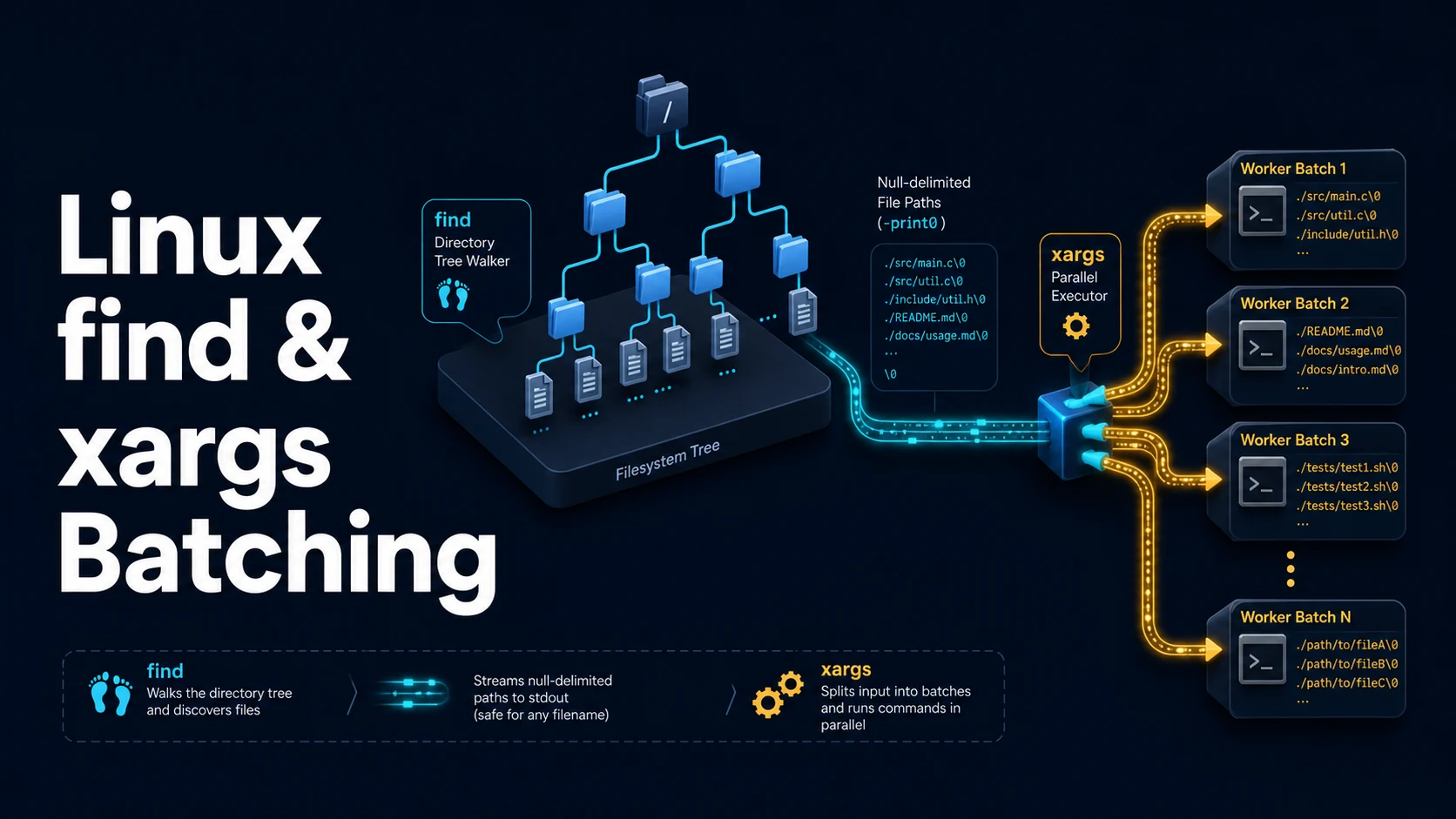
Quick Summary
find walks a directory tree and prints or acts on the paths that match a set of tests. xargs takes that list and turns it into command arguments. Together they are the standard way to run one command over thousands of files, and together they contain the classic filename bug: the default transfer format is newline-separated, so any file with a space, a tab, or a newline in its name is split into multiple arguments.
The fix is -print0 and -0. find ... -print0 emits NUL-terminated paths, xargs -0 reads NUL-terminated paths, and no legal filename can contain a NUL byte. That pair is the only correct way to pipe filenames, and it is the first thing to check when an rm or chmod command behaves strangely on a directory with spaces in it.
The other half of the tool is -exec. find ... -exec cmd {} + runs the command in batches with many paths at once, which is faster than \; and correct without the quoting hazards of a shell pipeline. -exec ... \; runs once per file. Reaching for xargs is worth it when you need -P for parallelism or -n for fixed batch sizes, not for the simple case.
Basic Syntax & Signature
# Selection
find /var/log -type f -name '*.log' -mtime +7
find . -maxdepth 2 -type f -iname '*.jpg'
find /srv -type f -size +100M -printf '%s %p\n'
find . -type d -empty
find . -newer package.json -type f -not -path './node_modules/*'

# Actions
find . -name '*.tmp' -delete
find /tmp -type f -mtime +1 -exec rm -f {} +
find . -name '*.log' -exec gzip -9 {} \;

# Correct batching
find . -name '*.md' -print0 | xargs -0 -n 50 wc -l
find . -type f -name '*.js' -print0 | xargs -0 -P 8 -I{} sh -c 'eslint "$1"' _ {}

# GNU alternatives that avoid the shell entirely
find . -type f -name '*.js' -execdir node --check {} +
find evaluates tests left to right with short-circuit boolean logic, and -print is an action. When no action is given, -print is implied; when any action is given, it is not:
find . -name '*.log'                # prints
find . -name '*.log' -delete        # deletes, prints nothing
find . -name '*.log' -delete -print # deletes and prints
Key Comparison Table
| Option | Effect | Notes |
|---|---|---|
-name / -iname | Glob on basename | Case-sensitive / insensitive |
-path | Glob on full path | Quote it to stop shell expansion |
-type f/d/l | File, directory, symlink | -type l does not follow links |
-maxdepth / -mindepth | Depth limits | Place before other tests for speed |
-mtime +7 | Older than 7 days | -mmin for minutes |
-size +100M | Larger than 100 MB | Units: c, k, M, G |
-newer f | Modified after f | -newermt takes a date |
-print0 | NUL-terminated output | Required for names with spaces |
-exec cmd {} + | Batch arguments | Fast, no shell parsing |
-exec cmd {} \; | One invocation per file | Slower, correct quoting |
-execdir | Runs in the file's directory | Safer against path injection |
-delete | Removes matches | Must come after the tests |
-prune | Skips a subtree | Needs -o -print to be useful |
xargs -0 | Reads NUL-separated input | Pairs with -print0 |
xargs -n 20 | Max 20 args per run | Batching |
xargs -P 8 | Up to 8 parallel runs | Output interleaving |
xargs -r | Skip run on empty input | GNU; avoids a bare cmd |
xargs -I{} | Replace {} in place | Forces -L 1 semantics |
Practical Edge Cases & Deep Dives
1. The filename with a space
mkdir -p /tmp/demo && cd /tmp/demo
touch "report final.txt" "notes.txt"

# Wrong: two arguments, one of them missing
find . -name '*.txt' | xargs wc -l
# wc: 'report': No such file or directory
# wc: 'final.txt': No such file or directory

# Right: NUL-separated transfer
find . -name '*.txt' -print0 | xargs -0 wc -l
A newline in a filename breaks the wrong version even further, because it splits into two apparent filenames. -print0 / -0 is not a stylistic preference; it is the only separator that cannot occur in a path.
2. -exec {} + versus xargs
# Batched by find itself: one chmod for as many paths as fit in ARG_MAX
find /srv/assets -type f -name '*.png' -exec chmod 644 {} +

# Batched by xargs, with parallel workers
find /srv/assets -type f -name '*.png' -print0 | xargs -0 -P 4 -n 100 chmod 644

# Per-file invocation: slow, but needed when the command takes one argument
find . -name '*.conf' -exec grep -l 'deprecated' {} \;
-exec ... + is the simplest correct form and needs no xargs. xargs -P is the reason to add a process: image resizing, compression, or hashing hundreds of thousands of files, where a single command's CPU use is the bottleneck.
3. -prune with the boolean trap
# Wrong: -prune alone does nothing, because -print is not reached
find . -name node_modules -prune -print

# Right: prune the directory, then print everything else
find . -path ./node_modules -prune -o -type f -name '*.ts' -print

# Multiple exclusions
find . \( -path ./node_modules -o -path ./.git \) -prune -o -type f -print
The expression above reads as "if the path is one of these, prune and stop; otherwise, if it is a file, print it". -prune returns true, so the left branch of -o short-circuits and the file test never runs on excluded directories.
4. Deleting safely
# Preview first: always run the -print version before the -delete version
find /var/log/app -type f -name '*.log' -mtime +30 -print

# Then delete, with the same tests
find /var/log/app -type f -name '*.log' -mtime +30 -delete

# Refuse to follow symlinks out of the tree
find /var/log/app -xdev -type f -name '*.log' -mtime +30 -delete
-delete implies -depth, which means it processes children before parents; putting it before other tests changes the traversal and can fail with "cannot delete: Directory not empty". -xdev keeps the walk on one filesystem, which prevents a mount point from being traversed into another volume.
5. Parallel execution with a per-file placeholder
# -I{} forces one file per invocation; combine with -P for concurrency
find ./photos -type f -iname '*.jpg' -print0 |
  xargs -0 -P 8 -I{} sh -c 'convert "$1" -resize 1600x "$1.resized"' _ {}

# Progress and failure visibility: -t prints each command, -r skips empty input
find . -name '*.csv' -print0 | xargs -0 -r -t -n 1 gzip
sh -c '...' _ {} passes the filename as $1 inside the shell, which avoids the quoting disaster of interpolating {} directly into a shell string. Without -r, an empty find result still runs the command once with no arguments, which for rm is harmless and for gzip waits on stdin.
6. Finding by age and acting per directory
# Files changed in the last 20 minutes
find /etc -type f -mmin -20 -ls

# Newer than a reference file
find . -type f -newer ./dist/index.js -not -path './dist/*'

# Run a command in each matching directory
find /srv/sites -maxdepth 1 -mindepth 1 -type d -execdir git -C {} status --short \;

# Group results by directory
find . -type f -name '*.py' -printf '%h\n' | sort | uniq -c | sort -rn
-printf is a GNU extension: %p path, %f basename, %h directory, %s size, %T@ mtime as epoch seconds, %TY-%Tm-%Td as a date. It replaces a pipeline for most reporting, and it is the fastest way to get a sortable list because no additional process is involved.
7. -name versus -path, and the leading ./
# -name matches the basename only
find . -name 'config.yaml'

# -path matches the whole path string, including the './' prefix find prints
find . -path './*/config.yaml'
find . -path '*/config.yaml'      # also correct: the pattern is a glob over the path

# A pattern that looks right and never matches, because of the prefix
find . -path './src/*/test/*.ts'  # matches
find . -path 'src/*/test/*.ts'    # matches nothing: every path starts with './'
-path compares against the path exactly as find builds it from the starting point, so the pattern must include that prefix. -name avoids the issue by testing only the last component, at the cost of not being able to match a directory context — which is why excluding a subtree is -path ... -prune and not -name ... -prune.
Common Compilation/Runtime Mistakes
| Symptom | Cause | Fix |
|---|---|---|
No such file or directory on filenames with spaces | xargs without -0 | -print0 | xargs -0 |
-exec runs once per file and is slow | \; used instead of + | -exec cmd {} + |
xargs runs a command with no input | Empty input | xargs -r |
find returns nothing under a path | Symlink not followed | -L, or target the real path |
-prune has no effect | No -print on the other branch | -prune -o -print |
-delete fails on directories | Order of action and tests | Put -delete last; it implies -depth |
| Glob expanded by the shell | Unquoted *.log | Quote the pattern |
Permission denied noise | Walking unreadable trees | 2>/dev/null or -readable |
xargs splits a filename containing a quote | Shell parsing of {} | sh -c 'cmd "$1"' _ {} |
| Parallel output interleaved | -P with line output | Redirect per file, or drop -P |
find descends into a mounted volume | No filesystem boundary | -xdev |
| Results in a different order | No ordering guarantee | ` |
The reliable habit is to build the pipeline in two steps: first find ... -print and read the list, then replace -print with -print0 | xargs -0 ... or -exec ... +. Deleting, moving, or chmod-ing files based on a pipeline you have not looked at is the one mistake in this area that no flag can undo.
Try matching browser tools
All toolsSmall utilities that fit Linux work — they run entirely in this browser tab, so nothing you paste leaves your device.
Related Linux guides
All Linux guidesBash Indexed Arrays, Associative Maps, and Parameter Expansion
Quoting decides whether an array stays a list, and the expansion operators replace most external text tools. Includes set -u, mapfile, namerefs, and the bash 3.2 differences that break scripts on macOS.
Parsing JSON and YAML in Shell Pipelines with jq and yq
jq is a filter language, not a pretty-printer. The operators that do the work, --arg versus string interpolation, in-place YAML edits, and how to tell which yq is installed before writing a command.
Linux Memory, Swap, the OOM Killer, vmstat, and sysctl Tuning
MemAvailable versus used, the vmstat columns that prove thrashing, how the OOM killer picks its victim, and the sysctl keys that belong in /etc/sysctl.d instead of a one-off command.
Linux Firewalls: ufw, iptables, and nftables Rules and Persistence
First-match ordering, stateful filtering, and persistence: the three ideas behind every Linux firewall. Plus why Docker-published ports ignore ufw and how DOCKER-USER closes them.
More in Linux
All Linux guidesThe guides filed next to this one in Linux, in library order.