React Server Components vs Client Components: Serialization and Boundaries
use client marks a module graph, not a component. What runs where, what can cross the boundary, and how to keep interactive islands small.
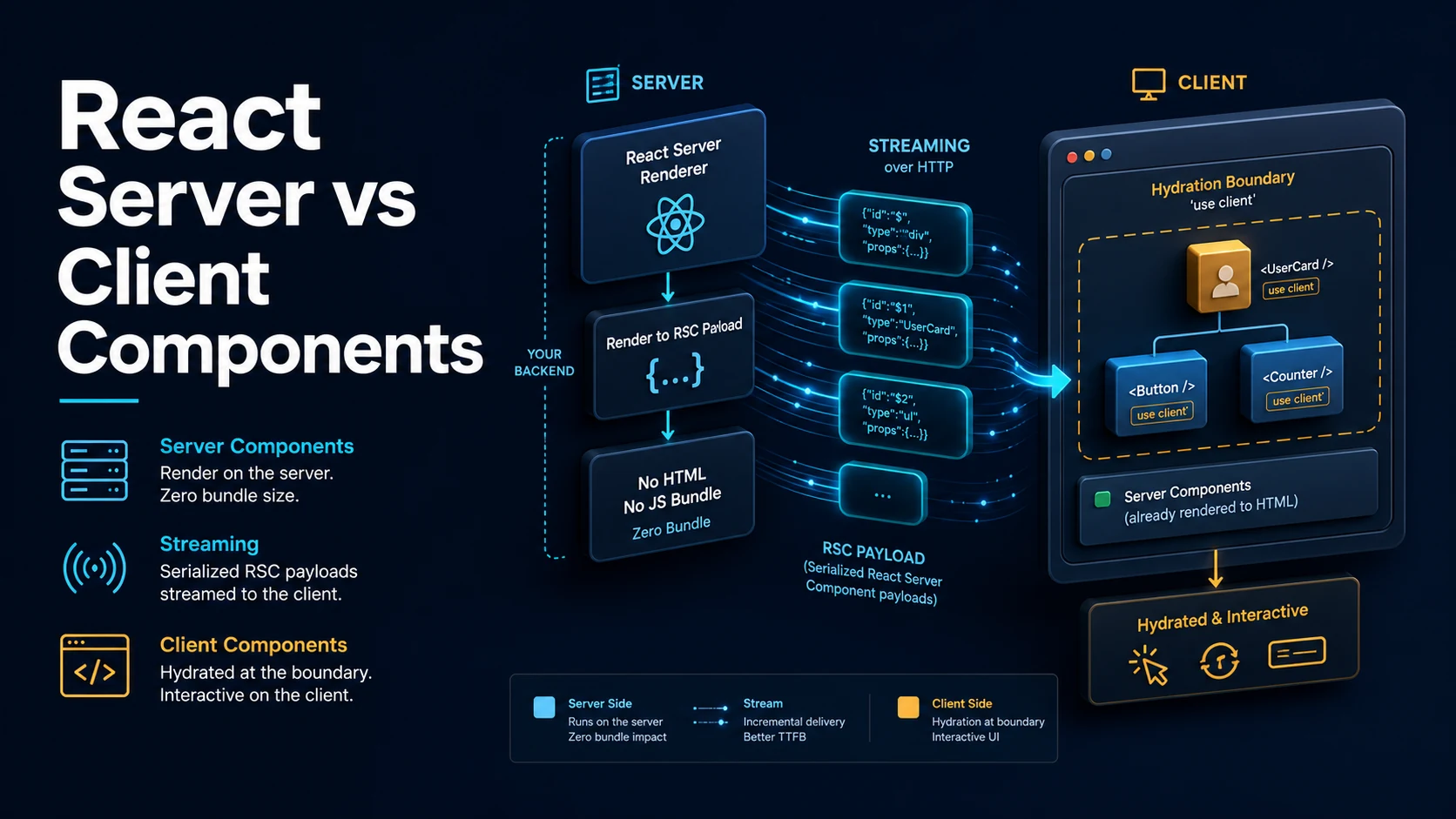
Quick Summary
React Server Components run on the server and never ship to the browser. Client Components run in both places: they are pre-rendered to HTML on the server for the first paint, then hydrated in the browser where hooks, state, and event handlers work. The directive 'use client' does not mean "only in the browser" — it marks the point where the client module graph starts.
That boundary is a file boundary, not a component one. Everything imported by a 'use client' module joins the client bundle, so one 'use client' at the top of a barrel file can silently pull an entire subtree into JavaScript the user must download. The discipline is to keep the directive as low in the tree as possible, around the components that actually need interactivity.
What can cross the boundary is serializable data and server actions. Functions, class instances, and symbols cannot be passed from a server component to a client component; a plain async function marked 'use server' can, because it becomes a reference to an HTTP endpoint rather than a value in the payload.
Basic Syntax & Signature
// app/posts/[id]/page.tsx — Server Component by default (no directive).
import { db } from "@/lib/db";
import { LikeButton } from "./LikeButton";
import { formatDate } from "@/lib/format";

export default async function PostPage({ params }: { params: { id: string } }) {
  // Direct data access: no API route, no useEffect, no fetch to yourself.
  const post = await db.post.findUnique({ where: { id: params.id } });

  if (!post) return <p>Not found</p>;

  return (
    <article>
      <h1>{post.title}</h1>
      <time>{formatDate(post.createdAt)}</time>
      <div>{post.body}</div>

      {/* Interactive island: the only part that ships JS. */}
      <LikeButton postId={post.id} initialLikes={post.likes} />
    </article>
  );
}// app/posts/[id]/LikeButton.tsx — Client Component.
"use client";
import { useState, useTransition } from "react";
import { incrementLikes } from "./actions";
export function LikeButton({ postId, initialLikes }: { postId: string; initialLikes: number }) {
const [likes, setLikes] = useState(initialLikes);
const [isPending, startTransition] = useTransition();
return (
<button
disabled={isPending}
onClick={() =>
startTransition(async () => {
setLikes((n) => n + 1);
await incrementLikes(postId);
})
}
>
♥ {likes}
</button>
);
}// app/posts/[id]/actions.ts — Server Action, callable from the client.
"use server";
import { db } from "@/lib/db";
import { revalidatePath } from "next/cache";
export async function incrementLikes(postId: string) {
await db.post.update({ where: { id: postId }, data: { likes: { increment: 1 } } });
revalidatePath(`/posts/${postId}`);
}Passing server-rendered content into a client component uses children:
// Client wrapper that renders server content it cannot import.
"use client";
import { useState, type ReactNode } from "react";

export function Collapsible({ children, title }: { children: ReactNode; title: string }) {
  const [open, setOpen] = useState(false);
  return (
    <section>
      <button onClick={() => setOpen((o) => !o)}>{title}</button>
      {open && children}
    </section>
  );
}
Key Comparison Table
| Server Component | Client Component | |
|---|---|---|
| Directive | None (default in App Router) | 'use client' |
| Runs on server | Yes | Yes, for initial HTML |
| Runs in browser | No | Yes, after hydration |
| Ships JavaScript | No | Yes |
async component | Yes | No |
Hooks (useState, useEffect) | No | Yes |
| Event handlers | No | Yes |
Browser APIs (window) | No | Yes |
| Secrets, DB, filesystem | Yes | No |
Receives ref | No | Yes |
| What crosses the boundary | Allowed | Workaround |
|---|---|---|
| Strings, numbers, booleans, null | Yes | — |
| Plain objects and arrays | Yes | — |
Date, Map, Set, BigInt, typed arrays | Yes | — |
| Promise | Yes, unwrap with use | — |
| Server action function | Yes | Mark the function 'use server' |
| Ordinary function | No | Move the logic into the client, or use an action |
| Class instance | No | Convert to a plain object |
React element as children | Yes | Pass the server component as a child |
| Import a server component | No | Pass it as children instead |
Practical Edge Cases & Deep Dives
1. 'use client' is transitive down the import graph
// app/ui/index.tsx
"use client";                       // everything re-exported below is client

export { Button } from "./Button";
export { Card } from "./Card";
export { Chart } from "./Chart";    // 180 KB of charting library, now in the bundle
A single directive in a barrel file marks every re-exported module as client code. Since the client graph is computed by imports, not by usage, a chart component imported but never rendered still ships. Keep barrel files free of directives, put 'use client' in the leaf component that truly needs interactivity, and check the bundle analyzer when a page's JavaScript grows unexpectedly.
2. Server data into a client component: serializable only
// Server
export default async function Page() {
  const user = await db.user.findFirst();
  const createdAt = new Date();
  return (
    <Profile
      user={{ id: user.id, name: user.name }}   // plain object: fine
      createdAt={createdAt}                     // Date: supported by React 19
      // formatter={formatName}                 // function: not allowed
      // ormClient={db}                         // class instance: not allowed
    />
  );
}

// Client
"use client";
export function Profile({ user, createdAt }: { user: { id: string; name: string }; createdAt: Date }) {
  return <p>{user.name} since {createdAt.getFullYear()}</p>;
}
The error when this is violated is explicit — something like "Functions cannot be passed directly to Client Components" — and the fix is to pass data, not behaviour. Formatting belongs on the server as pre-formatted strings, or on the client as an imported pure function (which is itself client code, so it ships, but a formatter is a few hundred bytes).
3. Context providers must be client components, children need not be
// app/providers.tsx
"use client";
import { createContext, useState, type ReactNode } from "react";

export const ThemeContext = createContext<{ theme: string; toggle: () => void }>({
  theme: "light",
  toggle: () => {},
});

export function Providers({ children }: { children: ReactNode }) {
  const [theme, setTheme] = useState("light");
  const toggle = () => setTheme((t) => (t === "light" ? "dark" : "light"));
  return <ThemeContext.Provider value={{ theme, toggle }}>{children}</ThemeContext.Provider>;
}// app/layout.tsx — stays a server component.
import { Providers } from "./providers";
export default function RootLayout({ children }: { children: React.ReactNode }) {
return (
<html lang="en">
<body>
<Providers>{children}</Providers>
</body>
</html>
);
}children is a React element created by the server, so wrapping it in a client provider does not turn the pages into client components — the provider is an island whose children arrive pre-rendered. This is the standard way to get a theme or query client at the root without breaking server rendering.
4. Server actions from a form, with progressive enhancement
// app/contact/page.tsx — server component.
import { submitContact } from "./actions";

export default function ContactPage() {
  return (
    <form action={submitContact}>
      <input name="email" type="email" required />
      <textarea name="message" required />
      {/* Works even before hydration: the browser posts the form. */}
      <button type="submit">send</button>
    </form>
  );
}// app/contact/actions.ts
"use server";
export async function submitContact(formData: FormData) {
const email = String(formData.get("email") ?? "");
const message = String(formData.get("message") ?? "");
if (!email.includes("@") || message.length < 10) {
return { ok: false, error: "Check the form." };
}
await saveMessage({ email, message });
return { ok: true };
}A server action passed to form action is a real POST endpoint, so the form submits without JavaScript and is progressively enhanced when it hydrates. The action's return value is available to useActionState on the client; its arguments must be serializable, and FormData is.
5. Fetching in the wrong place
// Wrong: a client component fetching its own page data.
"use client";
function PostList() {
  const [posts, setPosts] = useState<Post[]>([]);
  useEffect(() => {
    fetch("/api/posts").then((r) => r.json()).then(setPosts);
  }, []);
  return <ul>{posts.map((p) => <li key={p.id}>{p.title}</li>)}</ul>;
}

// Right: fetch on the server, render on the server, ship no JS for it.
async function PostListServer() {
  const posts = await db.post.findMany({ take: 20 });
  return <ul>{posts.map((p) => <li key={p.id}>{p.title}</li>)}</ul>;
}
The client version costs a round trip to your own API, a loading state, an error state, and the JavaScript for all three. The server version costs one query during the request and sends HTML. Interactive parts — a like button, a filter that must respond instantly — stay client components.
6. Third-party components without a client directive
// A library component that calls useState but was written for the client.
// Importing it from a server component fails: "useState only works in a Client Component".
import { DatePicker } from "some-date-lib";

// Fix: wrap it once, in a client module, and keep the wrapper narrow.
// components/DatePickerClient.tsx
"use client";
import { DatePicker } from "some-date-lib";
export function DatePickerClient(props: { value: string; onChange: (v: string) => void }) {
  return <DatePicker {...props} />;
}
The wrapper is the boundary, not the library. Keeping it in its own file means the library is bundled once and the server page stays a server component. The same technique applies to any component that touches window, document, or a browser-only global.
Common Compilation/Runtime Mistakes
| Error / symptom | Cause | Fix |
|---|---|---|
| "useState only works in a Client Component" | Hook used in a server component | Add 'use client' to that file |
| "Functions cannot be passed directly to Client Components" | Passing a callback from server to client | Use a server action, or move the handler into the client |
| "Event handlers cannot be passed to Client Component props" | onClick in a server component | Put the interactive element in a client component |
| Server component imported into a client file | Import direction is one-way | Pass it as children or a prop element |
| Entire page became client JavaScript | Directive at a barrel or layout | Move 'use client' to leaf components |
window is not defined | Browser API during server render or module scope | Access inside an effect or handler |
| Secret exposed in the bundle | NEXT_PUBLIC_ prefix on a secret | Read it only on the server |
| Server action called but no UI update | Revalidation missing | revalidatePath / revalidateTag |
Date prop arrives as a string | A middleware or API boundary serialized it to JSON | Pass through RSC props, or parse on the client |
| Hydration mismatch after conditional server data | Different output on server and client | Render client-only data after mount |
The mental model that prevents most mistakes: server components produce data and markup, client components produce interactivity, and the boundary between them is a file. Every time the boundary moves up, more JavaScript ships; every time it moves down, more of the app needs explicit prop plumbing. Place it per interactive island, not per page.
Try matching browser tools
All toolsSmall utilities that fit React work — they run entirely in this browser tab, so nothing you paste leaves your device.
Related React guides
All React guidesReact Profiler API: Measuring Render Timings and Identifying Wasted Re-Renders
actualDuration versus baseDuration, phase names that tell you who triggered a commit, and how to ship the numbers without flooding a backend.
React with TypeScript: Generic Components, PropsWithChildren, and Event Types
Generic props that infer from data, PropsWithChildren instead of React.FC, and element-scoped event types that keep currentTarget typed.
React useTransition and useDeferredValue: Non-Blocking Concurrent UI Updates
Transitions let React throw away background work when typing arrives. Which hook defers what, and why a controlled input must never be transitioned.
React.lazy and Code Splitting: Route Chunks, Preloading, and Suspense
Where the split points belong, how to preload on intent, and how to recover when a stale chunk 404s after a deployment.
More in React
All React guidesThe guides filed next to this one in React, in library order.