React Portals: createPortal for Modals, Tooltips, and Event Bubbling
Why portal content still bubbles events through the React tree, and how to move a modal out of a clipping container without losing context or focus.
Quick Summary
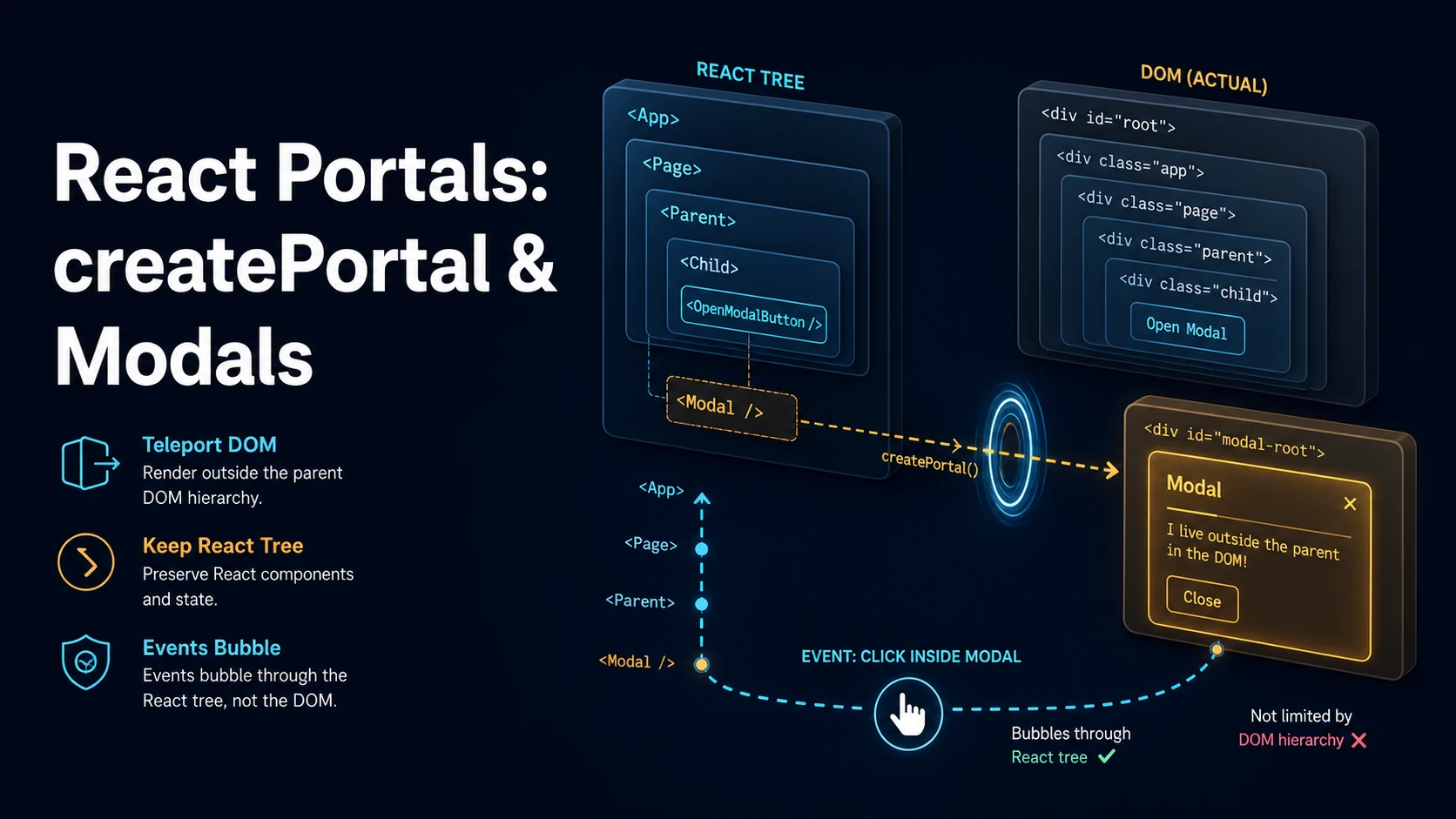
createPortal renders a React element into a DOM node that lives somewhere else in the document while keeping it in the same position in the React tree. The two trees no longer match: the DOM parent is whatever container you pass, but the component parent is unchanged. Everything React derives from the component tree — context, error boundaries, and event bubbling — keeps working exactly as if the element had been rendered in place.
That split is the whole point. A modal inside a card inside a scrolling container is clipped by overflow: hidden, trapped by a transform that creates a new containing block for position: fixed, or buried under a stacking context created three levels up. Moving the DOM node to document.body removes all three constraints without turning the modal into a global component that has to be wired through providers.
The cost is that DOM-based assumptions break. parentElement.contains(event.target) is false for portal content, CSS inheritance from the React parent is gone, and the portal container is a real DOM node you must create and remove yourself. Portals move markup; they do not move responsibility for focus, scroll locking, or stacking order.
Basic Syntax & Signature
import { createPortal } from "react-dom";

function Modal({ open, onClose, children }: {
  open: boolean;
  onClose: () => void;
  children: React.ReactNode;
}) {
  if (!open) return null;

  // Container is resolved at render time; document.body exists only in the browser.
  return createPortal(
    <div className="modal-backdrop" role="presentation" onMouseDown={onClose}>
      <div
        className="modal"
        role="dialog"
        aria-modal="true"
        onMouseDown={(e) => e.stopPropagation()}
      >
        {children}
      </div>
    </div>,
    document.body
  );
}
createPortal(children, domNode, key?) takes any renderable child, a real DOM element (not a selector string), and an optional key that React uses when the portal itself appears in a list. It returns a React node, so it composes where any element composes.
Event bubbling is the part that surprises people. A click on a button inside the portal bubbles through the React tree, not through the DOM tree:
function Card() {
  return (
    // DOM: portal content lands in <body>, outside this div.
    // React: the click still reaches this handler.
    <div onClick={() => console.log("card clicked")}>
      <Modal open>
        <button>Close</button>
      </Modal>
    </div>
  );
}
React attaches listeners at the root container and replays the synthetic event along the fiber path, so the handler above fires even though button has no DOM ancestor relationship to the card. Calling e.stopPropagation() inside the portal stops it at that point in the React tree, which is why modals often guard the inner panel against a backdrop click.
A reusable container avoids appending to document.body directly and gives you one node to style and remove:
function usePortalContainer(id = "portal-root") {
  const ref = useRef<HTMLDivElement | null>(null);

  if (ref.current === null && typeof document !== "undefined") {
    const existing = document.getElementById(id) as HTMLDivElement | null;
    const node = existing ?? document.createElement("div");
    node.id = id;
    if (!existing) document.body.appendChild(node);
    ref.current = node;
  }

  return ref.current;
}
Key Comparison Table
| Concern | Rendered in place | Rendered through createPortal |
|---|---|---|
| DOM parent | The React parent's element | The container you pass |
| React parent | The React parent | Unchanged |
| Context providers | Visible | Visible |
| Error boundaries | Catch errors | Catch errors |
| Synthetic event bubbling | Follows React tree | Follows React tree |
| CSS inheritance | From DOM ancestors | From the portal container's ancestors |
Clipped by overflow: hidden | Yes | No |
Trapped by an ancestor transform | Yes | No |
position: fixed viewport reference | Nearest transformed ancestor | Viewport (unless the container is transformed) |
document.querySelector from parent | Finds it | Does not find it under the parent |
| Server rendering | Works | Needs a guard; no DOM during SSR |
| Unmount cleanup | Automatic | Container stays unless you remove it |
Practical Edge Cases & Deep Dives
1. Escaping a transformed ancestor with position: fixed
function Tooltip({ target, children }: { target: DOMRect; children: React.ReactNode }) {
  return createPortal(
    <div
      style={{ position: "fixed", top: target.bottom + 8, left: target.left, zIndex: 1000 }}
      role="tooltip"
    >
      {children}
    </div>,
    document.body
  );
}

function AnimatedCard() {
  // A transform here creates a containing block: a child fixed element would
  // be positioned relative to this card, not the viewport.
  return (
    <div style={{ transform: "translateZ(0)", overflow: "hidden" }}>
      <Tooltip target={new DOMRect(10, 10, 0, 0)}>Rendered in body, unaffected</Tooltip>
    </div>
  );
}
This is the single most common production reason to reach for a portal. Overflow clipping and transform containment have no CSS-only escape that keeps the element in the tree, and moving the component higher in the component tree would mean threading position data through every intermediate layer.
2. Server rendering without a DOM
function ClientOnlyPortal({ children }: { children: React.ReactNode }) {
  const [mounted, setMounted] = useState(false);
  useEffect(() => setMounted(true), []);
  if (!mounted) return null;
  return createPortal(children, document.body);
}
During server rendering there is no document, so document.body throws. The two-pass guard renders nothing on the server, then mounts the portal after hydration. In a Next.js app, typeof window === "undefined" is not enough inside a component body because the component is also rendered on the client during hydration — the mounted flag makes the first client render match the server output, which is what keeps hydration from complaining.
3. Measuring the portal container for positioning
function Dialog({ children }: { children: React.ReactNode }) {
  const panelRef = useRef<HTMLDivElement>(null);
  const [rect, setRect] = useState<DOMRect | null>(null);

  useLayoutEffect(() => {
    if (panelRef.current) setRect(panelRef.current.getBoundingClientRect());
  }, []);

  return createPortal(
    <div style={{ position: "fixed", inset: 0, display: "grid", placeItems: "center" }}>
      <div ref={panelRef} role="dialog" aria-modal="true" data-measured={Boolean(rect)}>
        {children}
      </div>
    </div>,
    document.body
  );
}
Portals do not change measurement semantics: once mounted, the node is in the real document and getBoundingClientRect returns viewport coordinates. useLayoutEffect runs before paint, so a measurement that changes layout does not flash.
4. Outside-click detection that still works
function Popover({ anchorRef, onClose, children }: {
  anchorRef: React.RefObject<HTMLElement | null>;
  onClose: () => void;
  children: React.ReactNode;
}) {
  const panelRef = useRef<HTMLDivElement>(null);

  useEffect(() => {
    function onDocMouseDown(e: MouseEvent) {
      const t = e.target as Node;
      // A plain anchor.contains(t) check closes the popover when you click
      // inside it, because the panel is not a DOM descendant of the anchor.
      if (panelRef.current?.contains(t)) return;
      if (anchorRef.current?.contains(t)) return;
      onClose();
    }
    document.addEventListener("mousedown", onDocMouseDown);
    return () => document.removeEventListener("mousedown", onDocMouseDown);
  }, [anchorRef, onClose]);

  return createPortal(
    <div ref={panelRef} className="popover">{children}</div>,
    document.body
  );
}
Two nodes need the check, not one. The same mistake shows up in React's own onBlur handling: focus moving from a trigger button into a portal-rendered panel is a blur of the trigger, so a naive blur handler closes the popover before the click lands. Use relatedTarget and check both nodes, or delay the close by one task.
5. Modals with the native <dialog> element
function NativeDialog({ open, onClose, children }: {
  open: boolean;
  onClose: () => void;
  children: React.ReactNode;
}) {
  const ref = useRef<HTMLDialogElement>(null);

  useEffect(() => {
    const el = ref.current;
    if (!el) return;
    if (open && !el.open) el.showModal();
    if (!open && el.open) el.close();
  }, [open]);

  return createPortal(
    <dialog ref={ref} onClose={onClose} onCancel={onClose}>
      {children}
    </dialog>,
    document.body
  );
}
showModal() gives you the browser's top layer, a built-in backdrop, Escape handling, and focus containment, none of which a div offers. React 19 adds onClose and onCancel support so the dialog's own events reach state. Portals are still useful here for the simple reason that a <dialog> nested in a transformed card can still be clipped before it is promoted to the top layer in some engines.
6. Focus management and restoring it
function useFocusTrap(active: boolean) {
  const ref = useRef<HTMLDivElement>(null);

  useEffect(() => {
    if (!active) return;
    const previous = document.activeElement as HTMLElement | null;
    const root = ref.current;
    const focusable = root?.querySelectorAll<HTMLElement>(
      'a[href], button:not([disabled]), input, select, textarea, [tabindex]:not([tabindex="-1"])'
    );
    focusable?.[0]?.focus();

    function onKeyDown(e: KeyboardEvent) {
      if (e.key !== "Tab" || !focusable?.length) return;
      const first = focusable[0];
      const last = focusable[focusable.length - 1];
      if (e.shiftKey && document.activeElement === first) {
        e.preventDefault();
        last.focus();
      } else if (!e.shiftKey && document.activeElement === last) {
        e.preventDefault();
        first.focus();
      }
    }

    document.addEventListener("keydown", onKeyDown);
    return () => {
      document.removeEventListener("keydown", onKeyDown);
      // Returning focus to the trigger is what makes the dialog feel native.
      previous?.focus();
    };
  }, [active]);

  return ref;
}
Without this, opening a modal leaves focus on the trigger behind the overlay, so a screen reader keeps reading the page and Tab walks into content the user cannot see. The inert attribute on the app root, or aria-hidden on siblings, closes the same gap from the other side.
Common Compilation/Runtime Mistakes
| Symptom | Cause | Fix |
|---|---|---|
document is not defined during SSR | document.body read at render time | Mount guard or a container ref resolved in an effect |
| Modal still clipped | Rendered without a portal into body | Portal to a top-level container |
position: fixed offsets from a card | Ancestor transform/filter creates a containing block | Portal to document.body |
| Parent click handler fires on modal click | Events bubble through the React tree | stopPropagation on the panel, or handle by target |
| Popover closes when clicked | contains() checked only on the anchor | Check the panel ref too |
Console warning about createPortal in a list | Portal used as an array child without a key | Pass the third key argument |
| Tooltip cut off at the viewport edge | No collision handling | Clamp against window.innerWidth/Height after measuring |
| Duplicate content on the page | Same component rendered both in place and in a portal | Render one branch only |
| Stale portal container after HMR | Container appended once and never tracked | Reuse by id and clean up on unmount |
| Focus lost when the modal closes | No restore of document.activeElement | Capture and refocus in the cleanup |
Portals are a DOM relocation tool, not a state tool. The React tree stays where it was, which is why context and events keep working — and why every bug that involves "the modal is not where I think it is" comes from confusing the two trees rather than from createPortal itself.
Try matching browser tools
All toolsSmall utilities that fit React work — they run entirely in this browser tab, so nothing you paste leaves your device.
Related React guides
All React guidesReact Profiler API: Measuring Render Timings and Identifying Wasted Re-Renders
actualDuration versus baseDuration, phase names that tell you who triggered a commit, and how to ship the numbers without flooding a backend.
React with TypeScript: Generic Components, PropsWithChildren, and Event Types
Generic props that infer from data, PropsWithChildren instead of React.FC, and element-scoped event types that keep currentTarget typed.
React useTransition and useDeferredValue: Non-Blocking Concurrent UI Updates
Transitions let React throw away background work when typing arrives. Which hook defers what, and why a controlled input must never be transitioned.
React.lazy and Code Splitting: Route Chunks, Preloading, and Suspense
Where the split points belong, how to preload on intent, and how to recover when a stale chunk 404s after a deployment.
More in React
All React guidesThe guides filed next to this one in React, in library order.