React Keys and Reconciliation: How List Diffing Works and Index Key Bugs
React matches children by key, not by content. Why index keys shift state on insert, and how a key doubles as an intentional reset.
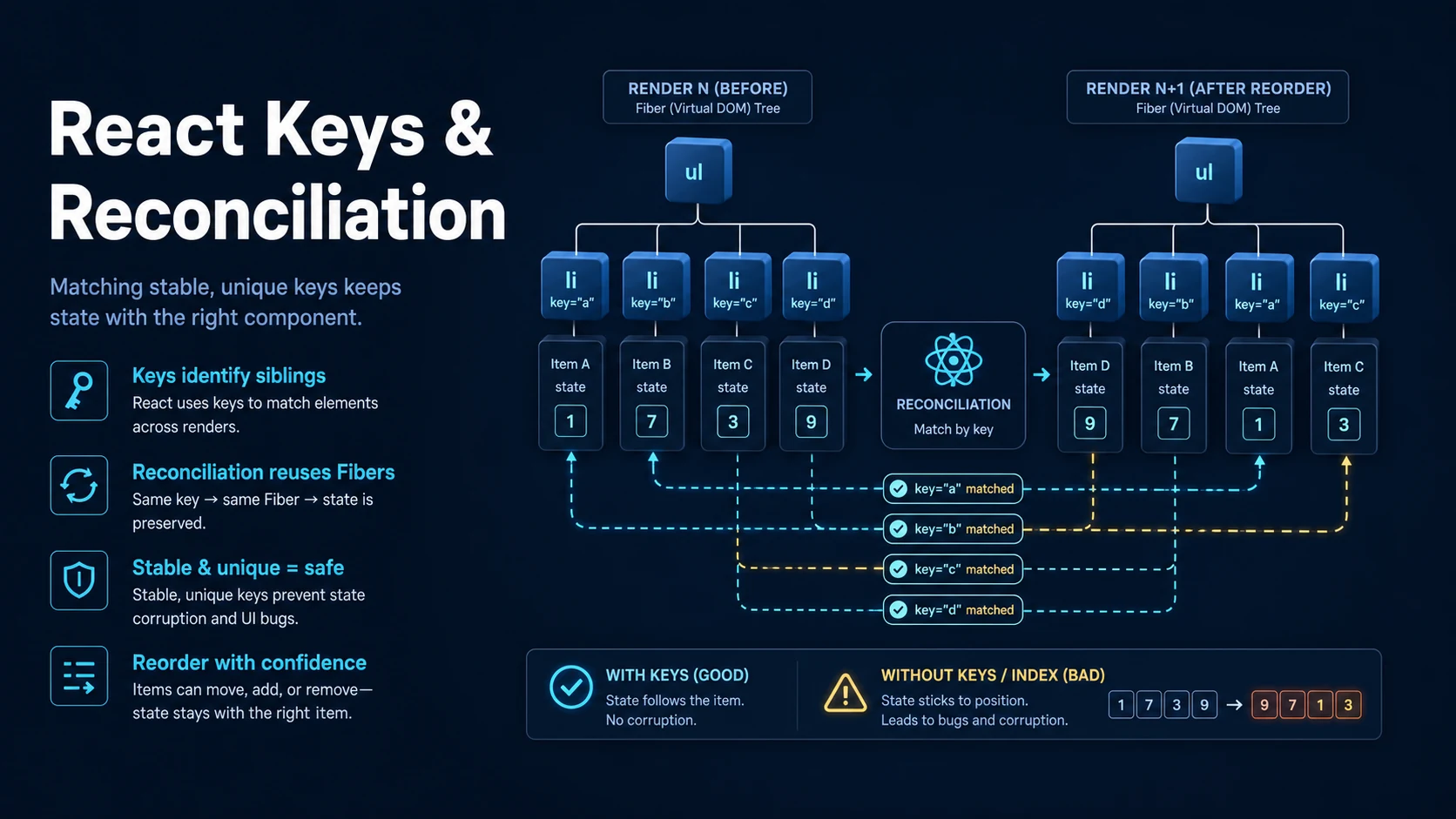
Quick Summary
React compares the previous element tree with the next one and applies the minimum set of DOM changes. The comparison is a heuristic, not a tree-diff algorithm: different element types mean "destroy and rebuild", the same type means "update props in place", and lists are matched by key — or by position when there is no key.
That last clause is the source of nearly every list bug. With index keys, React matches the first child to the first child no matter which item it represents, so inserting at the top shifts every state, every uncontrolled input value, and every focused DOM node by one row. With stable keys, React moves the existing elements and only mounts the new one.
A key does not enter the component as a prop. It is a hint for the reconciler, so props.key is undefined, and changing a key deliberately unmounts and remounts the element — which is why key is also the cleanest way to reset a component's state.
Basic Syntax & Signature
type Item = { id: string; label: string; done: boolean };

function TodoList({ items }: { items: Item[] }) {
  return (
    <ul>
      {items.map((item) => (
        // Stable identity: React tracks this row by item.id, not position.
        <TodoRow key={item.id} item={item} />
      ))}
    </ul>
  );
}

function TodoRow({ item }: { item: Item }) {
  // Not a prop: `item.key` would be undefined.
  // Uncontrolled input state is tied to the DOM node React reuses.
  return (
    <li>
      <input type="checkbox" defaultChecked={item.done} />
      {item.label}
    </li>
  );
}

// A key on a fragment groups siblings without a wrapper element.
function Pairs({ rows }: { rows: Array<{ id: string; a: string; b: string }> }) {
  return (
    <dl>
      {rows.map((row) => (
        <Fragment key={row.id}>
          <dt>{row.a}</dt>
          <dd>{row.b}</dd>
        </Fragment>
      ))}
    </dl>
  );
}

import { Fragment } from "react";
The reset pattern:
function Profile({ userId }: { userId: string }) {
  // Changing the key remounts Profile for a different user: all state resets,
  // effects re-run, refs are re-attached.
  return <ProfileEditor key={userId} userId={userId} />;
}

function ProfileEditor({ userId }: { userId: string }) {
  const [draft, setDraft] = useState("");
  return <input value={draft} onChange={(e) => setDraft(e.target.value)} aria-label={userId} />;
}
Key Comparison Table
| Situation | React does | Consequence |
|---|---|---|
| Different element type at the same position | Unmount old subtree, mount new | State and DOM nodes are recreated |
| Same type, different props | Update props in place | State is preserved |
| List with stable keys | Match by key, move existing nodes | State follows the item |
| List without keys | Match by index | State follows the position |
| Duplicate keys | Warns, then behaves unpredictably | Wrong rows reuse state |
| Key changes | Unmount and remount that element | Intentional state reset |
| Key on a component | Consumed by React | props.key is undefined |
key on a fragment | Groups multiple children | No extra DOM node |
| Key choice | Insert at top | Sort | Delete middle |
|---|---|---|---|
item.id | Correct | Correct | Correct |
index | State shifts by one | State scrambles | State shifts back |
crypto.randomUUID() | Remounts everything each render | Same | Same |
${id}-${version} | Remounts that item when version changes | Fine | Fine |
Practical Edge Cases & Deep Dives
1. Index keys corrupting state on insert
function IndexKeys({ rows }: { rows: string[] }) {
  return (
    <ul>
      {rows.map((row, index) => (
        // Broken: React reuses the node at position 0 for the new row.
        <li key={index}>
          <input defaultValue={row} />
        </li>
      ))}
    </ul>
  );
}

function IdKeys({ rows }: { rows: Array<{ id: string; text: string }> }) {
  return (
    <ul>
      {rows.map((row) => (
        <li key={row.id}>
          <input defaultValue={row.text} />
        </li>
      ))}
    </ul>
  );
}
Prepending a row to IndexKeys leaves the DOM input values attached to the old positions, so the first input now shows the second row's text. The DOM is not "wrong" from React's perspective — it correctly updated the props of the elements it kept. Only the identity was wrong, and identity is exactly what a key supplies.
2. Sorting a table with index keys
type Row = { id: string; name: string; score: number };

function Table({ rows }: { rows: Row[] }) {
  const [sortAsc, setSortAsc] = useState(true);
  const sorted = [...rows].sort((a, b) => (sortAsc ? a.score - b.score : b.score - a.score));

  return (
    <>
      <button onClick={() => setSortAsc((v) => !v)}>sort</button>
      <table>
        <tbody>
          {sorted.map((row) => (
            <tr key={row.id}>
              <td>{row.name}</td>
              <td>{row.score}</td>
              <td><RowActions row={row} /></td>
            </tr>
          ))}
        </tbody>
      </table>
    </>
  );
}

function RowActions({ row }: { row: Row }) {
  // Local state that must follow the row, not the position.
  const [open, setOpen] = useState(false);
  return <button onClick={() => setOpen((o) => !o)}>{open ? `editing ${row.name}` : "edit"}</button>;
}
With key={index}, reversing the sort order leaves each RowActions component attached to a row it no longer describes — the "editing" panel stays on row 1's position while the data under it changes. With key={row.id} the component moves with the row and the panel stays on the right record.
3. Keys and remounting for reset
function SearchPage({ query }: { query: string }) {
  return (
    <div>
      {/* A new query resets the whole results subtree: no stale page number,
          no leftover scroll position, no old draft in the filter box. */}
      <Results key={query} query={query} />
    </div>
  );
}

function Results({ query }: { query: string }) {
  const [page, setPage] = useState(1);
  const [filter, setFilter] = useState("");
  return (
    <div>
      <p>{query} page {page} filter {filter || "none"}</p>
      <button onClick={() => setPage((p) => p + 1)}>next</button>
      <input value={filter} onChange={(e) => setFilter(e.target.value)} />
    </div>
  );
}
This replaces a useEffect that watches query and resets state — one render instead of two, and no window in which the old page number is visible with the new query. The cost is a full remount of the subtree, which is exactly what "start over" means.
4. key is not a prop, and spreading breaks it
function Wrapper(props: { title: string; children?: React.ReactNode }) {
  // `props.key` is undefined: React removes it before rendering.
  return <section aria-label={props.title}>{props.children}</section>;
}

function App({ items }: { items: Array<{ id: string; title: string }> }) {
  return (
    <div>
      {items.map((item) => {
        const { id, ...rest } = item;
        // Wrong: the key is not inside `rest`, so React cannot see it.
        // <Wrapper key={id} {...rest} />

        // Right: pass key explicitly alongside the spread.
        return <Wrapper key={id} {...rest} />;
      })}
    </div>
  );
}
React 19 warns when a props object containing key is spread into JSX, because the reconciler may see both a spread key and an explicit key. The safe pattern is to destructure the identity out and pass key as a literal attribute, as above.
5. Duplicate keys and what they do
function Tags({ tags }: { tags: Array<{ label: string }> }) {
  return (
    <ul>
      {tags.map((tag) => (
        // If two tags share a label, React warns and reuses one of the nodes.
        <li key={tag.label}>{tag.label}</li>
      ))}
    </ul>
  );
}
Keys must be unique among siblings. Duplicates produce a console warning ("Encountered two children with the same key") and undefined behaviour in which one node is reused for two elements — most visible when the duplicated rows have local state or uncontrolled inputs. The fix is a stable unique id, not an index appended to the key: key={${tag.label}-${index}} hides the warning and keeps the position-dependence bug.
6. Reconciliation above and below the list
function Panel({ tab, items }: { tab: "a" | "b"; items: string[] }) {
  return (
    <div>
      {/* Different type on the same position: the whole subtree remounts. */}
      {tab === "a" ? <ListView items={items} /> : <GridView items={items} />}

      {/* Same type, different props: one instance updated. */}
      <Summary items={items} />

      {/* Same component, different key: remount on purpose. */}
      <Summary key={tab} items={items} />
    </div>
  );
}

function ListView({ items }: { items: string[] }) { return <ul>{items.map((i) => <li key={i}>{i}</li>)}</ul>; }
function GridView({ items }: { items: string[] }) { return <div>{items.map((i) => <span key={i}>{i}</span>)}</div>; }
function Summary({ items }: { items: string[] }) { return <p>{items.length} items</p>; }
Switching tab between ListView and GridView destroys one and creates the other — any state inside them is lost, even though both receive the same items. That is often desirable; when it is not, both branches should render the same component with a view prop so the instance survives.
Common Compilation/Runtime Mistakes
| Symptom | Cause | Fix |
|---|---|---|
| Input values shift after inserting a row | Index keys | Use a stable id |
| Rows show another row's expanded state | Index keys plus reordering | key={item.id} |
| Focus jumps to a different row | Node identity changed | Stable keys |
| "Encountered two children with the same key" | Duplicate key values | Unique id per item |
| Everything remounts every render | Random or freshly generated key | Derive keys from data |
props.key is undefined | Key is not a prop | Pass the id separately if needed |
| State persists after switching records | Same position, same key | Give the component a new key |
| Form does not reset on navigation | Component instance reused | key on the form or subtree |
| Animation restarts on every update | Element remounted | Stable key, stable type |
key on a fragment does nothing | Used <>...</> instead of <Fragment> | <Fragment key={...}> |
The rule that covers all of these: a key must be derived from the identity of the data, not from its position, its content, or a random value. When no unique id exists, generate one when the item is created — crypto.randomUUID() or a counter — and store it with the item. Position is a property of the view; identity is a property of the data, and React needs the second one.
Try matching browser tools
All toolsSmall utilities that fit React work — they run entirely in this browser tab, so nothing you paste leaves your device.
Related React guides
All React guidesReact Profiler API: Measuring Render Timings and Identifying Wasted Re-Renders
actualDuration versus baseDuration, phase names that tell you who triggered a commit, and how to ship the numbers without flooding a backend.
React with TypeScript: Generic Components, PropsWithChildren, and Event Types
Generic props that infer from data, PropsWithChildren instead of React.FC, and element-scoped event types that keep currentTarget typed.
React useTransition and useDeferredValue: Non-Blocking Concurrent UI Updates
Transitions let React throw away background work when typing arrives. Which hook defers what, and why a controlled input must never be transitioned.
React.lazy and Code Splitting: Route Chunks, Preloading, and Suspense
Where the split points belong, how to preload on intent, and how to recover when a stale chunk 404s after a deployment.
More in React
All React guidesThe guides filed next to this one in React, in library order.