React.lazy and Code Splitting: Route Chunks, Preloading, and Suspense
Where the split points belong, how to preload on intent, and how to recover when a stale chunk 404s after a deployment.
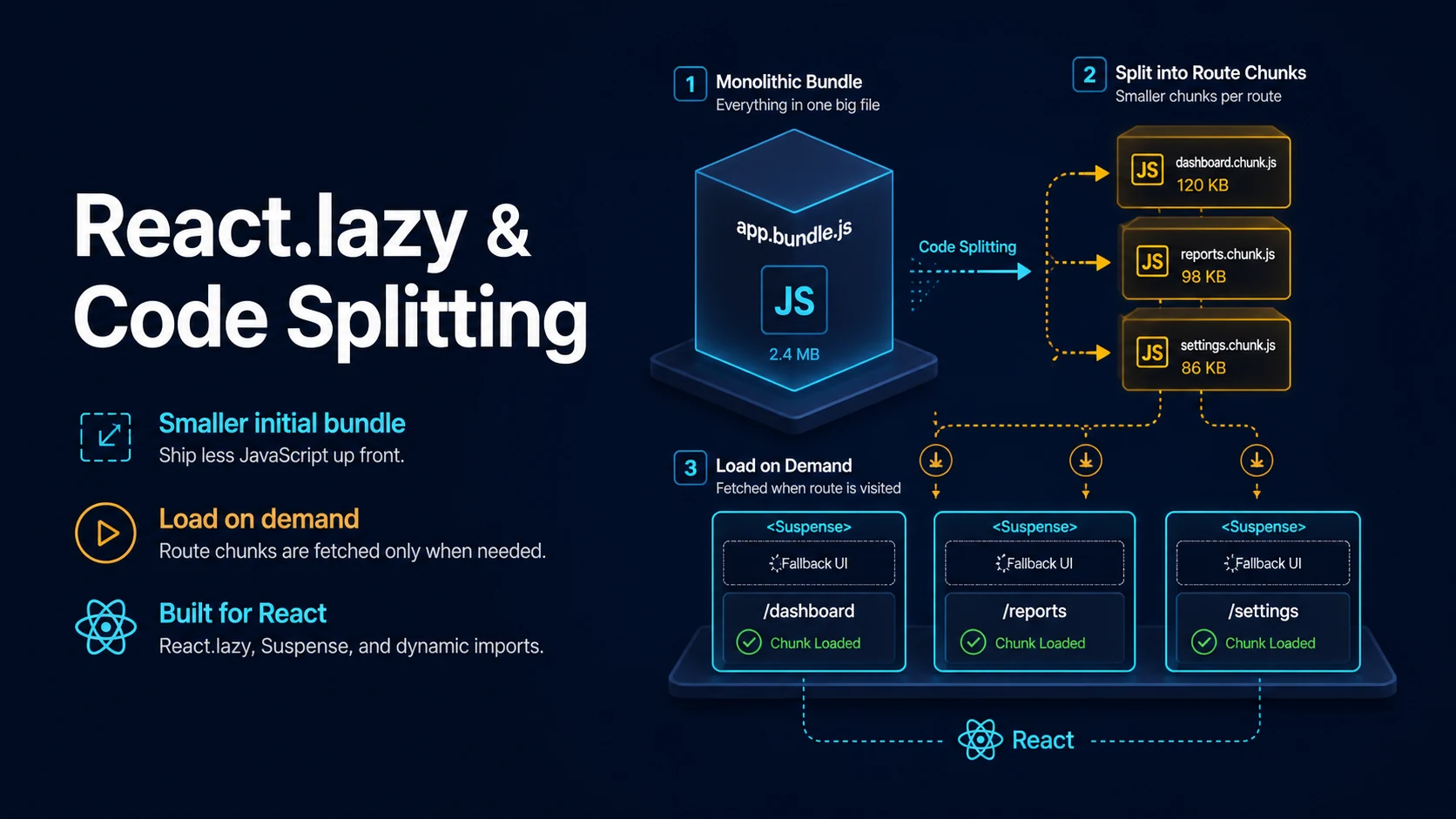
Quick Summary
React.lazy turns a dynamic import() into a component. The module is not fetched until React actually renders the element, at which point the returned promise suspends the nearest <Suspense> boundary until the chunk arrives. That is the whole mechanism: no router integration required, no build configuration beyond a bundler that understands import(), and no wrapper library.
What it does not do is decide where the split points belong. Splitting every component produces dozens of small requests and a waterfall; splitting nothing ships a single bundle that must be downloaded, parsed, and executed before the first pixel. The useful pattern is route-level chunks, plus a small number of genuinely heavy widgets — an editor, a chart library, a video player, a map — that most visitors never open.
The subtle failure is not the missing chunk, it is the stale one. A visitor with an old HTML document still open after a deployment asks for a hash-named chunk that no longer exists, gets a 404, and sees a blank screen unless an error boundary catches the failure and reloads.
Basic Syntax & Signature
import { lazy, Suspense } from "react";

// load must return a promise resolving to a module with a default export.
const HeavyChart = lazy(() => import("./HeavyChart"));

export function Dashboard() {
  return (
    <Suspense fallback={<p>Loading chart…</p>}>
      <HeavyChart data={data} />
    </Suspense>
  );
}
The dynamic import is a function, not a value, so it is called when React first renders the lazy element and the promise is cached by React after it resolves. A named export needs a mapping layer:
const Editor = lazy(() =>
  import("./Editor").then((mod) => ({ default: mod.NamedEditor }))
);
Where you place the boundary determines what the user sees while the chunk loads. One boundary high in the tree shows a whole-page fallback; several boundaries show partial UI:
function Page() {
  return (
    <main>
      <Header />
      <Suspense fallback={<Skeleton rows={3} />}>
        <Feed />
      </Suspense>
      <Suspense fallback={<Skeleton rows={1} />}>
        <Recommendations />
      </Suspense>
    </main>
  );
}
React 19 adds resource hints to react-dom for the network side of the same problem: preload, preinit, prefetchDNS, and preconnect let a component declare what it will need before it renders.
Key Comparison Table
| Approach | When the code loads | Granularity | Cost |
|---|---|---|---|
| Static import | With the parent bundle | None | Largest initial bundle |
React.lazy per route | On first navigation to the route | Route | One chunk per route |
React.lazy per widget | On first render of the widget | Component | One chunk per widget |
Conditional import() in a handler | On the user action | Action | Extra latency on click |
| Prefetch on hover | Before the click | Intent | Wasted bytes if unused |
next/dynamic with ssr: false | Client only, after hydration | Component | No server HTML for the widget |
| Bundle-level split (vendor chunk) | With the parent, cached separately | Infrastructure | Not a substitute for route splits |
Practical Edge Cases & Deep Dives
1. Route-level splitting with a router
import { lazy, Suspense } from "react";
import { Routes, Route } from "react-router-dom";

const Home = lazy(() => import("./routes/Home"));
const Settings = lazy(() => import("./routes/Settings"));
const Reports = lazy(() => import("./routes/Reports"));

export function App() {
  return (
    <Suspense fallback={<TopBarLoading />}>
      <Routes>
        <Route path="/" element={<Home />} />
        <Route path="/settings" element={<Settings />} />
        <Route path="/reports" element={<Reports />} />
      </Routes>
    </Suspense>
  );
}
The fallback sits outside the routed subtree so navigation does not unmount the shell. Placing <Suspense> inside each route gives a more local spinner but remounts the layout on every transition, which loses scroll position and focus.
2. Preloading on intent instead of on render
const loadEditor = () => import("./Editor");
const Editor = lazy(loadEditor);

function EditButton({ onClick }: { onClick: () => void }) {
  return (
    <button
      onClick={onClick}
      onMouseEnter={() => { void loadEditor(); }}
      onFocus={() => { void loadEditor(); }}
    >
      Edit
    </button>
  );
}
The browser caches the module, so the import() fired on hover makes the subsequent lazy render resolve from cache and skip the fallback entirely. Calling the loader unconditionally at module scope would defeat the split; calling it on intent costs one request for users who actually intend to use the feature.
3. Recovering from a stale chunk after deployment
class ChunkBoundary extends React.Component<
  { children: React.ReactNode },
  { failed: boolean }
> {
  state = { failed: false };

  static getDerivedStateFromError(error: unknown) {
    const message = error instanceof Error ? error.message : String(error);
    const isChunkError =
      /Loading chunk [\d]+ failed|Failed to fetch dynamically imported module/.test(message);
    return isChunkError ? { failed: true } : { failed: false };
  }

  componentDidCatch(error: unknown) {
    console.error("chunk load failed", error);
  }

  render() {
    if (this.state.failed) {
      return (
        <div role="alert">
          A new version is available.
          <button onClick={() => window.location.reload()}>Reload</button>
        </div>
      );
    }
    return this.props.children;
  }
}
The hash in a chunk filename changes on every build, and a browser tab opened before the deploy keeps referencing the old one. One automatic reload after a chunk error is enough for most apps; a loop guard in sessionStorage prevents a reload storm when the CDN itself is the problem.
4. Lazy components inside a transition
function Tabs() {
  const [tab, setTab] = useState<"a" | "b">("a");
  const [isPending, startTransition] = useTransition();

  function selectTab(name: "a" | "b") {
    // Inside a transition the old tab stays on screen while the new chunk loads.
    startTransition(() => setTab(name));
  }

  return (
    <div>
      <button onClick={() => selectTab("a")}>A</button>
      <button onClick={() => selectTab("b")}>B</button>
      <div style={{ opacity: isPending ? 0.7 : 1 }}>
        {tab === "a" ? <TabA /> : <TabB />}
      </div>
    </div>
  );
}
Transitioning the tab state means Suspense does not show its fallback; React keeps the previous tab visible until the chunk resolves. This is the difference between a tab that flashes a skeleton and one that feels instant, and it costs a single startTransition.
5. Splitting a heavy library out of the main bundle
const MarkdownEditor = lazy(() =>
  Promise.all([
    import("@uiw/react-md-editor"),
    import("remark-gfm"),
  ]).then(([editor, gfm]) => ({
    default: () => <editor.default remarkPlugins={[gfm.default]} />,
  }))
);
Two import() calls resolved together keep the editor and its plugins in the same request batch, so the user does not see a second spinner for the plugin. The library itself is what makes this worth doing: a markdown editor with a syntax highlighter and a plugin chain routinely accounts for more bytes than the rest of the application.
6. When the lazy component never resolves
function SafeLazy<T extends React.ComponentType<any>>(load: () => Promise<{ default: T }>) {
  const Component = lazy(() =>
    load().catch((error) => {
      // Surface a retry-able failure rather than an indefinite Suspense fallback.
      console.error("lazy load failed", error);
      throw error;
    })
  );

  return function Wrapped(props: React.ComponentProps<T>) {
    return (
      <Suspense fallback={<p>Loading…</p>}>
        <Component {...props} />
      </Suspense>
    );
  };
}
A rejected lazy promise propagates to the nearest error boundary and, without one, unmounts the whole tree. The wrapper makes the failure visible and recoverable instead of leaving the user on a permanent skeleton.
Common Compilation/Runtime Mistakes
| Symptom | Cause | Fix |
|---|---|---|
| "A component suspended while responding to synchronous input" | Suspense boundary below the mounted root | Add a boundary or wrap the update in a transition |
| Blank screen after deploy | Stale chunk 404 | Error boundary with reload |
lazy renders undefined | Module has no default export | Map the named export |
| Fallback flashes on every navigation | Lazy component rendered for a fraction of a second | Prefetch or transition |
| Network waterfall of 20 chunks | Splitting every component | Split at routes and heavy widgets |
Cannot find module in a test | Dynamic import not mocked | Mock the loader or use a stub |
| Element type is invalid | Lazy used without Suspense in React 17 or older | Wrap it |
Hydration mismatch with ssr: false | Server rendered the component | Guard with a mounted check |
| Chunk served with the wrong MIME type | Base path misconfigured | Set the asset prefix in the bundler |
| Duplicate downloads of the same module | Different import specifiers | Import from one path |
Code splitting is a trade between bytes upfront and latency later, and the trade only works when the split points match the user's path through the app. React.lazy gives the mechanism; the boundary placement, the prefetch on intent, and the error boundary for stale chunks are what make it feel like nothing was deferred at all.
Try matching browser tools
All toolsSmall utilities that fit React work — they run entirely in this browser tab, so nothing you paste leaves your device.
Related React guides
All React guidesReact Profiler API: Measuring Render Timings and Identifying Wasted Re-Renders
actualDuration versus baseDuration, phase names that tell you who triggered a commit, and how to ship the numbers without flooding a backend.
React with TypeScript: Generic Components, PropsWithChildren, and Event Types
Generic props that infer from data, PropsWithChildren instead of React.FC, and element-scoped event types that keep currentTarget typed.
React useTransition and useDeferredValue: Non-Blocking Concurrent UI Updates
Transitions let React throw away background work when typing arrives. Which hook defers what, and why a controlled input must never be transitioned.
React useLayoutEffect vs useEffect: Synchronous DOM Measurements and Flicker Fixes
One hook runs before the browser paints and one after. Measuring layout in the wrong one costs a visible frame of flicker on every mount.
More in React
All React guidesThe guides filed next to this one in React, in library order.