React Error Boundaries and Suspense: Fallback UI and Async Recovery
Boundaries catch render errors, Suspense shows pending UI, and neither catches the other's case. How to compose them so a failed widget does not blank the page.
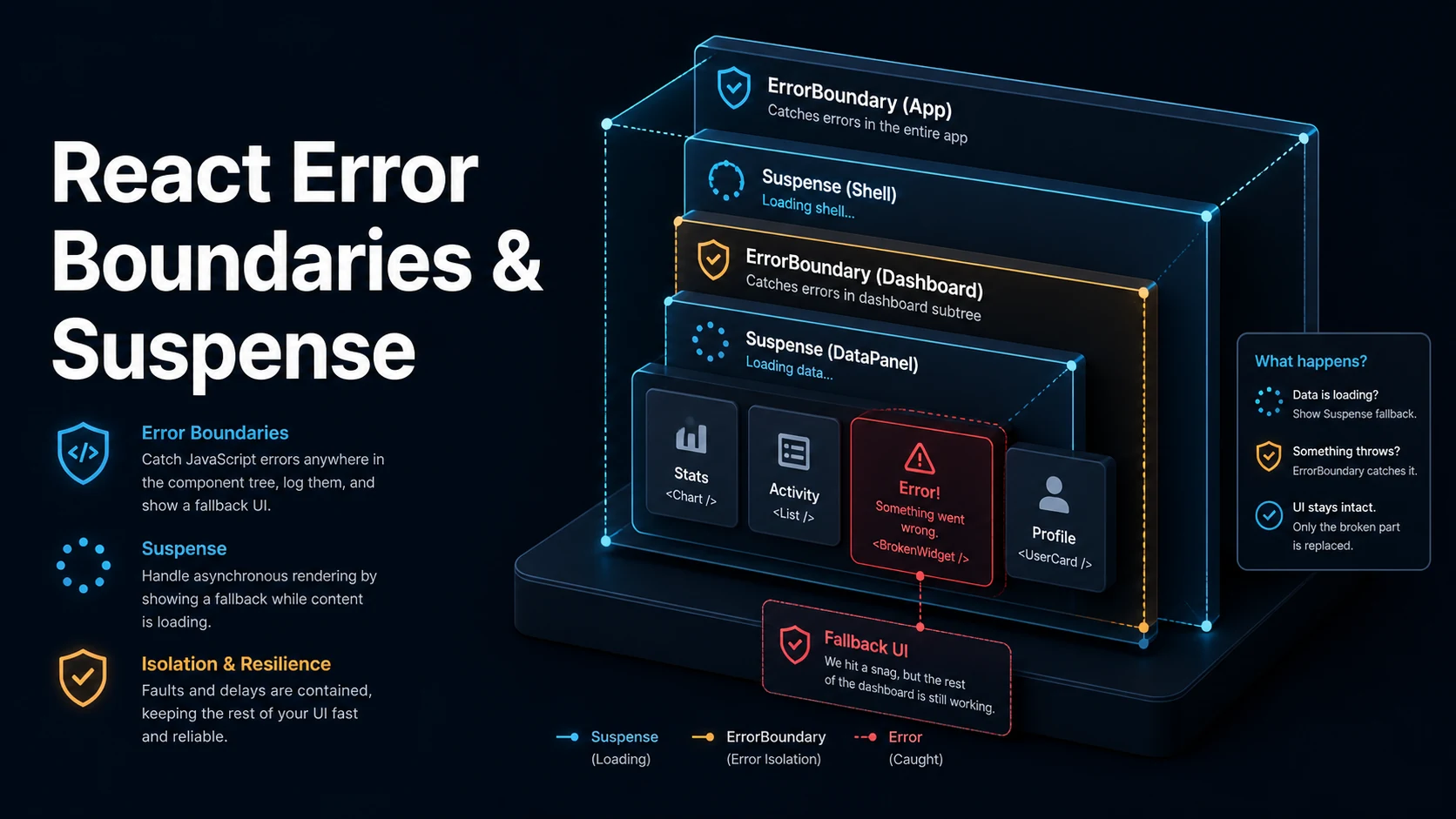
Quick Summary
An error boundary is a component that catches render-phase errors in its subtree and shows fallback UI instead of unmounting the whole app. It must be a class, because the API is static getDerivedStateFromError plus componentDidCatch — there is no hook equivalent. Anything below it that throws during rendering, in a lifecycle method, or in a constructor is caught; errors in event handlers, async callbacks, timers, and the boundary's own render are not.
Suspense is the loading counterpart. When a child suspends — a lazy-loaded component, or in React 19 a component that reads a promise with use — the nearest boundary above it renders its fallback while the rest of the tree stays interactive. Two boundaries, two jobs: errors go up to an error boundary, pending work renders a fallback.
The combination that matters in practice is a boundary outside a Suspense boundary. If the lazy component fails to load, the error must escape the fallback and reach something that can render a retry button. And when navigation changes data, wrapping the state update in startTransition keeps the old content on screen instead of flashing the fallback.
Basic Syntax & Signature
import { Component, Suspense, lazy, useState, useTransition, type ErrorInfo, type ReactNode } from "react";

type BoundaryProps = { fallback: ReactNode; children: ReactNode };
type BoundaryState = { error: Error | null };

class ErrorBoundary extends Component<BoundaryProps, BoundaryState> {
  state: BoundaryState = { error: null };

  // Called during render, must be pure: return the state to render.
  static getDerivedStateFromError(error: Error): BoundaryState {
    return { error };
  }

  // Called after the error is committed: logging belongs here.
  componentDidCatch(error: Error, info: ErrorInfo) {
    console.error("boundary caught", error, info.componentStack);
  }

  render() {
    if (this.state.error) {
      return (
        <div role="alert">
          <p>{this.props.fallback}</p>
          <button onClick={() => this.setState({ error: null })}>retry</button>
        </div>
      );
    }
    return this.props.children;
  }
}

// Code splitting.
const SettingsPanel = lazy(() => import("./SettingsPanel"));

export function App() {
  const [show, setShow] = useState(false);
  const [isPending, startTransition] = useTransition();

  function open() {
    // A transition keeps the current UI visible while the chunk loads,
    // instead of showing the Suspense fallback immediately.
    startTransition(() => setShow(true));
  }

  return (
    <ErrorBoundary fallback="Settings failed to load.">
      <button onClick={open} disabled={isPending}>open settings</button>
      <Suspense fallback={<p>loading…</p>}>{show && <SettingsPanel />}</Suspense>
    </ErrorBoundary>
  );
}
React 19 adds root-level error hooks for errors no boundary caught:
import { createRoot } from "react-dom/client";

createRoot(document.getElementById("root")!, {
  onUncaughtError: (error, errorInfo) => {
    reportToServer(error, errorInfo.componentStack);
  },
  onCaughtError: (error, errorInfo) => {
    console.warn("caught by a boundary", error, errorInfo.componentStack);
  },
  onRecoverableError: (error) => {
    console.warn("recoverable hydration error", error);
  },
}).render(<App />);
Key Comparison Table
| Error boundary | Suspense | useTransition | |
|---|---|---|---|
| Catches | Render/lifecycle errors | Nothing | Nothing |
| Handles | Failure UI | Pending UI | Keeping old UI during a pending update |
| API | Class component | <Suspense fallback> | [isPending, startTransition] |
| Replacing it with a hook | Not possible | Not needed | useDeferredValue for values |
| Triggers | A thrown error below | A thrown promise, or lazy | A state update inside the callback |
| Error source | Caught by boundary | Alternative |
|---|---|---|
| Render of a child | Yes | — |
| Lifecycle method | Yes | — |
| Event handler | No | try/catch in the handler |
setTimeout / promise | No | Local error state |
| Server-side rendering | No | Server framework error page |
| The boundary itself | No | A boundary above it |
| Hydration mismatch | Not as an error | onRecoverableError |
Practical Edge Cases & Deep Dives
1. The event handler gap
function SaveButton() {
  const [error, setError] = useState<string | null>(null);

  async function onClick() {
    // A boundary above this component will NOT catch this.
    try {
      const res = await fetch("/api/save", { method: "POST" });
      if (!res.ok) throw new Error(`HTTP ${res.status}`);
    } catch (err) {
      setError(err instanceof Error ? err.message : "save failed");
    }
  }

  return (
    <div>
      <button onClick={onClick}>save</button>
      {error && <p role="alert">{error}</p>}
    </div>
  );
}
Error boundaries participate in the render tree, and event handlers run outside it. The two options are local error state (as above) or re-throwing inside a render by storing the error in state and throwing during render — a pattern that lets a boundary handle it but costs an extra render and is rarely worth it outside form submission flows.
2. Retrying by resetting the boundary
function Panel({ id }: { id: string }) {
  return (
    <ErrorBoundary key={id} fallback={`Panel ${id} failed.`}>
      <Suspense fallback={<p>loading panel…</p>}>
        <PanelContent id={id} />
      </Suspense>
    </ErrorBoundary>
  );
}
A key on the boundary is the simplest reset: when id changes, React unmounts the failed boundary and mounts a fresh one with error: null. Without it, the boundary keeps its error state and shows the fallback for the new, perfectly valid id. react-error-boundary exposes the same idea declaratively with resetKeys={[id]}.
3. lazy needs a default export or a mapping
// Works when the module has `export default`.
const A = lazy(() => import("./A"));

// Named exports need an explicit mapping.
const B = lazy(() => import("./B").then((mod) => ({ default: mod.B })));

// A retry wrapper for flaky chunk loads after a deploy.
const C = lazy(() =>
  import("./C").catch(() => import("./C")),
);
After a deployment, an open tab may request a chunk hash that no longer exists, and the import rejects. Without a boundary the whole app unmounts; with one, the user sees a retry. The catch retry above works only when the failure is transient; a hard failure still needs the boundary.
4. Nested boundaries isolate failure
function Dashboard() {
  return (
    <>
      <ErrorBoundary fallback="Revenue widget failed.">
        <RevenueWidget />
      </ErrorBoundary>
      <ErrorBoundary fallback="Activity feed failed.">
        <ActivityFeed />
      </ErrorBoundary>
      <ErrorBoundary fallback="Recommendations failed.">
        <Recommendations />
      </ErrorBoundary>
    </>
  );
}
One boundary at the top of the app means any widget failure blanks the page. Per-widget boundaries keep the rest usable, and the granularity is a product decision: put a boundary around each independently meaningful region, not around every component.
5. Suspense without a transition flashes the fallback
function Tabs() {
  const [tab, setTab] = useState<"a" | "b">("a");
  const [isPending, startTransition] = useTransition();

  return (
    <div>
      <button
        onClick={() => startTransition(() => setTab("b"))}
        disabled={isPending}
      >
        tab b
      </button>
      <Suspense fallback={<p>loading…</p>}>
        {tab === "a" ? <TabA /> : <TabB />}
      </Suspense>
    </div>
  );
}

function TabA() { return <p>A</p>; }
function TabB() { return <p>B</p>; }
Without the transition, setTab("b") commits immediately, TabB suspends, and the fallback replaces the whole tab area — a visible flash for content that loads in 100 ms. Inside a transition React keeps rendering the old tab until the new one is ready, which is why isPending exists as the "something is loading but I am still showing usable content" signal.
6. Suspense with a promise in React 19
import { Suspense, use } from "react";

type Post = { id: number; title: string };

function PostBody({ postPromise }: { postPromise: Promise<Post> }) {
  const post = use(postPromise);   // suspends until resolved
  return <article>{post.title}</article>;
}

function PostPage({ id }: { id: number }) {
  const promise = getPost(id);     // see the warning below
  return (
    <Suspense fallback={<p>loading post…</p>}>
      <PostBody postPromise={promise} />
    </Suspense>
  );
}

const cache = new Map<string, Promise<Post>>();

function getPost(id: number): Promise<Post> {
  const key = String(id);
  const cached = cache.get(key);
  if (cached) return cached;
  const p = fetch(`/api/posts/${id}`).then((r) => r.json() as Promise<Post>);
  cache.set(key, p);
  return p;
}
Calling fetch directly in PostPage creates a new promise on every render, so the component suspends forever and the network is hit repeatedly. The promise must be created once — memoized, hoisted into a cache, or created by the server. This is the single most common way a use-based Suspense implementation breaks.
Common Compilation/Runtime Mistakes
| Symptom | Cause | Fix |
|---|---|---|
| Whole app goes blank on one error | No boundary, or one only at the root | Add boundaries per region |
| Event handler error still crashes | Boundaries do not catch handlers | try/catch and local error state |
| Boundary does not reset on navigation | Error state persists | key on the boundary, or resetKeys |
lazy component never loads | Missing default export | .then(m => ({ default: m.X })) |
| Fallback flashes on every navigation | Update not in a transition | startTransition, useDeferredValue |
| Fallback shows forever | Promise recreated each render | Cache or memoize the promise |
| Error boundary catches its own fallback error | Fallback throws | Move the fallback rendering up a level |
| Server render error not caught | Boundaries are client-side | Framework error page, server logging |
getDerivedStateFromError missing | Only componentDidCatch implemented | Add both: one returns state, one logs |
| "A component suspended while responding to synchronous input" | Suspending outside a transition | Wrap the update in startTransition |
The architecture that avoids most of these: one top-level boundary that renders a full-page error, one boundary per independently useful region, and a Suspense inside each boundary so the failure UI and the loading UI never fight over the same subtree.
Try matching browser tools
All toolsSmall utilities that fit React work — they run entirely in this browser tab, so nothing you paste leaves your device.
Related React guides
All React guidesReact Profiler API: Measuring Render Timings and Identifying Wasted Re-Renders
actualDuration versus baseDuration, phase names that tell you who triggered a commit, and how to ship the numbers without flooding a backend.
React with TypeScript: Generic Components, PropsWithChildren, and Event Types
Generic props that infer from data, PropsWithChildren instead of React.FC, and element-scoped event types that keep currentTarget typed.
React useTransition and useDeferredValue: Non-Blocking Concurrent UI Updates
Transitions let React throw away background work when typing arrives. Which hook defers what, and why a controlled input must never be transitioned.
React.lazy and Code Splitting: Route Chunks, Preloading, and Suspense
Where the split points belong, how to preload on intent, and how to recover when a stale chunk 404s after a deployment.
More in React
All React guidesThe guides filed next to this one in React, in library order.