React Forms: Controlled vs Uncontrolled Inputs, useActionState, and Validation
State-driven inputs versus FormData, and the React 19 action APIs that make server validation round-trip without losing the user's input.
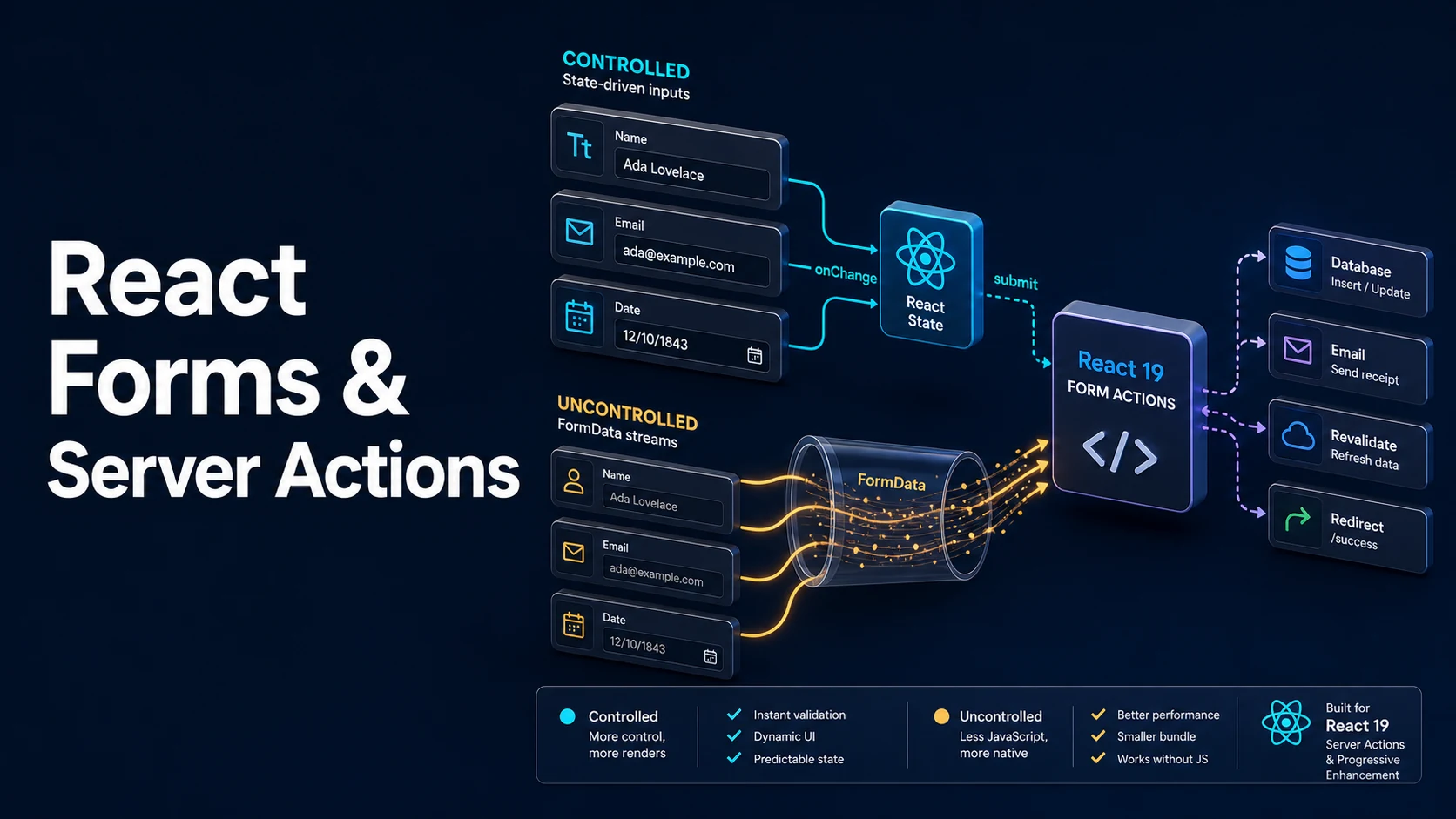
Quick Summary
A controlled input takes its value from React state: value={name} plus onChange={e => setName(e.target.value)}. React is the source of truth, so validation, formatting, and conditional UI can read the value during render. The cost is a re-render per keystroke and the requirement that every change goes through the setter — a readOnly warning appears the moment a value prop is supplied without an onChange.
An uncontrolled input keeps its value in the DOM. defaultValue sets the initial value, ref reads it, and a form submission collects everything with a name attribute into a FormData. That is less code and less rendering, which is why React 19's form features build on it: <form action={fn}> posts FormData to a server action, and useActionState gives the action's result back to the component.
The React 19 additions are small but change the shape of form code: useActionState returns [state, formAction, isPending], useFormStatus reads the pending state of the enclosing form from a child component, and a successful action submission automatically resets uncontrolled fields.
Basic Syntax & Signature
import { useActionState } from "react";
import { useFormStatus } from "react-dom";

type FormState = { ok: boolean; errors: Record<string, string> };

async function subscribe(_prev: FormState, formData: FormData): Promise<FormState> {
  const email = String(formData.get("email") ?? "");
  const errors: Record<string, string> = {};
  if (!email.includes("@")) errors.email = "Enter a valid email.";
  if (Object.keys(errors).length > 0) return { ok: false, errors };

  await new Promise((r) => setTimeout(r, 300));   // replace with a real call
  return { ok: true, errors: {} };
}

function SubmitButton() {
  // Must be rendered inside the <form> to see its status.
  const { pending, data } = useFormStatus();
  return (
    <button type="submit" disabled={pending}>
      {pending ? `sending ${String(data?.get("email") ?? "")}…` : "subscribe"}
    </button>
  );
}

export function NewsletterForm() {
  const [state, formAction, isPending] = useActionState(subscribe, { ok: false, errors: {} });

  return (
    <form action={formAction}>
      <label htmlFor="email">Email</label>
      <input
        id="email"
        name="email"
        type="email"
        defaultValue=""
        aria-invalid={state.errors.email ? true : undefined}
        aria-describedby={state.errors.email ? "email-error" : undefined}
      />
      {state.errors.email && <p id="email-error" role="alert">{state.errors.email}</p>}

      <SubmitButton />
      {state.ok && <p>Subscribed.</p>}
      {isPending && <p>working…</p>}
    </form>
  );
}
A controlled equivalent, with the same validation done locally:
import { useState } from "react";

export function ControlledForm() {
  const [email, setEmail] = useState("");
  const [error, setError] = useState<string | null>(null);

  function onSubmit(e: React.FormEvent<HTMLFormElement>) {
    e.preventDefault();
    if (!email.includes("@")) {
      setError("Enter a valid email.");
      return;
    }
    setError(null);
  }

  return (
    <form onSubmit={onSubmit} noValidate>
      <input
        name="email"
        value={email}
        onChange={(e) => setEmail(e.target.value)}
        aria-invalid={error ? true : undefined}
      />
      {error && <p role="alert">{error}</p>}
      <button type="submit">subscribe</button>
    </form>
  );
}
Signatures:
function useActionState<State>(
  action: (prevState: State, formData: FormData) => State | Promise<State>,
  initialState: State,
  permalink?: string,
): [state: State, formAction: (formData: FormData) => void, isPending: boolean];

function useFormStatus(): {
  pending: boolean;
  data: FormData | null;
  method: string | null;
  action: string | ((formData: FormData) => void) | null;
};
Key Comparison Table
| Controlled | Uncontrolled | |
|---|---|---|
| Source of truth | React state | The DOM |
| Initial value | value | defaultValue / defaultChecked |
| Read current value | From state | ref.current.value or FormData |
| Re-render per keystroke | Yes | No |
| Instant validation of typing | Yes | Needs a handler anyway |
Works with useActionState | Yes, but state must be synced | Yes, natively |
| Progressive enhancement | No (needs JS) | Yes with a server action |
| Dynamic fields | Easy to add | Easy to add |
| React 19 API | Import from | Purpose |
|---|---|---|
useActionState | react | Form action state plus pending flag |
useFormStatus | react-dom | Pending state of the enclosing form |
useOptimistic | react | Optimistic UI during an action |
requestFormReset | react-dom | Reset a form after a successful action |
useFormState (React 18) | react-dom | Predecessor of useActionState |
Practical Edge Cases & Deep Dives
1. The controlled-input readOnly trap and the value lag
function Bad() {
  // React warns: "You provided a `value` prop to a form field without an
  // `onChange` handler. This will render a read-only field."
  return <input value="fixed" />;
}

function Delayed() {
  const [text, setText] = useState("");
  return (
    <input
      value={text}
      onChange={(e) => {
        // Transforming the value here is fine, but the displayed value lags
        // the keystroke by design: the DOM shows what state says.
        setText(e.target.value.toUpperCase());
      }}
    />
  );
}
A value prop without onChange is a read-only field, which is intended for readOnly inputs and a bug everywhere else. And a controlled input that transforms input shows the transformed value only after the state update commits, so a slow onChange makes typing feel laggy — one reason large forms move to uncontrolled fields.
2. Uncontrolled fields with FormData
function ProfileForm() {
  function onSubmit(e: React.FormEvent<HTMLFormElement>) {
    e.preventDefault();
    const data = new FormData(e.currentTarget);
    const profile = {
      name: String(data.get("name") ?? ""),
      bio: String(data.get("bio") ?? ""),
      newsletter: data.get("newsletter") === "on",
      tags: data.getAll("tags").map(String),
    };
    console.log(profile);
  }

  return (
    <form onSubmit={onSubmit}>
      <input name="name" defaultValue="Ada" />
      <textarea name="bio" defaultValue="Engineer" />
      <input type="checkbox" name="newsletter" defaultChecked />
      <select name="tags" multiple defaultValue={["ts", "react"]}>
        <option value="ts">TypeScript</option>
        <option value="react">React</option>
        <option value="rust">Rust</option>
      </select>
      <button type="submit">save</button>
    </form>
  );
}
FormData only includes controls that have a name. A checkbox contributes "on" when checked and nothing when unchecked, which is why data.get("newsletter") === "on" is the check rather than a boolean cast. getAll is required for multiple selects and checkbox groups; get returns only the first value.
3. useFormStatus must be a child of the form
function SaveButton() {
  const { pending } = useFormStatus();
  // Silently returns pending: false if this component is not inside the form.
  return <button disabled={pending}>{pending ? "saving…" : "save"}</button>;
}

function BrokenForm() {
  return (
    <form action={action}>
      <SaveButton />
      {/* ... */}
    </form>
  );
}

// Wrong placement: the component calling useFormStatus is the form's parent,
// so it always sees pending === false.
function WrongForm() {
  const { pending } = useFormStatus();
  return <form action={action}><button disabled={pending}>save</button></form>;
}
useFormStatus reads the nearest form context, so the hook must run in a descendant of the <form>. The "always false" symptom has no error attached, which makes it one of the more costly mistakes in the new form APIs.
4. Optimistic UI with useOptimistic
import { useOptimistic } from "react";

type Message = { id: string; text: string; sending?: boolean };

function Thread({ messages, send }: { messages: Message[]; send: (text: string) => Promise<void> }) {
  const [optimistic, addOptimistic] = useOptimistic(
    messages,
    (current, text: string) => [...current, { id: `tmp-${text}`, text, sending: true }],
  );

  async function onSubmit(formData: FormData) {
    const text = String(formData.get("text") ?? "");
    addOptimistic(text);          // appears immediately
    await send(text);             // server confirms; `messages` updates
  }

  return (
    <div>
      <ul>
        {optimistic.map((m) => (
          <li key={m.id} style={{ opacity: m.sending ? 0.6 : 1 }}>{m.text}</li>
        ))}
      </ul>
      <form action={onSubmit}>
        <input name="text" />
        <button type="submit">send</button>
      </form>
    </div>
  );
}
The optimistic value is temporary: it renders while the action is pending and is replaced by the real state when the action completes. It must be updated inside an action or transition, and it must never be treated as confirmed data — a failed action rolls it back automatically.
5. Resetting a form, by key or by action
function ResetByKey() {
  const [version, setVersion] = useState(0);
  return (
    <form key={version}>
      <input name="title" defaultValue="" />
      <button type="button" onClick={() => setVersion((v) => v + 1)}>clear</button>
    </form>
  );
}

function ResetAfterAction() {
  async function action(formData: FormData) {
    "use server";
    await save(formData);
    // In React 19, a successful action submission resets uncontrolled fields
    // automatically; requestFormReset can force it explicitly on the client.
  }

  return (
    <form action={action}>
      <input name="title" />
      <button type="submit">save</button>
    </form>
  );
}

async function save(_data: FormData) {}
Changing key unmounts the form and mounts a fresh one, which resets every uncontrolled field and any internal state at once. That is the cheapest reliable reset, and it works for controlled forms too.
6. Validation that survives the round trip
type State = { values: Record<string, string>; errors: Record<string, string> };

async function action(prev: State, formData: FormData): Promise<State> {
  "use server";
  const email = String(formData.get("email") ?? "");
  const errors: Record<string, string> = {};

  if (!/^[^@\s]+@[^@\s]+$/.test(email)) errors.email = "Enter a valid email.";
  if (email.length > 254) errors.email = "That email is too long.";

  if (Object.keys(errors).length) {
    // Returning the submitted values keeps the user's input after the POST.
    return { values: { email }, errors };
  }
  await persist(email);
  return { values: { email }, errors: {} };
}

async function persist(_email: string) {}
A server action runs in a fresh request, so the form's DOM state is gone unless the action returns the submitted values. Echoing values back and using defaultValue={state.values.email} is what keeps the form usable after a validation error, and it is the reason the action's state type usually holds both values and errors.
Common Compilation/Runtime Mistakes
| Symptom | Cause | Fix |
|---|---|---|
| Field is read-only and does not type | value without onChange | Add onChange, or use defaultValue |
FormData.get returns null | Input has no name | Add name |
| Checkbox always false | Comparing to true | Compare to "on", or use data.has |
useFormStatus pending never true | Hook called outside the <form> | Move the button into a child component |
| Form clears after every action | React 19 auto-reset | Use controlled fields, or echo values back |
| Validation error loses input | Action did not return values | defaultValue from action state |
| Select multiple returns one value | get instead of getAll | data.getAll("tags") |
useActionState is not exported | React 18 installed | Use useFormState from react-dom |
action prop does nothing without JS | Client function as action | Use a server action for progressive enhancement |
| Input cursor jumps to the end | Controlled value transformed per keystroke | Keep the raw value in state, transform on submit |
The choice between the two models is usually about where the truth lives: use uncontrolled fields plus FormData when the server owns the data and the form is a submit-and-validate flow; use controlled fields when the UI must react to every keystroke, such as live search, character counts, or dependent dropdowns. Mixing them in one form is legal and common — a single controlled field for the search box beside uncontrolled fields for the rest.
Try matching browser tools
All toolsSmall utilities that fit React work — they run entirely in this browser tab, so nothing you paste leaves your device.
Related React guides
All React guidesReact Profiler API: Measuring Render Timings and Identifying Wasted Re-Renders
actualDuration versus baseDuration, phase names that tell you who triggered a commit, and how to ship the numbers without flooding a backend.
React with TypeScript: Generic Components, PropsWithChildren, and Event Types
Generic props that infer from data, PropsWithChildren instead of React.FC, and element-scoped event types that keep currentTarget typed.
React useTransition and useDeferredValue: Non-Blocking Concurrent UI Updates
Transitions let React throw away background work when typing arrives. Which hook defers what, and why a controlled input must never be transitioned.
React.lazy and Code Splitting: Route Chunks, Preloading, and Suspense
Where the split points belong, how to preload on intent, and how to recover when a stale chunk 404s after a deployment.
More in React
All React guidesThe guides filed next to this one in React, in library order.