React useLayoutEffect vs useEffect: Synchronous DOM Measurements and Flicker Fixes
One hook runs before the browser paints and one after. Measuring layout in the wrong one costs a visible frame of flicker on every mount.
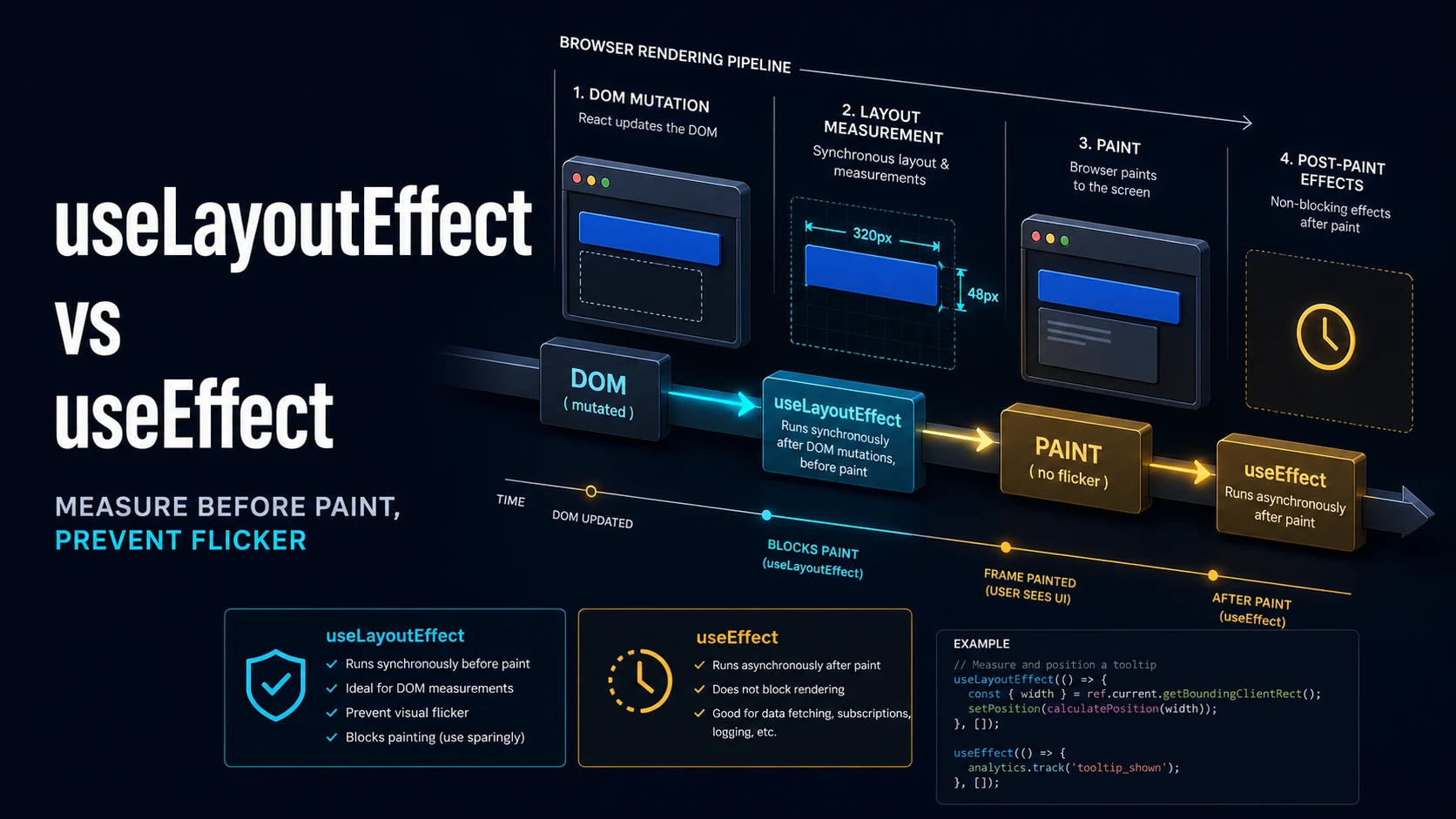
Quick Summary
Both hooks run after React has committed DOM changes, but only one of them runs before the browser paints. useEffect is scheduled after paint, which keeps rendering responsive; useLayoutEffect runs synchronously in the same commit, blocking paint until it returns. The difference is invisible for data fetching and visible for measurements: any state derived from getBoundingClientRect, scrollHeight, or an element's size must be applied in useLayoutEffect, or the browser paints the wrong layout first and the user sees a flicker.
The rule most teams adopt is mechanical. If the effect reads layout or writes layout that the user would otherwise see move, use useLayoutEffect. If it talks to the network, subscribes to a global event, or does anything that does not need to be finished before the next frame, use useEffect.
The cost of useLayoutEffect is real. It blocks the browser from painting, it runs twice on mount in StrictMode, and it forces synchronous layout when it reads geometry right after a DOM mutation. Reaching for it to "make things faster" has the opposite effect; reaching for it to place a tooltip before the first paint is exactly right.
Basic Syntax & Signature
import { useEffect, useLayoutEffect, useRef, useState } from "react";

function Tooltip({ text, anchor }: { text: string; anchor: DOMRect }) {
  const ref = useRef<HTMLDivElement>(null);
  const [left, setLeft] = useState(anchor.left);

  // Runs after DOM mutation, before paint: the clamp is already applied
  // when the frame is presented, so the tooltip never appears off-screen.
  useLayoutEffect(() => {
    const el = ref.current;
    if (!el) return;
    const { width } = el.getBoundingClientRect();
    const max = window.innerWidth - 8 - width;
    setLeft(Math.min(Math.max(8, anchor.left), max));
  }, [anchor.left, text]);

  return (
    <div ref={ref} style={{ position: "fixed", top: anchor.bottom, left }}>
      {text}
    </div>
  );
}

function Analytics({ page }: { page: string }) {
  // Runs after paint: a network call or a log must not block the frame.
  useEffect(() => {
    void fetch("/api/pageview", { method: "POST", body: JSON.stringify({ page }) });
  }, [page]);

  return null;
}
Ordering inside a commit is fixed: React mutates the DOM, runs useLayoutEffect cleanups, runs useLayoutEffect setups, then the browser paints, then useEffect runs. Passive effects are flushed in a separate task, which is why a setState inside useEffect costs an extra paint that useLayoutEffect avoids.
// Cleanup order on dependency change:
// 1. useLayoutEffect cleanup (previous deps)
// 2. useLayoutEffect setup (new deps)
// 3. paint
// 4. useEffect cleanup (previous deps)
// 5. useEffect setup (new deps)
On unmount, layout cleanups run before passive cleanups for the same subtree, so a listener added in useEffect can outlive a layout effect's teardown by one frame.
Key Comparison Table
| Property | useEffect | useLayoutEffect |
|---|---|---|
| Timing | After paint, in a separate task | Before paint, synchronously in the commit |
| Blocks the browser | No | Yes, until it returns |
| Reads layout safely | Yes, but after the frame is shown | Yes, while the frame can still be corrected |
setState causes | Second render and second paint | Second render before the first paint |
| Visible flicker | Possible | Prevented |
| Server rendering | Runs on the client after hydration | Warns and does nothing; no DOM on the server |
| StrictMode double invoke | Yes, in development | Yes, in development |
| Typical use | Fetching, subscriptions, logging, timers | Measurement, scroll position, focus, tooltips |
| Cost when misused | Slight delay | Jank: a long task on every commit |
| Order relative to paint | After | Before |
Practical Edge Cases & Deep Dives
1. The flicker that only useLayoutEffect removes
function BadMeasure() {
  const ref = useRef<HTMLParagraphElement>(null);
  const [clamped, setClamped] = useState(false);

  useEffect(() => {
    const el = ref.current;
    if (el) setClamped(el.scrollHeight > el.clientHeight);
  }, []);

  return (
    <p ref={ref} style={{ height: 40, overflow: "hidden" }}>
      Long text that overflows the fixed height and should show a "Read more" button.
      {clamped && <button>Read more</button>}
    </p>
  );
}
With useEffect the browser paints the paragraph without the button and then repaints with it — a one-frame layout shift that is easy to see on a slow device and shows up as a cumulative layout shift score in the field data. Replacing the hook with useLayoutEffect keeps the first paint correct because the state is committed before the frame is presented. If the measurement itself is expensive, gates matter more than the hook: measure once, store the result, and re-measure from a ResizeObserver instead of on every render.
2. Scrolling a chat log to the bottom
function Chat({ messages }: { messages: string[] }) {
  const listRef = useRef<HTMLDivElement>(null);

  useLayoutEffect(() => {
    const el = listRef.current;
    if (!el) return;
    // scrollHeight is only correct after the new message is in the DOM,
    // and scrolling after paint would show the jump for one frame.
    el.scrollTop = el.scrollHeight;
  }, [messages.length]);

  return (
    <div ref={listRef} style={{ overflowY: "auto", height: 320 }}>
      {messages.map((m, i) => <p key={i}>{m}</p>)}
    </div>
  );
}
The dependency is messages.length, not messages: an array recreated on each parent render would scroll the log on unrelated updates. If messages arrive while the user has scrolled up, the correct behaviour is to skip the scroll — track distance from the bottom before the mutation and restore only when it was near zero.
3. Measuring before setup, without a layout round trip
function AutoSizedTextarea({ value }: { value: string }) {
  const ref = useRef<HTMLTextAreaElement>(null);

  useLayoutEffect(() => {
    const el = ref.current;
    if (!el) return;
    // Reset first: scrollHeight only shrinks after the height is cleared.
    el.style.height = "auto";
    el.style.height = `${el.scrollHeight}px`;
  }, [value]);

  return <textarea ref={ref} rows={1} defaultValue={value} />;
}
This is the one place where a layout write inside a layout effect is unavoidable: the height depends on content that only the browser can measure. Reading scrollHeight and writing height in the same block causes one forced synchronous layout, which is cheaper than a visible resize.
4. An SSR-safe isomorphic hook
import { useEffect, useLayoutEffect } from "react";

// useLayoutEffect does nothing on the server and logs a warning.
// Falling back keeps Next.js and other SSR frameworks quiet.
export const useIsomorphicLayoutEffect =
  typeof window !== "undefined" ? useLayoutEffect : useEffect;

function ScrollProgress() {
  const [progress, setProgress] = useState(0);

  useIsomorphicLayoutEffect(() => {
    function onScroll() {
      const max = document.documentElement.scrollHeight - window.innerHeight;
      setProgress(max > 0 ? window.scrollY / max : 0);
    }
    onScroll();
    window.addEventListener("scroll", onScroll, { passive: true });
    return () => window.removeEventListener("scroll", onScroll);
  }, []);

  return <div style={{ width: `${progress * 100}%`, height: 2 }} />;
}
The alternative is to avoid the layout effect on the server entirely by rendering the component only on the client. Both work; the first keeps the component usable in static output and degrades to a post-paint update, which is acceptable for a progress bar and not acceptable for a tooltip position.
5. Observing size instead of measuring on every render
function useElementWidth<T extends HTMLElement>() {
  const ref = useRef<T>(null);
  const [width, setWidth] = useState(0);

  useLayoutEffect(() => {
    const el = ref.current;
    if (!el) return;
    const rect = el.getBoundingClientRect();
    setWidth(rect.width);

    const observer = new ResizeObserver((entries) => {
      for (const entry of entries) {
        setWidth(entry.contentRect.width);
      }
    });
    observer.observe(el);
    return () => observer.disconnect();
  }, []);

  return [ref, width] as const;
}
ResizeObserver callbacks arrive before paint in the same frame, which gives the correctness of a layout effect with far fewer reads: one measurement on mount, then one per actual resize. Combining this with useSyncExternalStore keeps the subscription outside React's render path.
6. What runs twice in StrictMode
function Counter() {
  const ref = useRef<HTMLDivElement>(null);
  console.log("render");

  useLayoutEffect(() => {
    console.log("layout setup", ref.current?.getBoundingClientRect().height);
    return () => console.log("layout cleanup");
  }, []);

  useEffect(() => {
    console.log("passive setup");
    return () => console.log("passive cleanup");
  }, []);

  return <div ref={ref}>height probe</div>;
}
In development with StrictMode, React renders twice, then mounts, runs the effects, unmounts the simulated instance (running cleanups), and mounts again. The log sequence shows render render, layout setup, layout cleanup, layout setup, passive setup, passive cleanup, passive setup. Effects that are not idempotent — starting a poller, incrementing a counter ref, subscribing without unsubscribing — surface here first.
Common Compilation/Runtime Mistakes
| Symptom | Cause | Fix |
|---|---|---|
| "useLayoutEffect does nothing on the server" warning | Hook used during SSR | Isomorphic wrapper or client-only render |
| Tooltip appears, then jumps into place | Measured in useEffect | Move the measurement to useLayoutEffect |
| Visible one-frame layout shift on load | State applied after paint | Apply before paint, or reserve space with CSS |
| Page hangs for 200 ms on route change | Heavy work in useLayoutEffect | Move it to useEffect or off the main thread |
| Effect fires on every render | Unstable dependency object | Depend on primitives or memoize |
| Listener leak in development | Subscription without cleanup | Return a cleanup function |
| Infinite loop | Layout effect sets state it depends on | Remove state as a dependency; derive instead |
| Multiple forced reflows in a profile | Reading and writing layout repeatedly | Batch reads first, then writes |
| Scroll position resets after navigation | Scroll written in a layout effect on re-render | Guard with a key or scrollRestoration |
| Warnings about missing dependencies | Deliberate omission | Restructure the effect so the dependency is stable |
The decision rule is narrow enough to keep in a code-review checklist: layout effects exist so that the frame is correct the first time it is presented. If the effect's output can wait for the next frame — a log, a request, a timer — it belongs in useEffect, where it costs nothing to the frame budget.
Try matching browser tools
All toolsSmall utilities that fit React work — they run entirely in this browser tab, so nothing you paste leaves your device.
Related React guides
All React guidesReact Profiler API: Measuring Render Timings and Identifying Wasted Re-Renders
actualDuration versus baseDuration, phase names that tell you who triggered a commit, and how to ship the numbers without flooding a backend.
React with TypeScript: Generic Components, PropsWithChildren, and Event Types
Generic props that infer from data, PropsWithChildren instead of React.FC, and element-scoped event types that keep currentTarget typed.
React useTransition and useDeferredValue: Non-Blocking Concurrent UI Updates
Transitions let React throw away background work when typing arrives. Which hook defers what, and why a controlled input must never be transitioned.
React.lazy and Code Splitting: Route Chunks, Preloading, and Suspense
Where the split points belong, how to preload on intent, and how to recover when a stale chunk 404s after a deployment.
More in React
All React guidesThe guides filed next to this one in React, in library order.