React useImperativeHandle: Exposing Custom Ref APIs Without Breaking Encapsulation
A ref gate that exposes three methods instead of the whole DOM node, with the React 19 ref-prop form and the dependency rules that keep it fresh.
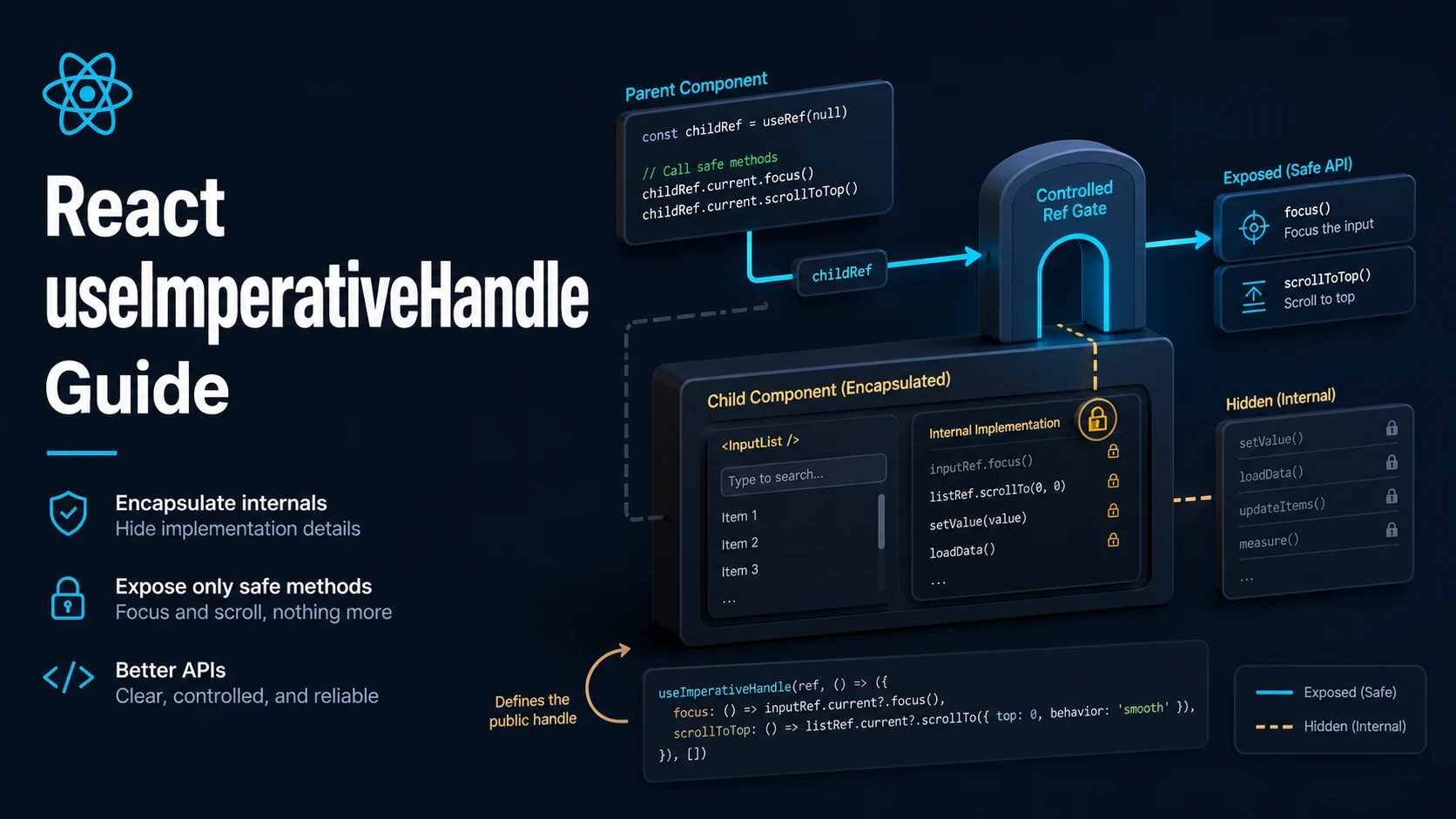
Quick Summary
useImperativeHandle lets a child component expose a small, hand-written API through its ref instead of exposing the DOM node or the component instance. The ref becomes a gate: the parent can call focus(), scrollTo(), or play(), and cannot touch anything else. Default ref behaviour is the opposite — a ref on a <div> is the entire HTMLDivElement, with every DOM property and method reachable.
The hook is the answer to a narrow question: how does a parent trigger imperative behaviour in a child that the child owns? Scrolling a virtualised list to an index, focusing the first invalid field, resetting a canvas, starting playback. None of these are state, none of them can be expressed by passing props down, and all of them require the child to keep control of how they happen.
React 19 changes the plumbing but not the concept. ref is now a regular prop on function components, so forwardRef is no longer needed for new code; the hook still takes the ref and a factory function. What has not changed is that the exposed object should stay small, and that a ref used for data flow is a sign the component boundary is wrong.
Basic Syntax & Signature
import { useImperativeHandle, useRef } from "react";
import type { Ref } from "react";

export type PlayerHandle = {
  play(): void;
  pause(): void;
  seek(seconds: number): void;
};

type PlayerProps = {
  src: string;
  ref?: Ref<PlayerHandle>;
};

export function Player({ src, ref }: PlayerProps) {
  const videoRef = useRef<HTMLVideoElement>(null);

  useImperativeHandle(
    ref,
    () => ({
      play: () => void videoRef.current?.play(),
      pause: () => videoRef.current?.pause(),
      seek: (seconds) => {
        const el = videoRef.current;
        if (el) el.currentTime = seconds;
      },
    }),
    [] // recreate the handle only when the deps change
  );

  return <video ref={videoRef} src={src} playsInline />;
}
The pre-React-19 form is identical apart from the wrapper:
import { forwardRef } from "react";

export const LegacyPlayer = forwardRef<PlayerHandle, { src: string }>(
  function LegacyPlayer({ src }, ref) {
    const videoRef = useRef<HTMLVideoElement>(null);
    useImperativeHandle(ref, () => ({
      play: () => void videoRef.current?.play(),
      pause: () => videoRef.current?.pause(),
      seek: (s) => { if (videoRef.current) videoRef.current.currentTime = s; },
    }), []);
    return <video ref={videoRef} src={src} />;
  }
);
The dependencies array is the same contract as useMemo: without it the handle object is recreated on every render, and any parent that stored the old handle keeps a stale closure over the DOM node.
Key Comparison Table
| Approach | Parent sees | Encapsulation | Re-render on change | Use when |
|---|---|---|---|---|
Plain ref on a DOM element | The whole HTMLDivElement | None | No | The parent needs raw DOM access |
ref on a class component | The instance | Whatever the class exposes | No | Legacy class components |
useImperativeHandle | Only the declared methods | Full | No | Child owns behaviour the parent must trigger |
Callback prop (onReady) | A function | Full | Yes, if stored in state | Data or state, not commands |
| Context with methods | Shared object | Depends | Yes | Several consumers need the same commands |
| Controlled props | Data and callbacks | Full | Yes | Everything that can be state |
Practical Edge Cases & Deep Dives
1. Virtualised list: scroll to an index
type ListHandle = { scrollToIndex(index: number): void };

function VirtualList({ rows, ref }: { rows: string[]; ref?: Ref<ListHandle> }) {
  const containerRef = useRef<HTMLDivElement>(null);
  const rowHeight = 32;

  useImperativeHandle(ref, () => ({
    scrollToIndex(index: number) {
      const el = containerRef.current;
      if (!el) return;
      el.scrollTop = Math.max(0, index * rowHeight);
    },
  }), []);

  return (
    <div ref={containerRef} style={{ height: 320, overflowY: "auto" }}>
      <div style={{ height: rows.length * rowHeight }}>
        {rows.map((row, i) => (
          <div key={row} style={{ height: rowHeight }}>{row}</div>
        ))}
      </div>
    </div>
  );
}

function SearchResults({ rows }: { rows: string[] }) {
  const listRef = useRef<ListHandle>(null);
  return (
    <>
      <button onClick={() => listRef.current?.scrollToIndex(0)}>Back to top</button>
      <VirtualList rows={rows} ref={listRef} />
    </>
  );
}
The parent does not know about scroll containers, row heights, or whether the list is virtualised at all. It calls one method. The optional chain matters: on the first render the ref is null, and in tests it may never attach.
2. Focus the first invalid field in a form
type FieldHandle = { focus(): void; validate(): string | null };

const Field = ({ name, label, ref }: {
  name: string; label: string; ref?: Ref<FieldHandle>;
}) => {
  const inputRef = useRef<HTMLInputElement>(null);

  useImperativeHandle(ref, () => ({
    focus: () => inputRef.current?.focus(),
    validate: () => {
      const value = inputRef.current?.value.trim() ?? "";
      return value.length > 0 ? null : `${label} is required.`;
    },
  }), [label]);

  return (
    <label>
      {label}
      <input ref={inputRef} name={name} />
    </label>
  );
};

function SignupForm() {
  const firstRef = useRef<FieldHandle>(null);
  const secondRef = useRef<FieldHandle>(null);

  function onSubmit(e: React.FormEvent) {
    e.preventDefault();
    for (const field of [firstRef, secondRef]) {
      const error = field.current?.validate();
      if (error) {
        field.current?.focus();
        return;
      }
    }
  }

  return (
    <form onSubmit={onSubmit}>
      <Field name="email" label="Email" ref={firstRef} />
      <Field name="password" label="Password" ref={secondRef} />
      <button>Sign up</button>
    </form>
  );
}
Validation stays inside the field that knows its own rules, and the form decides order and focus. Passing error props down would invert that: the parent would need to know every rule to compute the message.
3. useImperativeHandle without forwardRef in React 19
// React 19: ref is a normal prop, no wrapper needed.
function Modal({ open, ref }: { open: boolean; ref?: Ref<{ close(): void }> }) {
  useImperativeHandle(ref, () => ({ close: () => console.log("closed") }), []);
  return open ? <div role="dialog">content</div> : null;
}

// React 18: forwardRef is still required for the same code.
Migrating is mechanical but not automatic: a component that destructures props and spreads the rest onto a DOM element will now forward ref into the DOM, which changes behaviour. Audit spreads before dropping forwardRef.
4. Combining the exposed handle with a callback ref
function Input({ ref }: { ref?: Ref<{ clear(): void }> }) {
  const el = useRef<HTMLInputElement>(null);

  // React 19 callback refs may return a cleanup function.
  const setNode = (node: HTMLInputElement | null) => {
    el.current = node;
  };

  useImperativeHandle(ref, () => ({
    clear: () => { if (el.current) el.current.value = ""; },
  }), []);

  return <input ref={setNode} />;
}
A callback ref that returns a value is treated as a cleanup function in React 19, so an arrow with a concise body that returns an assignment (ref={(n) => (el.current = n)}) will be interpreted as a cleanup and break. Use a block body.
5. Why data should not travel through a handle
// Wrong: the parent polls the child for its value.
type EditorHandle = { getValue(): string };

function Parent() {
  const editorRef = useRef<EditorHandle>(null);
  return (
    <form onSubmit={() => save(editorRef.current?.getValue() ?? "")}>
      <TextEditor ref={editorRef} />
      <button>Save</button>
    </form>
  );
}

// Right: the child reports changes upward and the parent holds the value.
function ParentFixed() {
  const [value, setValue] = useState("");
  return (
    <form onSubmit={() => save(value)}>
      <TextEditor value={value} onChange={setValue} />
      <button disabled={!value.trim()}>Save</button>
    </form>
  );
}
The polling version cannot disable the button while the field is empty, cannot validate before submit, and cannot keep two editors in sync, because the value has no single owner. Commands flow down through refs; data flows up through callbacks.
6. Resetting a third-party widget
type MapHandle = { recenter(lat: number, lng: number): void; destroy(): void };

function MapView({ ref, apiKey }: { ref?: Ref<MapHandle>; apiKey: string }) {
  const container = useRef<HTMLDivElement>(null);
  const mapInstance = useRef<{ setCenter(lat: number, lng: number): void; remove(): void } | null>(null);

  useEffect(() => {
    const map = createMap(container.current!, apiKey);
    mapInstance.current = map;
    return () => map.remove();
  }, [apiKey]);

  useImperativeHandle(ref, () => ({
    recenter: (lat, lng) => mapInstance.current?.setCenter(lat, lng),
    destroy: () => mapInstance.current?.remove(),
  }), []);

  return <div ref={container} style={{ height: 400 }} />;
}
The handle wraps an object whose lifetime is managed by an Effect, so the methods are safe to call at any time — they no-op before mount and after unmount. Exposing mapInstance.current directly would hand the parent a reference that becomes invalid on the next effect cleanup.
Common Compilation/Runtime Mistakes
| Symptom | Cause | Fix |
|---|---|---|
ref.current is null in the parent | Handle not attached, or child not mounted | Optional chaining; check the render condition |
| Stale methods captured | Dependencies array missing values | Include captured values in deps |
| Handle recreated every render | No dependencies array | Pass [] or real deps |
Function components cannot be given refs | React 18 component without forwardRef | forwardRef, or React 19's ref prop |
| Cleanup function called unexpectedly | Callback ref returns a value | Use a block-bodied callback |
| Parent reads data through the handle | Data flowing the wrong direction | Lift the value into state |
Cannot read properties of null after unmount | Method called after cleanup | Guard inside the method |
Ref typed as any | Missing generic | Ref<Handle> and a declared type |
useImperativeHandle in a class | Hook used in a class | Use instance methods instead |
| Ordering bugs between two handles | Child depends on sibling ref timing | Coordinate in the parent's effect |
The healthy use of useImperativeHandle is rare and obvious: a parent needs to trigger an action in a child that the child must own the implementation of. When a ref starts carrying values, when the exposed object grows past a handful of methods, or when the parent could get the same result from a prop, the ref is compensating for a boundary that should be redrawn.
Try matching browser tools
All toolsSmall utilities that fit React work — they run entirely in this browser tab, so nothing you paste leaves your device.
Related React guides
All React guidesReact Profiler API: Measuring Render Timings and Identifying Wasted Re-Renders
actualDuration versus baseDuration, phase names that tell you who triggered a commit, and how to ship the numbers without flooding a backend.
React with TypeScript: Generic Components, PropsWithChildren, and Event Types
Generic props that infer from data, PropsWithChildren instead of React.FC, and element-scoped event types that keep currentTarget typed.
React useTransition and useDeferredValue: Non-Blocking Concurrent UI Updates
Transitions let React throw away background work when typing arrives. Which hook defers what, and why a controlled input must never be transitioned.
React.lazy and Code Splitting: Route Chunks, Preloading, and Suspense
Where the split points belong, how to preload on intent, and how to recover when a stale chunk 404s after a deployment.
More in React
All React guidesThe guides filed next to this one in React, in library order.
- React useId and useSyncExternalStore: SSR-Safe Hydration and External Stores
- React useEffect: Dependency Arrays, Cleanup Functions, and Race Conditions
- React useLayoutEffect vs useEffect: Synchronous DOM Measurements and Flicker Fixes
- React useMemo vs useCallback: Memoization, React.memo, and When to Skip