React useId and useSyncExternalStore: SSR-Safe Hydration and External Stores
Generated ids that match on both sides of hydration, and external store reads that never tear and never loop.
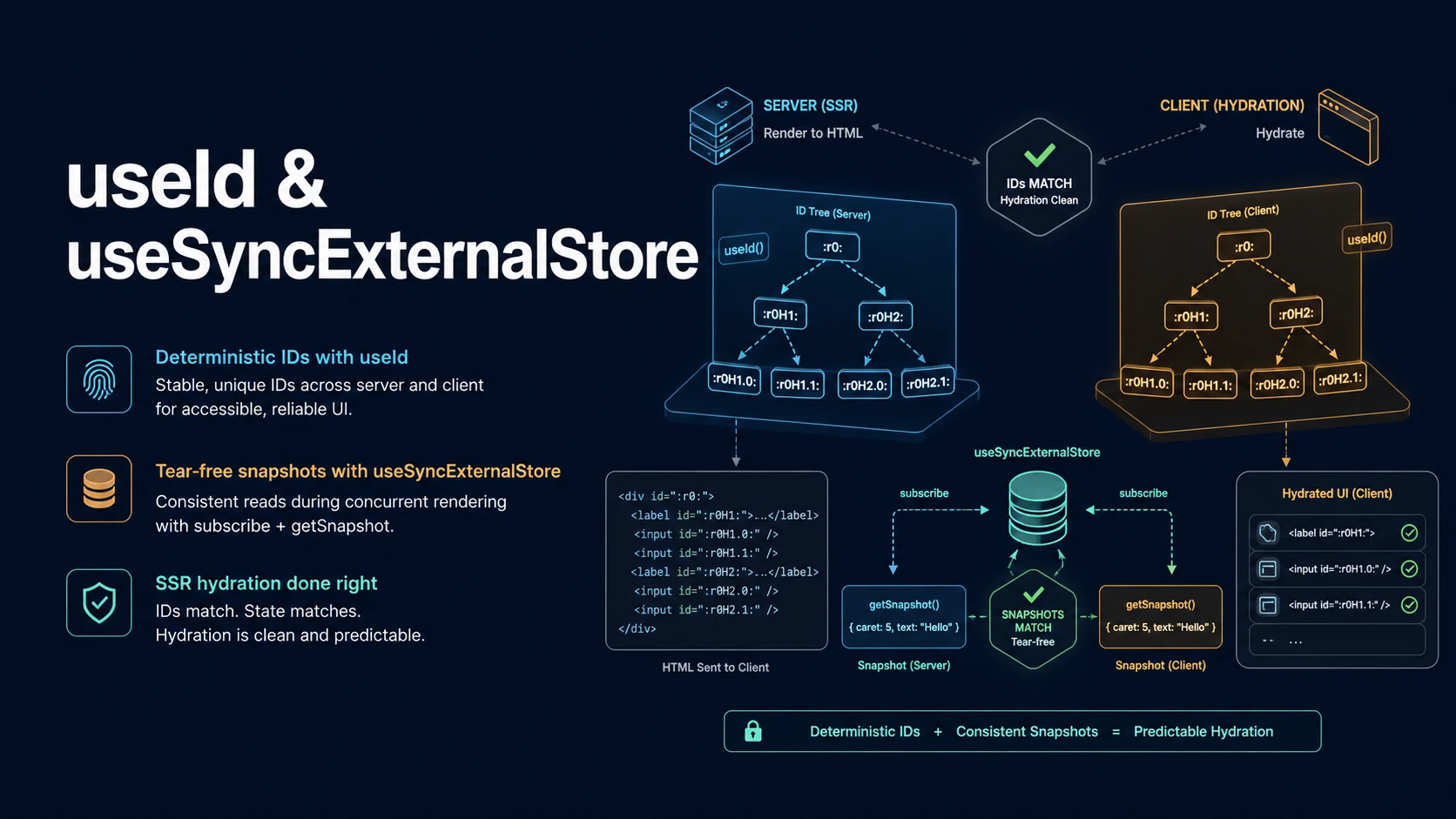
Quick Summary
Two hooks solve the same category of problem from opposite ends: keeping client state identical to what the server produced. useId generates identifiers that match between a server render and its hydration pass, so aria-describedby, htmlFor, and id attributes do not break when the markup is streamed and rehydrated. useSyncExternalStore reads a value that lives outside React — matchMedia, localStorage, a WebSocket, a Redux store — in a way that never tears and that has a defined value during server rendering.
Both exist because hydration is a comparison. The client does not build the page from scratch; it adopts server HTML and attaches behaviour. Any value that differs between the two passes is a mismatch, and anything random, time-based, or environment-based in the render path differs by construction. useId removes one source of that difference. useSyncExternalStore removes another, by letting you supply a separate server snapshot instead of reading window during render.
The failure modes are quiet. useId returns a value that depends on the tree path rather than on call order, so it stays stable when a component is reused, but it changes when the tree structure changes — it is not a cache key, not a list key, and not something to parse. useSyncExternalStore will loop forever if getSnapshot returns a new object on every call, because React compares snapshots with Object.is to decide whether a re-render is needed.
Basic Syntax & Signature
import { useId, useSyncExternalStore } from "react";

function Field({ label }: { label: string }) {
  const id = useId();
  return (
    <div>
      <label htmlFor={id}>{label}</label>
      <input id={id} aria-describedby={`${id}-hint`} />
      <p id={`${id}-hint`}>Required, 8 characters minimum.</p>
    </div>
  );
}

// subscribe: called with a callback, returns an unsubscribe function.
// getSnapshot: must return a cached, immutable value.
// getServerSnapshot: used during hydration and server rendering.
const isOnline = useSyncExternalStore(
  (callback) => {
    window.addEventListener("online", callback);
    window.addEventListener("offline", callback);
    return () => {
      window.removeEventListener("online", callback);
      window.removeEventListener("offline", callback);
    };
  },
  () => navigator.onLine,
  () => true
);
Both subscribe and snapshot functions must be stable across renders, or the store is torn down and re-subscribed on every commit:
// Defined once at module scope: identity never changes.
function subscribeToWidth(callback: () => void) {
  const mql = window.matchMedia("(max-width: 768px)");
  mql.addEventListener("change", callback);
  return () => mql.removeEventListener("change", callback);
}

const getWidthSnapshot = () => window.matchMedia("(max-width: 768px)").matches;
const getServerWidthSnapshot = () => false;

function useIsMobile() {
  return useSyncExternalStore(subscribeToWidth, getWidthSnapshot, getServerWidthSnapshot);
}
For multiple independent apps on one page, createRoot(container, { identifierPrefix }) and hydrateRoot(..., { identifierPrefix }) namespace every useId value so two roots never collide.
Key Comparison Table
| Aspect | useId | useSyncExternalStore |
|---|---|---|
| Problem solved | Unique, hydration-stable ids | Tear-free reads from external state |
| Server support | Generates ids on both passes | Requires getServerSnapshot |
| Depends on tree position | Yes | No |
| Changes between renders | No, while mounted | Whenever the snapshot changes |
| Valid as a list key | No | Not applicable |
| Valid as a cache key | No | Not applicable |
| Mismatch when tree differs | Yes, ids differ on hydration | Yes, if snapshots differ |
| Stable function requirements | None | subscribe and getSnapshot identity |
| Re-render trigger | Never | Snapshot changes by Object.is |
| Typical misuse | Parsing or truncating the id | Inline arrow functions, fresh objects |
Practical Edge Cases & Deep Dives
1. Ids inside a repeated component
function AccordionItem({ title, children }: { title: string; children: React.ReactNode }) {
  const id = useId();
  const [open, setOpen] = useState(false);

  return (
    <div>
      <button aria-expanded={open} aria-controls={`${id}-panel`} onClick={() => setOpen(!open)}>
        {title}
      </button>
      <div id={`${id}-panel`} hidden={!open}>
        {children}
      </div>
    </div>
  );
}
Three accordion items on a page produce three different ids without a counter, without a useRef, and without any risk of a hydration mismatch. A module-level counter would also produce unique values in a single pass, but not necessarily in the same order on the server and on the client — which is exactly the case useId is built to survive.
2. Using a generated id in a selector
function Anchored() {
  const id = useId();
  const ref = useRef<HTMLDivElement>(null);

  useLayoutEffect(() => {
    // Ids may contain characters that are not valid unescaped in a selector.
    const el = document.querySelector(CSS.escape(`#${id}`));
    if (el) ref.current?.scrollIntoView();
  }, [id]);

  return <div id={id} ref={ref}>anchored</div>;
}
Prefer the ref. When a selector is unavoidable, CSS.escape is the difference between working and a SyntaxError from querySelector, because generated ids are not guaranteed to be plain alphanumerics and React has changed the format between versions. Code that strips colons or assumes a prefix breaks on upgrade.
3. A store with a selector, without tearing
type State = { count: number; name: string };
let state: State = { count: 0, name: "anon" };
const listeners = new Set<() => void>();

const store = {
  getState: () => state,
  setState(next: Partial<State>) {
    state = { ...state, ...next };
    listeners.forEach((l) => l());
  },
  subscribe(listener: () => void) {
    listeners.add(listener);
    return () => listeners.delete(listener);
  },
};

function useCount() {
  return useSyncExternalStore(
    store.subscribe,
    () => store.getState().count,
    () => 0
  );
}

function useName() {
  return useSyncExternalStore(
    store.subscribe,
    () => store.getState().name,
    () => "anon"
  );
}
Each selector subscribes to the whole store but only re-renders when its own snapshot changes, because React compares the returned value, not the store object. The getServerSnapshot values must match what the server rendered; returning undefined there and 0 on the client produces a mismatch warning on the first commit.
4. Reading localStorage without a hydration mismatch
function useLocalStorageValue(key, fallback) {
  const subscribe = useCallback(
    (callback) => {
      const onStorage = (e) => { if (e.key === key || e.key === null) callback(); };
      window.addEventListener("storage", onStorage);
      return () => window.removeEventListener("storage", onStorage);
    },
    [key]
  );

  const getSnapshot = useCallback(() => window.localStorage.getItem(key), [key]);
  // The server has no storage: render the fallback there, then hydrate.
  const getServerSnapshot = useCallback(() => null, []);

  const raw = useSyncExternalStore(subscribe, getSnapshot, getServerSnapshot);
  return raw === null ? fallback : JSON.parse(raw);
}
localStorage.getItem returns a string, so the snapshot is a primitive and the identity check works. Returning JSON.parse(...) straight from getSnapshot would create a new object on every call and trigger an infinite render loop — parse outside the snapshot, one layer up.
5. The infinite loop from an uncached snapshot
// Wrong: new object every call, Object.is never matches, React re-renders forever.
function useBadState() {
  return useSyncExternalStore(
    subscribeToResize,
    () => ({ width: window.innerWidth, height: window.innerHeight })
  );
}

// Right: cache the object and only replace it when the numbers change.
let cached = { width: 0, height: 0 };
function readSize() {
  const width = window.innerWidth;
  const height = window.innerHeight;
  if (cached.width !== width || cached.height !== height) cached = { width, height };
  return cached;
}

function useSize() {
  return useSyncExternalStore(subscribeToResize, readSize, () => ({ width: 0, height: 0 }));
}
React logs a warning ("The result of getSnapshot should be cached") before it locks up, so the message is worth taking literally. The same rule applies to useSelector in Redux Toolkit and to useStore in Zustand, both of which are built on this hook.
6. Ids and the identifierPrefix for micro-frontends
import { createRoot, hydrateRoot } from "react-dom/client";

const container = document.getElementById("widget")!;
if (container.hasChildNodes()) {
  hydrateRoot(container, <Widget />, { identifierPrefix: "widget-" });
} else {
  createRoot(container, { identifierPrefix: "widget-" }).render(<Widget />);
}
Two React roots on one page each count ids from their own root, so without prefixes both produce the same strings and the second one wins in the DOM. identifierPrefix is applied consistently to server output and client hydration, which is why it belongs in the bootstrap file rather than in every component.
Common Compilation/Runtime Mistakes
| Symptom | Cause | Fix |
|---|---|---|
Duplicate id attributes in the page | Static string used in a repeated component | useId per instance |
Hydration mismatch on id/aria-describedby | Random or counter-based id | useId, or identifierPrefix for multiple roots |
querySelector throws on a generated id | Unescaped special characters | CSS.escape or a ref |
| Ids reused across two roots | Separate roots, no prefix | identifierPrefix on both |
useId used as a list key | Misunderstanding of stability | Key from data |
| "The result of getSnapshot should be cached" | New object from getSnapshot | Cache and return the same reference |
| Store re-subscribes on every render | Inline subscribe arrow | Module-level function or useCallback |
| Hydration mismatch on store-backed UI | getServerSnapshot omitted | Pass a server-safe value |
| Immediate re-render loop | Snapshot changes on every read | Derive from a primitive |
useSyncExternalStore in an async Server Component | Not allowed; it is a client hook | Move it into a client component |
The shared principle is that the server and the client must agree on what they render before hydration, and that React's comparison is shallow and synchronous. useId guarantees agreement for identifiers; useSyncExternalStore lets you declare the server's answer for values the server cannot read, and then converge after hydration without tearing a render in half.
Try matching browser tools
All toolsSmall utilities that fit React work — they run entirely in this browser tab, so nothing you paste leaves your device.
Related React guides
All React guidesReact Profiler API: Measuring Render Timings and Identifying Wasted Re-Renders
actualDuration versus baseDuration, phase names that tell you who triggered a commit, and how to ship the numbers without flooding a backend.
React with TypeScript: Generic Components, PropsWithChildren, and Event Types
Generic props that infer from data, PropsWithChildren instead of React.FC, and element-scoped event types that keep currentTarget typed.
React useTransition and useDeferredValue: Non-Blocking Concurrent UI Updates
Transitions let React throw away background work when typing arrives. Which hook defers what, and why a controlled input must never be transitioned.
React.lazy and Code Splitting: Route Chunks, Preloading, and Suspense
Where the split points belong, how to preload on intent, and how to recover when a stale chunk 404s after a deployment.
More in React
All React guidesThe guides filed next to this one in React, in library order.
- React useEffect: Dependency Arrays, Cleanup Functions, and Race Conditions
- React useContext and useReducer: Scalable State Sharing Without Redux
- React useImperativeHandle: Exposing Custom Ref APIs Without Breaking Encapsulation
- React useLayoutEffect vs useEffect: Synchronous DOM Measurements and Flicker Fixes