React useContext and useReducer: Scalable State Sharing Without Redux
Context transports state and useReducer names the transitions. Splitting the two contexts is what keeps dispatch-only components from re-rendering.
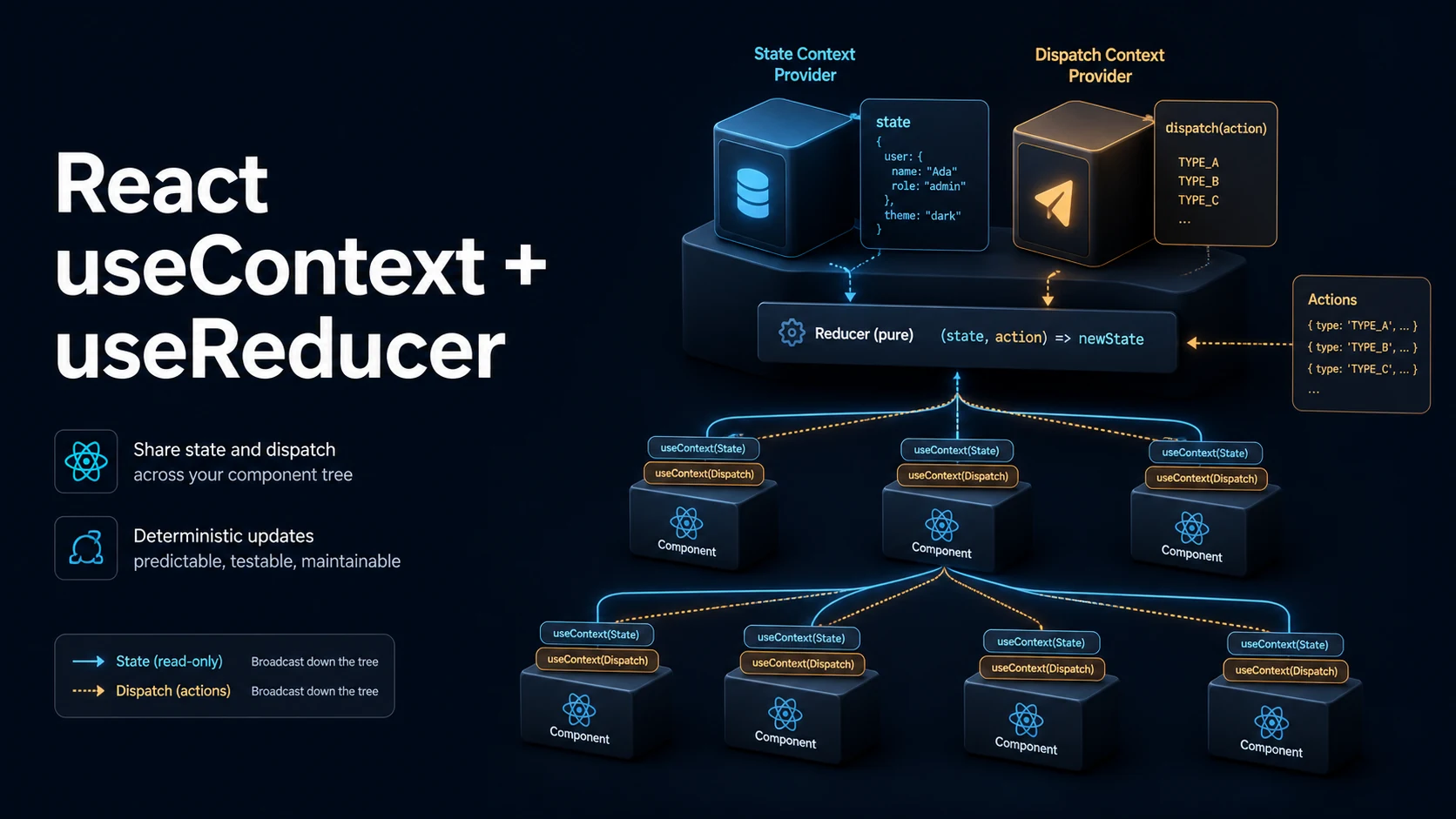
Quick Summary
Context solves prop drilling: a value declared at the top of a tree is read by any descendant without passing it through every intermediate component. It does not solve state management by itself — context is a transport, and useReducer is a state container. Used together they cover most of what teams reach for Redux to get: a single store, explicit actions, and predictable transitions.
useReducer(reducer, initialState) returns the current state and a stable dispatch function. The reducer is a pure function (state, action) => newState. Because the state transitions are named and centralized, they are easier to test and to reason about than a scatter of setState calls, and the reducer can be extracted into its own module and unit-tested without React.
The performance rule is the whole design: every component that calls useContext(SomeContext) re-renders when that context's value changes by identity. There are no selectors. So the patterns that matter are splitting the context (state in one, dispatch in another), memoizing the value object, and keeping frequently changing data out of contexts that many components consume.
Basic Syntax & Signature
import { createContext, useContext, useReducer, useMemo, type Dispatch, type ReactNode } from "react";

type Todo = { id: number; text: string; done: boolean };

type State = { todos: Todo[]; filter: "all" | "open" | "done" };

type Action =
  | { type: "add"; text: string }
  | { type: "toggle"; id: number }
  | { type: "clear" }
  | { type: "setFilter"; filter: State["filter"] };

const initialState: State = { todos: [], filter: "all" };

function reducer(state: State, action: Action): State {
  switch (action.type) {
    case "add":
      return {
        ...state,
        todos: [...state.todos, { id: Date.now(), text: action.text, done: false }],
      };
    case "toggle":
      return {
        ...state,
        todos: state.todos.map((t) =>
          t.id === action.id ? { ...t, done: !t.done } : t,
        ),
      };
    case "clear":
      return { ...state, todos: [] };
    case "setFilter":
      return { ...state, filter: action.filter };
    default: {
      const exhaustive: never = action;
      return exhaustive;
    }
  }
}

// Separate contexts: consumers of dispatch do not re-render on state changes.
const StateContext = createContext<State | null>(null);
const DispatchContext = createContext<Dispatch<Action> | null>(null);

export function TodoProvider({ children }: { children: ReactNode }) {
  const [state, dispatch] = useReducer(reducer, initialState, (init) => init);

  // The state object changes only when the reducer returns a new one, so no
  // extra memoization is needed here; `children` is stable across renders.
  return (
    <StateContext.Provider value={state}>
      <DispatchContext.Provider value={dispatch}>{children}</DispatchContext.Provider>
    </StateContext.Provider>
  );
}

export function useTodos(): State {
  const state = useContext(StateContext);
  if (state === null) throw new Error("useTodos must be used inside <TodoProvider>");
  return state;
}

export function useTodoDispatch(): Dispatch<Action> {
  const dispatch = useContext(DispatchContext);
  if (dispatch === null) throw new Error("useTodoDispatch must be used inside <TodoProvider>");
  return dispatch;
}
React 19 allows <Context> itself as the provider, without .Provider:
<StateContext value={state}>
  <DispatchContext value={dispatch}>{children}</DispatchContext>
</StateContext>
Signatures:
function createContext<T>(defaultValue: T): Context<T>;
function useContext<T>(context: Context<T>): T;
function useReducer<S, A>(
  reducer: (state: S, action: A) => S,
  initialState: S,
): [S, Dispatch<A>];

function useReducer<S, I, A>(
  reducer: (state: S, action: A) => S,
  initialArg: I,
  init: (arg: I) => S,
): [S, Dispatch<A>];
Key Comparison Table
useState | useReducer | Context + reducer | |
|---|---|---|---|
| State shape | Any single value | Any single value, updated by actions | Tree-wide state |
| Update logic | Inline setter calls | One pure reducer | One pure reducer |
| Passed down by | Props | Props (state + dispatch) | Context |
| Testable without React | No | Yes, the reducer is a plain function | Yes |
| Re-render scope | The component | The component | Every consumer of the changed context |
| Pattern | Re-renders on state change | Use when |
|---|---|---|
One context holding {state, dispatch} | All consumers | Small apps, rarely changing data |
| Split state / dispatch contexts | Components reading state only | Most apps; dispatch readers stay stable |
| Multiple contexts by domain | Consumers of the changed domain | Larger apps, independent slices |
| External store + selectors | Only components whose slice changed | High-frequency updates |
| Context value | Identity | Consequence |
|---|---|---|
value={{ a, b }} inline | New object every render | Every consumer re-renders every parent render |
const v = useMemo(() => ({a, b}), [a, b]) | Stable until inputs change | Consumers re-render only on real changes |
value={dispatch} | Already stable | Safe to pass directly |
value={state} from useReducer | New only when reducer returns new state | Safe when the reducer is pure |
Practical Edge Cases & Deep Dives
1. The inline value object that re-renders the whole tree
import { createContext, useMemo, useState, type ReactNode } from "react";

function BadProvider({ children }: { children: ReactNode }) {
  const [theme, setTheme] = useState("dark");
  const [user, setUser] = useState("ada");
  // New object on every provider render, even when theme and user did not change.
  return (
    <AppContext.Provider value={{ theme, setTheme, user, setUser }}>
      {children}
    </AppContext.Provider>
  );
}

const AppContext = createContext<{
  theme: string;
  setTheme: (t: string) => void;
  user: string;
  setUser: (u: string) => void;
} | null>(null);

function GoodProvider({ children }: { children: ReactNode }) {
  const [theme, setTheme] = useState("dark");
  const [user, setUser] = useState("ada");

  const value = useMemo(() => ({ theme, setTheme, user, setUser }), [theme, user]);
  return <AppContext.Provider value={value}>{children}</AppContext.Provider>;
}
setTheme and setUser are already stable, so the memo only needs to list the changing values. Every consumer below BadProvider re-renders whenever the provider renders for any reason — including when an unrelated parent state changes.
2. Dispatch-only consumers stay still
function AddTodoButton() {
  // Reads only the dispatch context: no re-render when todos change.
  const dispatch = useTodoDispatch();
  return <button onClick={() => dispatch({ type: "add", text: "new" })}>add</button>;
}

function TodoCount() {
  // Reads the state context: re-renders on every todo change.
  const state = useTodos();
  return <p>{state.todos.length}</p>;
}
This split is the single highest-leverage change in a context-based app. Buttons and forms that only dispatch never need to re-render, and the dispatch identity is guaranteed stable by useReducer, so the second context's value never changes.
3. Reducer purity and StrictMode
function reducer(state: { count: number }, action: { type: "inc" }) {
  // Wrong: mutating and returning the same object means React sees no change.
  // state.count += 1;
  // return state;

  // Also wrong: a side effect inside a reducer runs twice in StrictMode.
  // localStorage.setItem("count", String(state.count + 1));

  switch (action.type) {
    case "inc":
      return { count: state.count + 1 };
    default:
      return state;
  }
}
React may call a reducer twice in development to check purity, and may call it on every dispatch it replays. Logging, network calls, and mutation inside a reducer produce duplicated effects and states that depend on call count. Side effects belong in an effect that reacts after the state has committed.
4. Lazy initialization of a heavy reducer state
type State = { rows: Row[] };
type Row = { id: number; value: string };

function init(): State {
  const raw = typeof window === "undefined" ? null : localStorage.getItem("rows");
  return raw ? { rows: JSON.parse(raw) as Row[] } : { rows: [] };
}

function Table() {
  // The third argument runs only on the first render.
  const [state, dispatch] = useReducer(reducer, undefined, init);
  return <p>{state.rows.length} {String(dispatch !== null)}</p>;
}

function reducer(state: State, _action: { type: "noop" }): State {
  return state;
}
With useReducer(reducer, initialArg, init), init(initialArg) is called once. Passing undefined as initialArg is the usual form when the initializer needs no argument. This is the reducer equivalent of useState(() => ...), and it matters when the initial state comes from storage or a parse.
5. Context default values are a silent failure mode
// Dangerous: a real default makes a missing provider invisible.
const DangerousContext = createContext({ theme: "light", setTheme: (_: string) => {} });

function DangerousConsumer() {
  const { theme } = useContext(DangerousContext);
  // Renders "light" with no provider anywhere — the bug looks like a theme issue.
  return <p>{theme}</p>;
}

// Safe: null default plus a guard in a custom hook.
const SafeContext = createContext<{ theme: string } | null>(null);

function useTheme() {
  const ctx = useContext(SafeContext);
  if (!ctx) throw new Error("useTheme requires <ThemeProvider>");
  return ctx;
}
A thrown error with a clear message is far cheaper than a component that silently renders with placeholder values. The only legitimate non-null defaults are values that are genuinely correct with no provider — a no-op logger, or an empty feature flag object.
6. Context is not a performance store: the selector problem
type Store = { user: string; ticks: number };

function SlowConsumer() {
  const store = useContext(StoreContext);
  // Re-renders on every tick even though it only displays `user`.
  return <p>{store.user}</p>;
}

import { useSyncExternalStore } from "react";

function FastConsumer() {
  // For high-frequency external state, subscribe with a selector instead.
  const user = useSyncExternalStore(
    (cb) => store.subscribe(cb),
    () => store.getState().user,
  );
  return <p>{user}</p>;
}

const store = {
  state: { user: "ada" } as { user: string },
  listeners: new Set<() => void>(),
  getState() { return this.state; },
  subscribe(cb: () => void) {
    this.listeners.add(cb);
    return () => this.listeners.delete(cb);
  },
};

const StoreContext = createContext<{ user: string; ticks: number } | null>(null);
Context has no way to subscribe to a slice, so a context holding a ticking value re-renders every consumer at that tick rate. Once updates become frequent, an external store with useSyncExternalStore (or a library built on it) is the right shape, and context is relegated to dependency injection — passing the store instance down.
Common Compilation/Runtime Mistakes
| Symptom | Cause | Fix |
|---|---|---|
| Consumers do not update | Value passed to a different provider instance | Use the same context object, not a copy |
useContext returns the default | Component is outside the provider | Move the provider higher, or add a guard |
| Whole tree re-renders on every parent render | Inline value object | Memoize the value |
| State update has no effect | Reducer mutated and returned the same object | Return a new object |
| Action reaches the wrong slice | Two contexts with the same shape swapped | Name them per domain; type the dispatch |
dispatch causes a re-render of everything | Single combined context | Split state and dispatch |
| Reducer runs twice | StrictMode purity check | Keep the reducer pure |
Type error on never in default | A new action type was added | Handle it, then assert never |
| Context value is stale inside a callback | Callback captured an old render | Depend on the value, or read via a ref |
| Provider below the component that needs it | Tree structure | Lift the provider, or portal the subtree |
The design rule that keeps this maintainable: one context per domain, one reducer per domain, and a custom hook (useTodos) as the only public way to consume it. Components then depend on useTodos() rather than on createContext internals, so a later move to a different store is a change in one file instead of every consumer.
Try matching browser tools
All toolsSmall utilities that fit React work — they run entirely in this browser tab, so nothing you paste leaves your device.
Related React guides
All React guidesReact Profiler API: Measuring Render Timings and Identifying Wasted Re-Renders
actualDuration versus baseDuration, phase names that tell you who triggered a commit, and how to ship the numbers without flooding a backend.
React with TypeScript: Generic Components, PropsWithChildren, and Event Types
Generic props that infer from data, PropsWithChildren instead of React.FC, and element-scoped event types that keep currentTarget typed.
React useTransition and useDeferredValue: Non-Blocking Concurrent UI Updates
Transitions let React throw away background work when typing arrives. Which hook defers what, and why a controlled input must never be transitioned.
React.lazy and Code Splitting: Route Chunks, Preloading, and Suspense
Where the split points belong, how to preload on intent, and how to recover when a stale chunk 404s after a deployment.
More in React
All React guidesThe guides filed next to this one in React, in library order.