React useRef: DOM Access, Mutable Values, and Ref Forwarding
A ref holds a value for the lifetime of the component without re-rendering. When to reach for the DOM, and how refs behave in React 19.
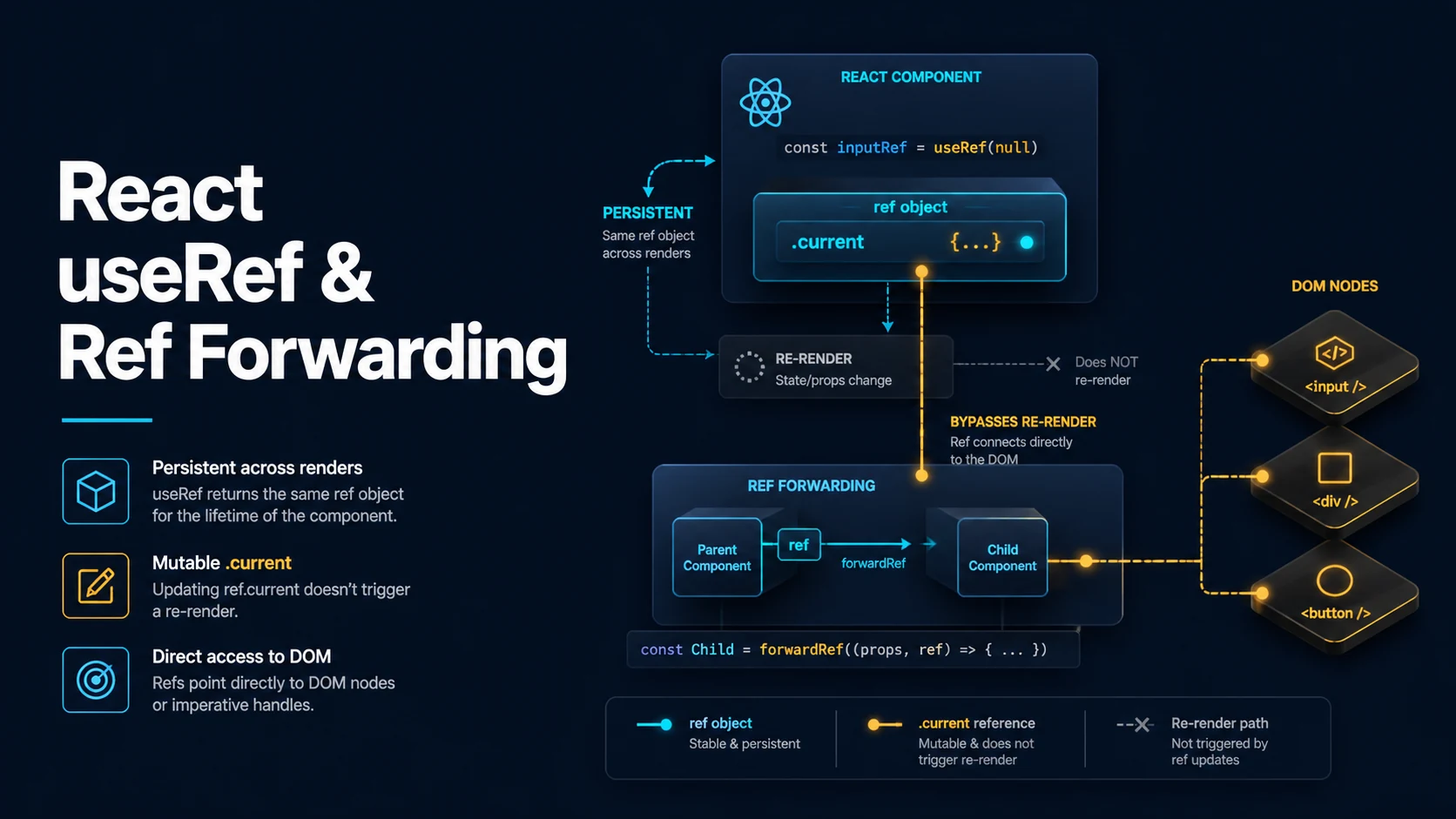
Quick Summary
useRef(initialValue) returns a plain object with one mutable property, current, that keeps its identity for the lifetime of the component. Writing to ref.current does not schedule a render — that is the feature, not a gap. It is how a component holds a value across renders when the value itself is not part of what is displayed.
Two uses dominate. A DOM ref gives direct access to an element after React commits it, for focus, measurement, scrolling, or integrating a non-React library. A mutable instance value holds a timer id, a socket, a previous value, or an "is mounted" flag without causing renders.
The rules are short but strict. Do not read or write ref.current during render, because render must stay pure and may run twice in StrictMode. Do not use a ref where a render needs to reflect the change — that is state. And in React 19, function components receive ref as an ordinary prop, so forwardRef is no longer required to expose a DOM node; useImperativeHandle is still the way to expose a custom API.
Basic Syntax & Signature
import { useEffect, useRef } from "react";

export function SearchField() {
  // DOM ref: initial null, typed to the element.
  const inputRef = useRef<HTMLInputElement>(null);

  // Mutable instance value: no DOM, no rendering.
  const timerRef = useRef<number | null>(null);

  // Previous value across renders.
  const renders = useRef(0);

  useEffect(() => {
    // After commit, the element exists.
    inputRef.current?.focus();
    renders.current += 1;
  }, []);

  function startDebounce() {
    if (timerRef.current !== null) window.clearTimeout(timerRef.current);
    timerRef.current = window.setTimeout(() => {
      console.log("debounced");
    }, 300);
  }

  return (
    <div>
      <input ref={inputRef} placeholder="type…" />
      <button onClick={startDebounce}>debounce</button>
      <p>renders: {renders.current}</p>
    </div>
  );
}
React 19 makes ref a normal prop on function components:
// React 19: no forwardRef needed.
import type { ComponentProps } from "react";

export function FancyInput({ ref, ...props }: ComponentProps<"input">) {
  return <input ref={ref} {...props} className="fancy" />;
}

// React 18 and earlier, still supported:
import { forwardRef } from "react";

export const LegacyInput = forwardRef<HTMLInputElement, ComponentProps<"input">>(
  (props, ref) => <input ref={ref} {...props} className="fancy" />,
);
Exposing a custom imperative API instead of the raw node:
import { useImperativeHandle, useRef } from "react";

type Handle = { focusAndSelect: () => void };

import type { Ref } from "react";

export function Editor({ ref }: { ref?: Ref<Handle> }) {
  const inputRef = useRef<HTMLInputElement>(null);

  useImperativeHandle(ref, () => ({
    focusAndSelect() {
      inputRef.current?.focus();
      inputRef.current?.select();
    },
  }), []);

  return <input ref={inputRef} />;
}
Key Comparison Table
useRef | useState | Module-level variable | |
|---|---|---|---|
| Survives re-render | Yes | Yes | Yes (shared by all instances) |
| Triggers re-render on change | No | Yes | No |
| Per component instance | Yes | Yes | No |
| Readable on the server | Yes, but no DOM | Yes | Yes |
| Safe to read during render | No (except lazy init) | Yes | No, for mutable data |
| Typical content | DOM node, timer id, socket | Displayed data | Constants, caches |
| Ref kind | Type (React 19) | Set by |
|---|---|---|
useRef<HTMLDivElement>(null) | RefObject<HTMLDivElement | null> | React on commit |
useRef(0) | RefObject<number> | Your code |
createRef<T>() | RefObject<T | null> | Class components / unusual cases |
| Callback ref | (node: T | null) => void | (() => void) | React, with node then cleanup |
useImperativeHandle | Whatever handle you return | The hook, when the parent ref is set |
Practical Edge Cases & Deep Dives
1. Ref timing: null during render, set before effects
import { useLayoutEffect, useRef, useState } from "react";

function Measure() {
  const boxRef = useRef<HTMLDivElement>(null);
  const [width, setWidth] = useState(0);

  // Wrong: during render the node may not exist yet, and reading layout here
  // breaks purity and SSR.
  // const w = boxRef.current?.offsetWidth ?? 0;

  // Right: measure after commit. useLayoutEffect avoids a visible flicker.
  useLayoutEffect(() => {
    if (!boxRef.current) return;
    setWidth(boxRef.current.getBoundingClientRect().width);
  }, []);

  return (
    <div>
      <div ref={boxRef} style={{ width: "50%" }}>content</div>
      <p>{width}px</p>
    </div>
  );
}
React attaches refs during the commit phase, before useLayoutEffect runs, so a layout effect can always read ref.current. A plain useEffect also sees the node, but the measurement happens after paint, which can cause a frame of wrong layout.
2. The "latest callback" pattern without re-subscribing
function useEventListener(type: string, handler: (e: Event) => void) {
  const handlerRef = useRef(handler);

  // Keep the ref current without making the subscription depend on it.
  useEffect(() => {
    handlerRef.current = handler;
  });

  useEffect(() => {
    const listener = (e: Event) => handlerRef.current(e);
    window.addEventListener(type, listener);
    return () => window.removeEventListener(type, listener);
  }, [type]);
}

function Page() {
  const [count, setCount] = useState(0);
  useEventListener("resize", () => console.log("resize", count));
  return <button onClick={() => setCount((c) => c + 1)}>{count}</button>;
}
Without the ref, the subscription effect would need handler in its dependencies, and an inline handler is new on every render — the listener would be removed and re-added constantly. The ref breaks the identity chain while still delivering the newest closure. The write belongs in an effect, not in render, because a render may be discarded.
3. Callback refs and React 19 cleanup functions
function AutoScroll() {
  const [height, setHeight] = useState(0);

  // React calls this with the node on mount and with null on unmount.
  const measureRef = (node: HTMLDivElement | null) => {
    if (node) setHeight(node.scrollHeight);
  };

  // React 19: a callback ref may return a cleanup function.
  const observeRef = (node: HTMLDivElement | null) => {
    if (!node) return;
    const observer = new ResizeObserver(() => setHeight(node.scrollHeight));
    observer.observe(node);
    return () => observer.disconnect();
  };

  return <div ref={observeRef}>{height}</div>;
}
Before React 19, returning anything from a ref callback was an error, so observers had to be tracked in a ref and torn down in an effect. The cleanup form keeps the setup and teardown in one place and runs when the node is removed or the ref callback identity changes.
4. useImperativeHandle for a controlled external API
import { useImperativeHandle, useRef } from "react";

type PlayerHandle = { play: () => void; pause: () => void; isPlaying: () => boolean };

function VideoPlayer({ ref, src }: { ref?: Ref<PlayerHandle>; src: string }) {
  const videoRef = useRef<HTMLVideoElement>(null);
  const playingRef = useRef(false);

  useImperativeHandle(ref, () => ({
    play() {
      playingRef.current = true;
      void videoRef.current?.play();
    },
    pause() {
      playingRef.current = false;
      videoRef.current?.pause();
    },
    isPlaying: () => playingRef.current,
  }), []);

  return <video ref={videoRef} src={src} />;
}

function App() {
  const player = useRef<PlayerHandle>(null);
  return (
    <>
      <VideoPlayer ref={player} src="/clip.mp4" />
      <button onClick={() => player.current?.play()}>play</button>
    </>
  );
}
The dependency array of useImperativeHandle matters exactly as in useMemo: an empty array means the handle object is created once and keeps its identity, so the methods must read mutable refs rather than closed-over props. With [src] the handle is recreated when src changes and the parent's player.current updates.
5. A previous-value ref, and why it belongs in an effect
function usePrevious<T>(value: T): T | undefined {
  const ref = useRef<T | undefined>(undefined);

  useEffect(() => {
    ref.current = value;
  }, [value]);

  return ref.current;
}

function Price({ value }: { value: number }) {
  const prev = usePrevious(value);
  const direction = prev === undefined ? "flat" : value > prev ? "up" : "down";
  return <p>{value} ({direction})</p>;
}
usePrevious returns the value from the previous committed render because the effect that updates the ref runs after render. Writing ref.current = value in the render body would return the current value in the same pass and break the hook during StrictMode's double render.
6. Lazy initialization of a mutable object during render
function ExpensiveThing() {
  const cacheRef = useRef<Map<string, number> | null>(null);

  // Legitimate render-phase ref write: initialize once, then reuse.
  if (cacheRef.current === null) {
    cacheRef.current = new Map();
  }

  const cache = cacheRef.current;
  cache.set("visited", (cache.get("visited") ?? 0) + 1);

  return <p>{cache.get("visited")}</p>;
}
This is the one render-phase write React documents as acceptable, because the write is idempotent: a second StrictMode render finds a non-null map and skips the assignment. Mutating the map during render is still impure in a strict sense; the safer version creates the resource in useState's lazy initializer or in an effect.
Common Compilation/Runtime Mistakes
| Symptom | Cause | Fix |
|---|---|---|
ref.current is null in the render body | Node not attached yet | Read it in an effect or a handler |
Type error: RefObject<HTMLDivElement> not assignable to Ref<HTMLDivElement> | React 18 typing without null | useRef<HTMLDivElement>(null), or MutableRefObject |
UI does not update after ref.current++ | Ref changes do not render | Use state for displayed values |
| Value resets on every render | Ref created conditionally or inside a loop | Call hooks unconditionally at the top level |
forwardRef warning about ref prop | React 19 passes ref as a prop | Drop forwardRef, accept ref in props |
| "Cannot update a component while rendering" | Writing state from a render-phase ref callback | Move the write into an effect |
| Ref callback runs twice in StrictMode | Intentional dev double invoke | Make setup idempotent and use the cleanup form |
useImperativeHandle exposes stale props | Empty deps with closed-over values | Read from refs, or add the deps |
| Same ref shared by two components | Ref created outside the component | Create it inside, or pass it explicitly |
| Hydration mismatch with a ref-read value | Server has no DOM | Render a stable placeholder until after mount |
A last distinction worth keeping: useRef for a DOM node is a bridge to an imperative API, and every bridge is a place where React's model stops applying. Keep refs at the edges — focus, scroll, measurement, third-party widgets — and keep the data flow inside state and props. When a component needs a ref to make its own rendering correct, that is usually a sign the value belongs in state instead.
Try matching browser tools
All toolsSmall utilities that fit React work — they run entirely in this browser tab, so nothing you paste leaves your device.
Related React guides
All React guidesReact Profiler API: Measuring Render Timings and Identifying Wasted Re-Renders
actualDuration versus baseDuration, phase names that tell you who triggered a commit, and how to ship the numbers without flooding a backend.
React with TypeScript: Generic Components, PropsWithChildren, and Event Types
Generic props that infer from data, PropsWithChildren instead of React.FC, and element-scoped event types that keep currentTarget typed.
React useTransition and useDeferredValue: Non-Blocking Concurrent UI Updates
Transitions let React throw away background work when typing arrives. Which hook defers what, and why a controlled input must never be transitioned.
React.lazy and Code Splitting: Route Chunks, Preloading, and Suspense
Where the split points belong, how to preload on intent, and how to recover when a stale chunk 404s after a deployment.
More in React
All React guidesThe guides filed next to this one in React, in library order.