React useState: Functional Updates, Automatic Batching, and Stale State
State is a snapshot, not a variable. Why three setCount calls add one, how React 18 batches after await, and how to update arrays and objects safely.
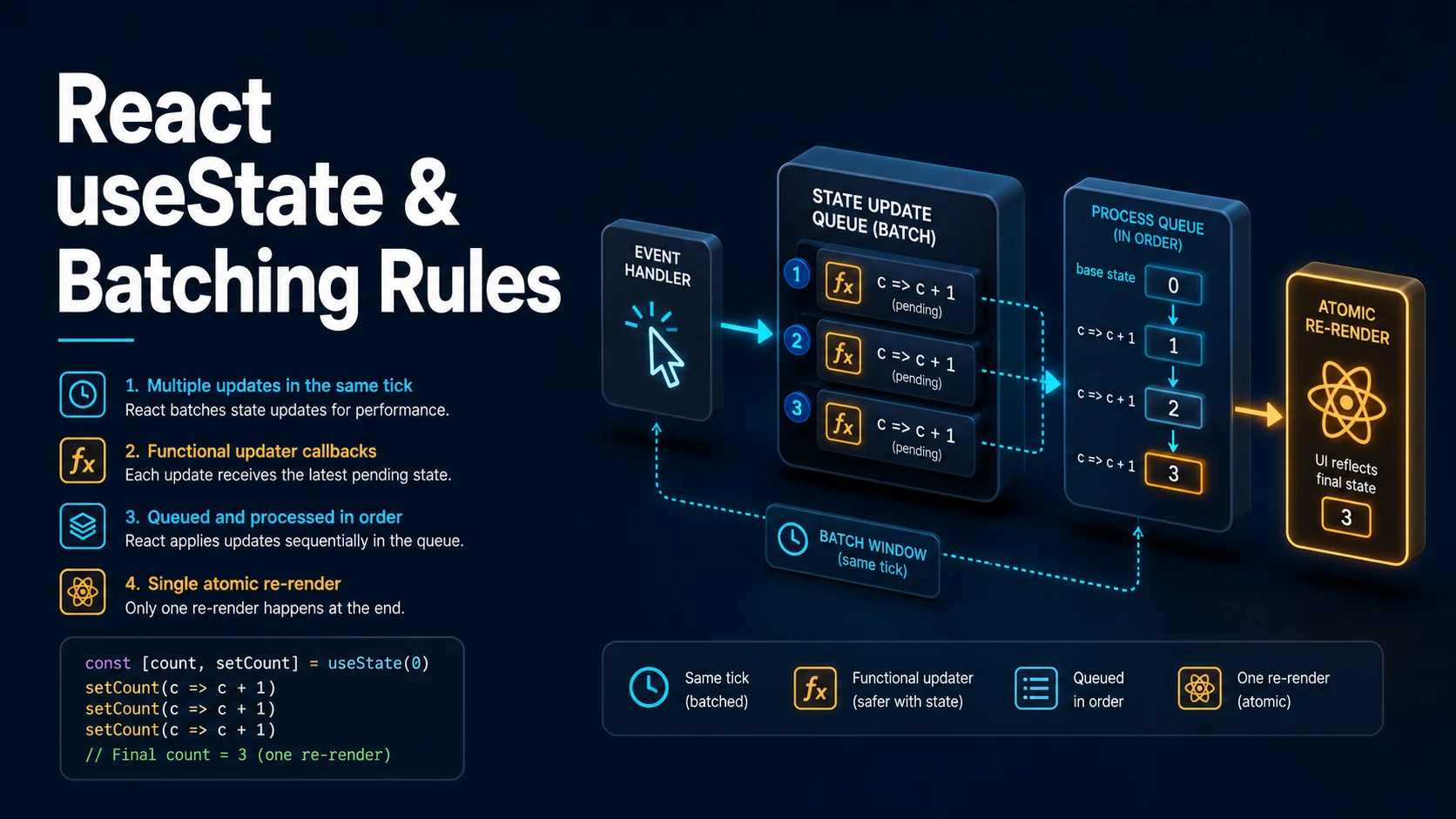
Quick Summary
useState returns a value and a setter. The value is a snapshot for the current render: calling the setter does not change count in the function that just called it. Read that sentence twice, because almost every "state is not updating" bug is a violation of it.
The setter queues an update. React batches queued updates — all of them since React 18, in event handlers, promises, timeouts, and native event listeners alike — and re-renders once with the result. Two patterns follow. When the next value depends on the previous one, pass a function: setCount(c => c + 1). When it does not, pass a value: setName("ada"). Mixing the two forms in one handler is legal and the queue is processed in order, which is why the functional form is immune to stale reads.
State is compared with Object.is. Setting the same value may still cause one render before React bails out, and mutating an object in place is invisible to that comparison — the array or object must be replaced with a new one.
Basic Syntax & Signature
import { useState } from "react";

type Item = { id: number; label: string };

export function Counter() {
  // 1. Simple value, initial state computed once.
  const [count, setCount] = useState(0);

  // 2. Lazy initializer: runs only on the first render.
  const [items, setItems] = useState<Item[]>(() => loadFromStorage());

  // 3. Nullable state with an explicit union.
  const [selected, setSelected] = useState<number | null>(null);

  // 4. State that holds a function needs a wrapper, because a bare
  //    function argument is treated as the initializer.
  const [formatter, setFormatter] = useState<() => string>(() => () => "idle");

  function incrementThrice() {
    // Wrong: all three read the same `count`.
    setCount(count + 1);
    setCount(count + 1);
    setCount(count + 1);
  }

  function incrementThriceCorrectly() {
    // Right: each updater receives the latest queued value.
    setCount((c) => c + 1);
    setCount((c) => c + 1);
    setCount((c) => c + 1);
  }

  function addItem(label: string) {
    // Replace, never mutate.
    setItems((prev) => [...prev, { id: Date.now(), label }]);
  }

  return (
    <div>
      <p>{count}</p>
      <button onClick={incrementThrice}>+3 (broken)</button>
      <button onClick={incrementThriceCorrectly}>+3</button>
      <button onClick={() => addItem("new")}>add</button>
      <p>{selected ?? "none"}</p>
      <button onClick={() => setSelected(1)}>select</button>
      <p>{formatter()}</p>
    </div>
  );
}

function loadFromStorage(): Item[] {
  const raw = typeof window === "undefined" ? null : window.localStorage.getItem("items");
  return raw ? (JSON.parse(raw) as Item[]) : [];
}
The signature is deliberately small:
function useState<S>(initialState: S | (() => S)): [S, Dispatch<SetStateAction<S>>];

type Dispatch<A> = (value: A) => void;
type SetStateAction<S> = S | ((prevState: S) => S);
Because SetStateAction<S> includes a function, useState cannot distinguish "set this function as the value" from "compute the value with this function". The double-arrow wrapper useState(() => () => "idle") is the standard escape.
Key Comparison Table
| Call | What it does | When to use |
|---|---|---|
setCount(5) | Queues the literal 5 | Value independent of previous state |
setCount(c => c + 1) | Queues an updater receiving the latest value | Depends on previous state; multiple updates per event |
setItems([...items, x]) | Uses the items captured in this render | Only when items cannot be stale |
setItems(prev => [...prev, x]) | Uses the value in the queue | Default choice for lists and objects |
useState(() => compute()) | Runs compute once | Expensive initialization |
useState(compute()) | Runs compute every render (result discarded) | Never, unless the call is trivial |
setState(same) | Object.is equal: usually no re-render of children | Bail-out optimization |
setState({...obj}) | New reference: always re-renders | Immutable updates |
| Situation | Behaviour |
|---|---|
Two setState calls in one click handler | Batched into one render |
Two calls across await boundaries in React 18+ | Still batched |
| Same-value update | One render may occur, then React bails out |
Update inside flushSync | Applied synchronously before the next line |
| Update during render of the same component | Render-phase update: React re-renders immediately, children skipped |
| Update during render of a different component | Error: cannot update a component while rendering another |
Practical Edge Cases & Deep Dives
1. The stale value in an async handler
function SearchBox() {
  const [query, setQuery] = useState("");
  const [results, setResults] = useState<string[]>([]);

  async function onSubmit() {
    setQuery("loading");          // queued
    console.log(query);           // still the OLD value: this render's snapshot

    const res = await fetch(`/api/search?q=${query}`); // uses the OLD query too
    const data = (await res.json()) as string[];
    setResults((prev) => [...prev, ...data]);
  }

  return <button onClick={onSubmit}>{query || "search"}</button>;
}
The handler closes over the render in which it was created. setQuery("loading") does not change query for the rest of that function. When the next step needs the new value, compute it into a local first:
async function onSubmitFixed(next: string) {
  setQuery(next);
  const res = await fetch(`/api/search?q=${encodeURIComponent(next)}`);
  setResults((prev) => [...prev, ...((await res.json()) as string[])]);
}
Deriving the value from an event argument instead of from state is the general fix: state is for rendering, not for passing data between lines of one function.
2. Object and array updates without mutation
type Form = { name: string; tags: string[]; nested: { active: boolean } };

function FormEditor() {
  const [form, setForm] = useState<Form>({
    name: "",
    tags: [],
    nested: { active: false },
  });

  // Wrong: mutates the existing object, so React sees the same reference.
  function badUpdate() {
    form.name = "x";
    setForm(form);            // Object.is(prev, next) is true -> no re-render
  }

  function setName(name: string) {
    setForm((prev) => ({ ...prev, name }));
  }

  function addTag(tag: string) {
    setForm((prev) => ({ ...prev, tags: [...prev.tags, tag] }));
  }

  function toggleActive() {
    setForm((prev) => ({
      ...prev,
      nested: { ...prev.nested, active: !prev.nested.active },
    }));
  }

  return (
    <form>
      <input value={form.name} onChange={(e) => setName(e.target.value)} />
      <button type="button" onClick={() => addTag("new")}>tag</button>
      <button type="button" onClick={toggleActive}>{String(form.nested.active)}</button>
    </form>
  );
}
The spread is shallow: nested objects need their own copy, which is the most common source of "the checkbox does not toggle" and of shared state between two rows. useReducer or an immutable helper (immer, structurajs) reduces the ceremony for deeply nested shapes.
3. Batching across await and the flushSync escape
import { flushSync } from "react-dom";
import { useState } from "react";

function BatchDemo() {
  const [a, setA] = useState(0);
  const [b, setB] = useState(0);
  const [renders, setRenders] = useState(0);

  // One render for both updates in React 18+, even after an await.
  async function batched() {
    setA((x) => x + 1);
    setB((x) => x + 1);
    await Promise.resolve();
    setA((x) => x + 1);
  }

  // Rare: force a synchronous commit, for measuring a DOM node right after.
  function forced() {
    flushSync(() => setA((x) => x + 1));
    // The DOM now reflects the new `a`.
  }

  return (
    <div>
      <p>{a} {b} {renders}</p>
      <button onClick={batched}>batch</button>
      <button onClick={forced}>flush</button>
    </div>
  );
}
Before React 18, updates inside promises and timeouts were not batched, so a setState after await rendered immediately. That difference is why older code sometimes relies on intermediate renders — and why flushSync exists rather than being the default behaviour.
4. Initializing state from props without an effect
type Props = { initialCount: number; userId: string };

function Profile({ initialCount, userId }: Props) {
  // Wrong: state is initialized once and never follows userId.
  const [count, setCount] = useState(initialCount);

  // Right, when the state should reset per user: put a key on the component
  // instead of syncing in an effect.
  return <Counter key={userId} start={initialCount} />;
}

function Counter({ start }: { start: number }) {
  const [count, setCount] = useState(start);
  return <button onClick={() => setCount((c) => c + 1)}>{count}</button>;
}
Passing key remounts the component when the key changes, which resets all of its state in one step. The alternative — a useEffect that calls setCount(initialCount) when props change — produces an extra render with stale UI and is the pattern React documentation now explicitly discourages.
5. A state machine with a discriminated union
type State =
  | { status: "idle" }
  | { status: "loading" }
  | { status: "error"; message: string }
  | { status: "success"; data: string[] };

function Results() {
  const [state, setState] = useState<State>({ status: "idle" });

  async function load() {
    setState({ status: "loading" });
    try {
      const res = await fetch("/api/items");
      if (!res.ok) throw new Error(`HTTP ${res.status}`);
      setState({ status: "success", data: (await res.json()) as string[] });
    } catch (err) {
      setState({
        status: "error",
        message: err instanceof Error ? err.message : "unknown error",
      });
    }
  }

  return (
    <div>
      <button onClick={load}>load</button>
      {state.status === "loading" && <p>loading…</p>}
      {state.status === "error" && <p role="alert">{state.message}</p>}
      {state.status === "success" && <ul>{state.data.map((d) => <li key={d}>{d}</li>)}</ul>}
    </div>
  );
}
A union makes impossible states unrepresentable: there is no loading flag plus data plus error to keep consistent. TypeScript narrows on state.status, so a branch that reads state.data before checking fails to compile.
6. State updates during render (the legitimate form)
function List({ items }: { items: string[] }) {
  const [prevItems, setPrevItems] = useState(items);
  const [selection, setSelection] = useState(0);

  // Render-phase update: React re-renders this component immediately,
  // before committing, so the user never sees the stale selection.
  if (prevItems !== items) {
    setPrevItems(items);
    setSelection(0);
  }

  return <p>{items[selection] ?? "empty"}</p>;
}
This pattern is legal only when updating the same component's state during its own render; React discards the output and re-renders immediately. Updating a different component during render throws. It is a narrow tool — the same result usually comes from a key or from deriving the value — but it is the correct answer for "reset a piece of state when a prop identity changes" without an effect.
Common Compilation/Runtime Mistakes
| Symptom | Cause | Fix |
|---|---|---|
count does not change right after setCount | State is a per-render snapshot | Read the new value from the next render, or use a local variable |
| Clicking +3 only adds 1 | Three calls all read the same count | Functional updater c => c + 1 |
List does not update after push | Mutated the array in place | setItems(prev => [...prev, item]) |
| Effect that sets state loops forever | Effect writes state it also depends on | Remove the dep, derive the value, or guard the update |
| Child does not re-render though data changed | Same object reference passed down | Create a new object, or pass primitives |
| State resets when a sibling is added | Component position in the tree changed | Give stable keys |
| "Cannot update a component while rendering a different component" | setState called during another component's render | Move the call into an event handler or effect |
| Initializer runs twice in development | StrictMode double-invokes it | Keep the initializer pure; do not rely on call count |
useState(myFunction) stores the result of calling it | Function argument is treated as an initializer | useState(() => myFunction) |
| State lost on refresh | useState is memory only | Persist to storage or the URL |
One more: setState inside a useEffect without a dependency guard is not automatically a loop, but it becomes one as soon as the effect depends on the state it writes. When the value can be computed from props or other state, compute it during render and skip the state entirely — fewer states means fewer inconsistencies.
Try matching browser tools
All toolsSmall utilities that fit React work — they run entirely in this browser tab, so nothing you paste leaves your device.
Related React guides
All React guidesReact Profiler API: Measuring Render Timings and Identifying Wasted Re-Renders
actualDuration versus baseDuration, phase names that tell you who triggered a commit, and how to ship the numbers without flooding a backend.
React with TypeScript: Generic Components, PropsWithChildren, and Event Types
Generic props that infer from data, PropsWithChildren instead of React.FC, and element-scoped event types that keep currentTarget typed.
React useTransition and useDeferredValue: Non-Blocking Concurrent UI Updates
Transitions let React throw away background work when typing arrives. Which hook defers what, and why a controlled input must never be transitioned.
React.lazy and Code Splitting: Route Chunks, Preloading, and Suspense
Where the split points belong, how to preload on intent, and how to recover when a stale chunk 404s after a deployment.
More in React
All React guidesThe guides filed next to this one in React, in library order.