Docker Environment Variables: ENV vs ARG, .env Files, and Order of Precedence
ARG exists only during the build, ENV ships with the image, and Compose's .env configures the YAML rather than the container. Plus secret handling.
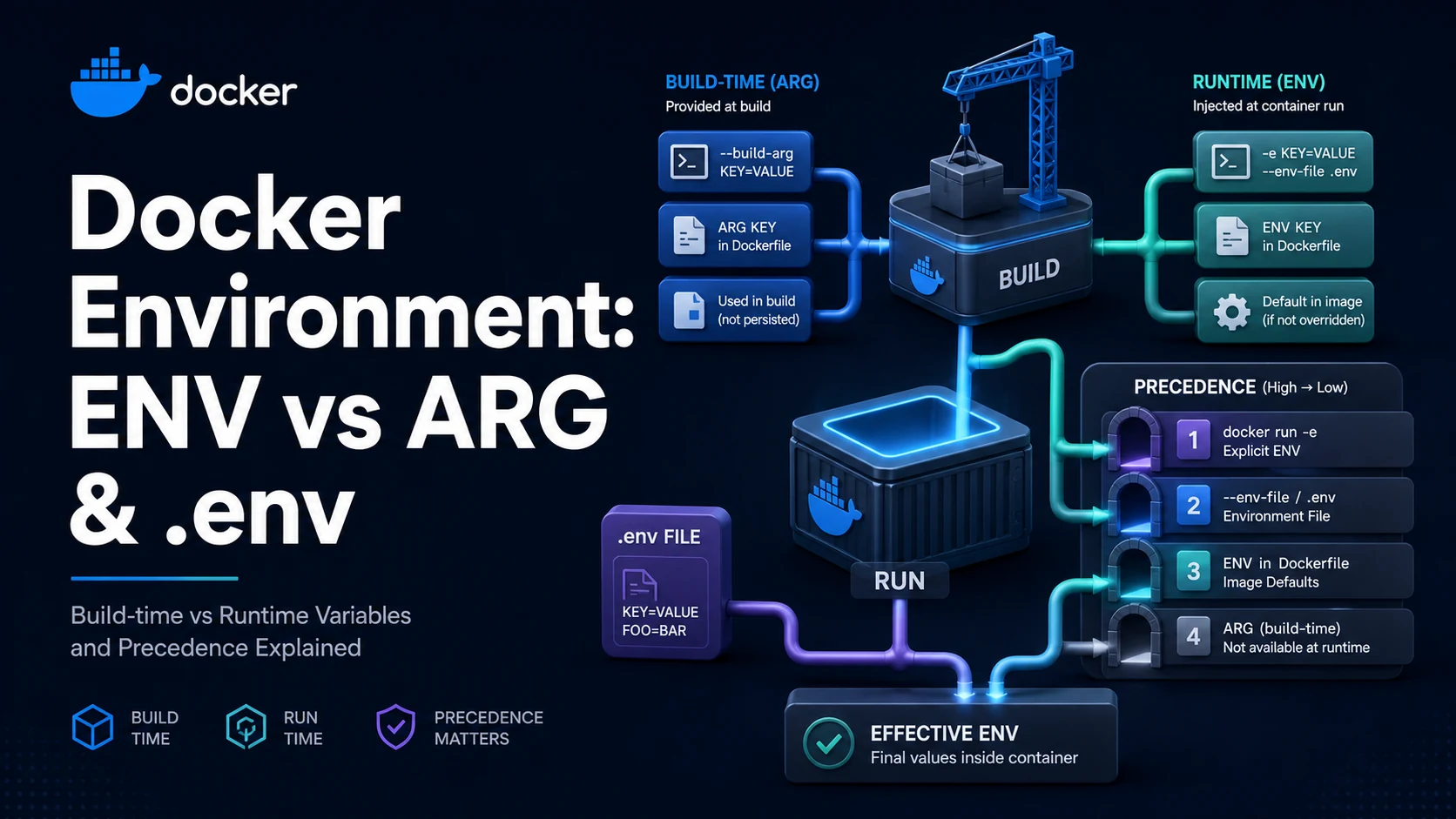
Quick Summary
ARG is a build-time variable; ENV is a runtime variable that is also visible during the build. ARG values exist only while the image is being built and are not present when a container starts. ENV values are baked into the image metadata, appear in docker inspect, and are inherited by every process the container launches.
Three layers then override them. --build-arg supplies an ARG at build time; docker run -e, --env-file, or Compose's environment/env_file supply runtime values that override ENV. Compose adds a fourth, subtler layer: .env is read for ${VAR} interpolation in the YAML file itself, not passed into the container. Confusing interpolation with container environment is the most common configuration bug in Compose.
Basic syntax and query signatures
# Global ARG: only usable in FROM lines
ARG NODE_VERSION=22
FROM node:${NODE_VERSION}-alpine AS build
# Stage ARG: must be re-declared to use inside the stage
ARG NPM_TOKEN
RUN cp /run/secrets/npmrc .npmrc && npm ci
# ENV: baked into the image, available at runtime
ENV NODE_ENV=production \
PORT=3000docker build --build-arg NODE_VERSION=20 --build-arg NPM_TOKEN=x -t app .
docker run -e PORT=8080 -e LOG_LEVEL=debug app
docker run --env-file .env.production appservices:
api:
image: "app/api:${TAG:-latest}" # ${...} interpolated by Compose from .env or shell
environment: # container environment, highest precedence
LOG_LEVEL: ${LOG_LEVEL:-info}
env_file: [.env.api] # container environment, lower than `environment`Key comparison table
| Layer | Where it lives | Available at build | Available at run | Overridden by |
|---|---|---|---|---|
ARG | Dockerfile / --build-arg | Yes | No | --build-arg |
ENV | Image metadata | Yes | Yes | docker run -e, env_file, environment |
.env (Compose) | File next to the compose file | n/a | No (interpolation only) | Shell variables |
env_file (Compose) | File listed in the service | n/a | Yes | environment |
--env-file (Docker) | Run-time file | n/a | Yes | -e after it |
ENV from base image | Parent image | Yes | Yes | Any of the above |
| Task | Use |
|---|---|
| Choose a base image version at build time | ARG before FROM |
| Install a private package with a token | BuildKit secret, not ARG |
| Configure the app per environment | ENV default + run-time override |
Set a value for one docker run | -e or --env-file |
| Inject a value into compose YAML | ${VAR} with .env |
Practical edge cases and deep dives
1. ARG must be re-declared inside the stage
ARG NODE_VERSION=22
FROM node:${NODE_VERSION}-alpine
RUN echo $NODE_VERSION        # empty: the global ARG is not in scope here
An ARG before the first FROM is available to FROM lines and to nothing else. To use the same name inside the stage, declare it again — with no default, so the build-time value flows through:
ARG NODE_VERSION=22
FROM node:${NODE_VERSION}-alpine
ARG NODE_VERSION
RUN echo $NODE_VERSION        # 22, or whatever --build-arg supplied
Redeclaring with a default (ARG NODE_VERSION=22) is also fine and gives a per-stage fallback, but the value passed on the command line still wins. This scoping rule is why a --build-arg sometimes "does not work": it reached the FROM, but no stage declared the name.
2. ARG is visible in image history
ARG GITHUB_TOKEN
RUN git clone https://x-access-token:${GITHUB_TOKEN}@github.com/org/repo .
docker history --no-trunc <image> prints the full instruction, including the token. Deleting the .git directory or unsetting the variable later does not help: the layer was recorded with the expanded string. Even --build-arg from a CI secret ends up in the layer metadata on the builder and, depending on the backend, in the pushed image.
The correct replacement is a secret mount that is never written into a layer:
# syntax=docker/dockerfile:1.4
RUN \
git clone https://x-access-token:$(cat /run/secrets/github_token)@github.com/org/repo .docker build --secret id=github_token,env=GITHUB_TOKEN .BuildKit mounts the secret at /run/secrets/<id> for the duration of that one RUN and excludes it from the cache key, so rotating the token does not invalidate the layer and the value never appears in history.
3. ENV KEY = value is not what you think
ENV PORT = 3000
# Sets: PORT="=", 3000="" — two variables, one of them a space-prefixed name
The legacy space-separated form takes everything after ENV as key value with the first space as the separator, so ENV PORT = 3000 sets PORT to = 3000 in modern Docker (and, in some parsers, defines a variable named PORT with the literal value = 3000). Use ENV PORT=3000, and quote values that contain spaces:
ENV APP_NAME="my service" \
    PATH="/app/bin:${PATH}"
Expansion inside ENV refers to earlier ENV values, not to ARGs that were never declared in the stage — another way to get an empty string where a path was expected.
4. Compose: .env is not the container's environment
services:
  api:
    image: "app/api:${TAG}"
    environment:
      LOG_LEVEL: ${LOG_LEVEL:-info}
With .env containing TAG=1.4.2 and LOG_LEVEL=debug, the image reference resolves to app/api:1.4.2 and the container receives LOG_LEVEL=debug. The variables in .env that are not referenced in environment reach neither the build nor the container. If the application needs DATABASE_URL, it must be listed under environment or in an env_file.
Precedence for a container's environment, highest first: environment, env_file, image ENV. Precedence for interpolation: shell environment, then .env, then the default in ${VAR:-default}. A shell export silently beats .env, which is why "it works on my machine" happens with the same compose file.
5. Making the value visible to the process
ENV LOG_LEVEL=info
# Exec form inherits the container's environment automatically
CMD ["node", "server.js"]
Both CMD forms receive ENV values as environment variables. The difference appears with expansion: CMD ["node", "server-$PORT.js"] does not expand $PORT (exec form has no shell), while CMD node server-$PORT.js does. Use the exec form and let the application read the environment, rather than baking values into the command line where they are invisible in docker inspect and hard to override.
ENTRYPOINT ["sh", "-c", "..."] brings back shell expansion but reintroduces the signal problem: the shell becomes PID 1 and does not forward SIGTERM. exec "$@" at the end of the script is the usual compromise.
6. Inspecting what the container actually received
docker inspect api --format '{{json .Config.Env}}' | python3 -m json.tool
docker exec api env | sort | grep -E 'LOG_LEVEL|DATABASE_URL'
docker compose config            # show the merged, interpolated compose file
The order of env output is not meaningful, but presence and value are: this is the fastest way to prove that environment in Compose beat env_file, or that a ${VAR} resolved to the default because the shell did not export it. docker compose config prints the file after interpolation, which is the only reliable way to see what Compose actually parsed when a value looks wrong.
Two more places the value may be transformed: an entrypoint script that re-exports variables, and the shell's own handling when ENV is used with quotes (ENV A="x y" is one value; ENV A=x y is a malformed instruction). Print the value at startup in a log line and the debugging loop becomes seconds rather than a rebuild.
Common mistakes and runtime errors
| Error or symptom | Cause | Fix |
|---|---|---|
ARG is empty inside the stage | Declared only before FROM | Re-declare it in the stage |
--build-arg ignored | Name not declared in any stage | Add ARG NAME where it is used |
ENV PORT = 3000 yields = 3000 | Spaces around = | ENV PORT=3000 |
Token visible in docker history | Credential passed as ARG or in RUN | BuildKit --mount=type=secret |
${TAG} empty → invalid reference format | No .env, no default | ${TAG:-latest}, or export it |
Variable set in .env not in container | .env only interpolates the YAML | Add to environment or env_file |
environment does not override env_file | Misreading precedence, or duplicate key order | environment always wins; check the merged file |
$VAR not expanded in CMD | Exec (JSON) form | Let the app read the env, or use shell form |
| Value changes require a rebuild | Used ENV where ARG was needed | Move per-build values to ARG |
| Secret leaks into logs | RUN echo $TOKEN | Never echo secrets; use secret mounts |
The rule that resolves most of this: ARG for what changes the build, ENV for what the process reads at run time, and secrets in neither. Anything that must not appear in docker inspect or docker history belongs in a secret mount or the orchestrator's secret store.
Try matching browser tools
All toolsSmall utilities that fit Docker work — they run entirely in this browser tab, so nothing you paste leaves your device.
Related Docker guides
All Docker guidesDocker Inspect: Go Templates, Format Flags, and JSON Filtering
The fields worth knowing, the array-versus-object trap, and why <no value> silently passes your monitoring check instead of failing it.
Docker Restart Policies: no, on-failure, always, and unless-stopped
What each policy really restarts, why on-failure ignores a clean exit, how backoff hides crash loops, and why health checks never trigger a restart.
Docker Compose Profiles: Multi-Environment Configs and Overrides
Profiles select which services exist; override files change how they run. How the two fit together, and why ports concatenate instead of replacing.
Docker COPY vs ADD: Build Context, .dockerignore, and Cache Busting
ADD adds tar extraction and URLs nobody wants; COPY is the predictable choice. How the build context is packed, and how copy order decides rebuild time.
More in Docker
All Docker guidesThe guides filed next to this one in Docker, in library order.