Docker COPY vs ADD: Build Context, .dockerignore, and Cache Busting
ADD adds tar extraction and URLs nobody wants; COPY is the predictable choice. How the build context is packed, and how copy order decides rebuild time.
Quick Summary
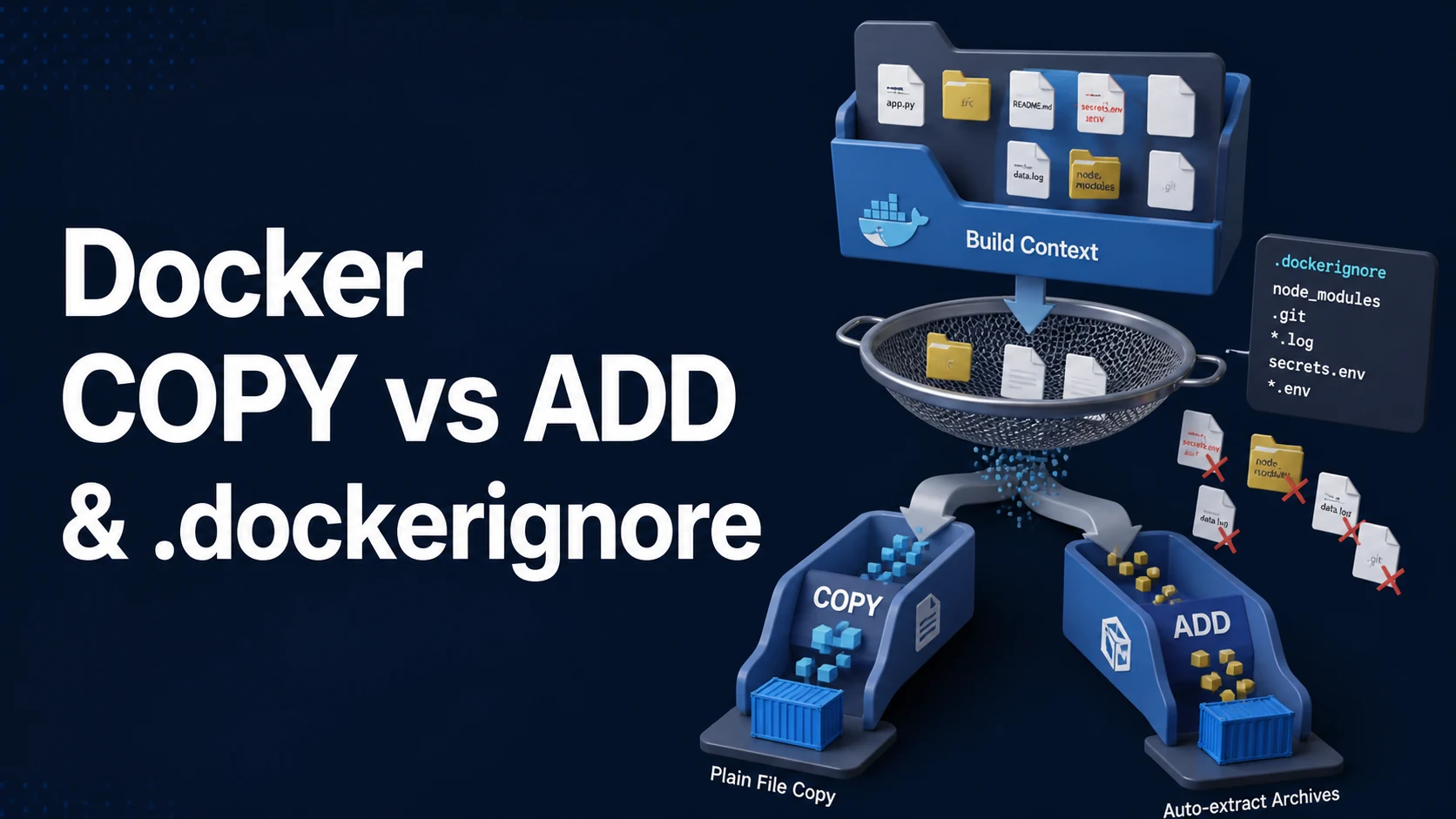
COPY copies files and directories from the build context into the image. ADD does the same and then does two extra things: it extracts a local tar archive into the destination, and it can fetch a remote URL. The extraction is convenient exactly once and surprising every other time, and the URL form is deprecated in practice because it bypasses the cache, ignores .dockerignore, and cannot verify a checksum. The portable rule is: use COPY, and reach for ADD only when you deliberately want local tar extraction.
Both instructions depend on the build context — the directory tree the client sends to the builder before the first instruction runs. That context is usually the repository root, so a missing .dockerignore sends .git, node_modules, build output and test fixtures on every build. A 2 GB context is slower on a laptop, expensive in CI, and can leak files into the image that nobody intended to ship, such as .env or local SQLite databases.
Cache behaviour follows file content. A COPY layer is invalidated when the checksum of the copied files changes, so COPY . . before npm ci throws away the dependency cache on every source edit, while COPY package*.json before the install keeps it. This ordering — manifests, then install, then source — is the highest-leverage rewrite in most Dockerfiles.
Basic syntax and query signatures
# Copy named files
COPY package.json package-lock.json /app/
# Copy a directory's contents (the directory itself is not recreated)
COPY src/ /app/src/
# Wildcards match one level; non-matching patterns fail the build
COPY config/*.yaml /app/config/
# From another build stage
COPY /app/dist /usr/share/nginx/html
# Ownership and mode, no extra layer (BuildKit)
COPY entrypoint.sh /usr/local/bin/
# ADD: local tar archive extraction
ADD app.tar.gz /opt/app/
# ADD: remote URL (discouraged)
ADD https://example.com/tool-1.2.3.tar.gz /tmp/tool.tar.gz
# ADD with checksum verification (BuildKit)
ADD \
https://example.com/tool.tar.gz /tmp/tool.tar.gzAn example .dockerignore that covers the usual offenders:
.git
.gitignore
node_modules
npm-debug.log*
.next
dist
coverage
*.log
.env
.env.*
!.env.example
docker-compose*.yaml
Dockerfile*
README.md
**/.DS_Store
.dockerignore supports # comments, ! negation, and ** for any number of directories. The last matching pattern wins, so the negation must come after the pattern it re-includes.
Key comparison table
| Behaviour | COPY | ADD |
|---|---|---|
| Copy from context | Yes | Yes |
Extract local tar (.tar, .tar.gz, .tgz, .bz2, .xz) | No | Yes |
| Fetch remote URL | No | Yes (no extraction, no cache) |
Respect .dockerignore | Yes | Yes for context paths; no for URLs |
| Cache invalidated by content | Yes | Yes for local files, never for URLs |
| Checksum verification | n/a | --checksum with a URL |
| Typical use | Everything | Local archive unpacking |
| Context source | Sent to builder | Affected by .dockerignore |
|---|---|---|
. build context | Whole tree | Yes |
--build-context named contexts | Selected tree | Yes per context |
| Remote Git URL | Repository checkout | Yes |
COPY --from=stage | Previous stage's filesystem | Not applicable |
Bind mount (RUN --mount=type=bind) | Only for that instruction | Yes |
| Cache key component | Included | Note |
|---|---|---|
| Copied file contents | Yes | The reason layout ordering matters |
| Source path | Yes | Renaming invalidates |
--chown/--chmod | Yes | Changing them rebuilds the layer |
| File mtime | No | Touch alone does not invalidate |
ADD <url> target | No | Cache never invalidates for the URL body |
Practical edge cases and deep dives
1. Order the copy so dependencies stay cached
FROM node:22-alpine AS build
WORKDIR /app

# Only manifests: this layer survives source edits
COPY package.json package-lock.json ./
RUN npm ci --omit=dev

# Source last: invalidates only the final layer
COPY tsconfig.json ./
COPY src ./src
RUN npm run build
Putting COPY . . first costs a full npm ci on every one-line change, which turns a 12-second rebuild into a two-minute one. The same pattern works for go mod download, pip install -r, and mvn dependency:go-offline.
2. ADD extraction can break your layout
ADD app.tar.gz /opt/app/If the archive contains a top-level app/ directory, the result is /opt/app/app/.... An archive built without a top-level directory lands directly in /opt/app. The build succeeds either way, and the entrypoint fails at runtime with "no such file".
# Deterministic: extract in a RUN with an explicit --strip-components
COPY app.tar.gz /tmp/app.tar.gz
RUN mkdir -p /opt/app \
 && tar -xzf /tmp/app.tar.gz -C /opt/app --strip-components=1 \
 && rm /tmp/app.tar.gz
This also documents the expected archive shape, and --strip-components makes the extraction independent of how the tarball was created.
3. Remote ADD is not a cache-friendly download
ADD https://example.com/tool-latest.tar.gz /tmp/tool.tar.gzThe URL is never re-fetched while the layer is cached, so a latest URL can serve a months-old artifact, and changing the layer nothing else about means you cannot force a refresh without touching the line. The permissions also default oddly (see the caveat on file modes below), and .dockerignore does not apply.
# Explicit, cacheable, verifiable
FROM curlimages/curl:8.11.0 AS fetch
ARG TOOL_VERSION=1.2.3
RUN curl -fsSLo /tmp/tool.tar.gz \
"https://example.com/tool-${TOOL_VERSION}.tar.gz" \
&& echo "2cf24dba...9824 /tmp/tool.tar.gz" | sha256sum -c -
FROM alpine:3.20
COPY /tmp/tool.tar.gz /tmp/
RUN tar -xzf /tmp/tool.tar.gz -C /usr/local/bin && rm /tmp/tool.tar.gzNow the version is a build argument, the checksum is verified, and the cache key moves when either changes.
4. .dockerignore semantics differ from .gitignore
!negation must follow the exclusion it re-includes; a later**/node_modulesre-excludes it.- A pattern like
distmatches a file or directory nameddistat any level;**/distis explicit. - Unlike
.gitignore, there is no "already tracked" state — the file either matches or does not. - Excluding the
Dockerfileitself is common and safe; it is read before the context is packed. - Patterns are matched against the path relative to the context root, so
./srcdoes not matchsrc.
# What actually reaches the builder
docker build --no-cache --progress=plain -t app:ctx . 2>&1 | grep "transferring context"
du -sh . --exclude=.git --exclude=node_modules     # rough target size
5. COPY of a directory copies its contents, not the directory
COPY src /app/src          # copies contents of src into /app/src
COPY src/ /app/src/        # same result, clearer
COPY . /app                # copies everything, including dotfiles in the root
The destination path matters too: a trailing slash on a destination that does not exist yet is treated as a directory, but a destination that resolves to a file is an error (COPY failed: not a directory). When copying a single file to a directory, always write the destination with a trailing slash or the full target filename.
6. BuildKit --link keeps cache reuse across reordered layers
COPY --link package.json package-lock.json /app/
COPY --link --from=build /app/dist /app/dist
--link stores the layer independently of its parent, so a change earlier in the Dockerfile does not invalidate the copy layer and the copy can be reattached. It also speeds up rebases on a new base image. It requires BuildKit (the default builder since Docker 23) and works best when the destination directory is not modified by later RUN steps.
7. Avoid the "copy everything then clean up" pattern
COPY . /app
RUN rm -rf /app/node_modules /app/.git
rm in a later layer does not shrink the image; the deleted bytes remain in the previous layer and are still shipped. Exclusion belongs in .dockerignore (for the build) or in the source layout (for runtime). Use multi-stage builds when build-time dependencies must not survive into the final image.
Common mistakes and runtime errors
| Error / symptom | Cause | Fix |
|---|---|---|
COPY failed: file not found in build context | Path excluded by .dockerignore or wrong relative path | Check the pattern; paths are context-relative |
COPY failed: no source files were specified | Wildcard matched nothing | Wildcards must match at least one file |
COPY failed: not a directory | Destination resolves to an existing file | Use the full target filename |
Image contains .env or node_modules | No .dockerignore | Add one; check with --progress=plain |
| Build slow on every code change | COPY . . before install | Copy manifests first |
ADD extraction doubled a directory | Archive has a top-level folder | Use RUN tar --strip-components=1 |
Stale binary from a latest URL | Remote files are cached forever | Version + --checksum, or a RUN curl |
ADD URL file mode is 600 | Remote adds default to 0600 | RUN chmod in the same layer |
| Deleted files still in image | RUN rm after COPY | Exclude at copy time; multi-stage |
| Build works locally, fails in CI | Local files not committed but present | .dockerignore mirrors reality, commit needed files |
| Layer rebuilds after touching a file | --chown or content actually changed | Content is the cache key, mtime is not |
Try matching browser tools
All toolsSmall utilities that fit Docker work — they run entirely in this browser tab, so nothing you paste leaves your device.
Related Docker guides
All Docker guidesDocker Inspect: Go Templates, Format Flags, and JSON Filtering
The fields worth knowing, the array-versus-object trap, and why <no value> silently passes your monitoring check instead of failing it.
Docker Restart Policies: no, on-failure, always, and unless-stopped
What each policy really restarts, why on-failure ignores a clean exit, how backoff hides crash loops, and why health checks never trigger a restart.
Docker Compose Profiles: Multi-Environment Configs and Overrides
Profiles select which services exist; override files change how they run. How the two fit together, and why ports concatenate instead of replacing.
Docker Rootless Mode: Setup, Security Model, and Limitations
Running dockerd inside a user namespace removes the root daemon. What that buys, what it forbids, and the four prerequisites setup fails on.
More in Docker
All Docker guidesThe guides filed next to this one in Docker, in library order.